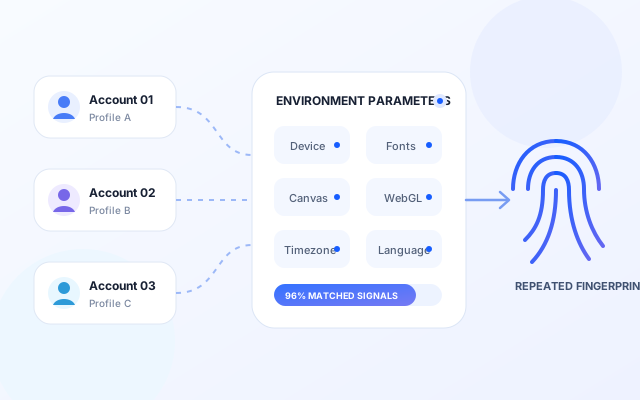
Overlapping Browser Fingerprints
Device, operating system, fonts, Canvas, WebGL, language, and timezone settings can create repeated device characteristics when they remain too similar across accounts.
Loading messages…
You are viewing a previous conversation.
Enter to send · Shift + Enter for a new line
Secure Multi-Account Browser
Built for the Platforms You Use
MasBrowser is a professional anti-detect browser that creates isolated browser environments with stable, consistent fingerprints for each account. It helps reduce environment overlap and account-linking risks while improving multi-account efficiency through bulk actions, window synchronization, and automation.
Profile Isolation · Stable Fingerprints · Automation · Team Collaboration

Account Linking Risks
Platforms often evaluate browser fingerprints, device environments, network signals, and behavior patterns to identify links between accounts. When multiple accounts share similar environments or repeated activity patterns, overlapping signals can accumulate and increase linking risk.
Device, operating system, fonts, Canvas, WebGL, language, and timezone settings can create repeated device characteristics when they remain too similar across accounts.
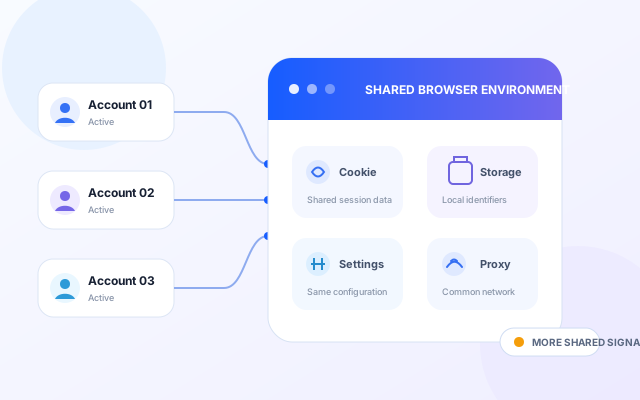
When accounts share cookies, local storage, browser settings, or proxy networks, overlapping environment signals make them easier to connect.
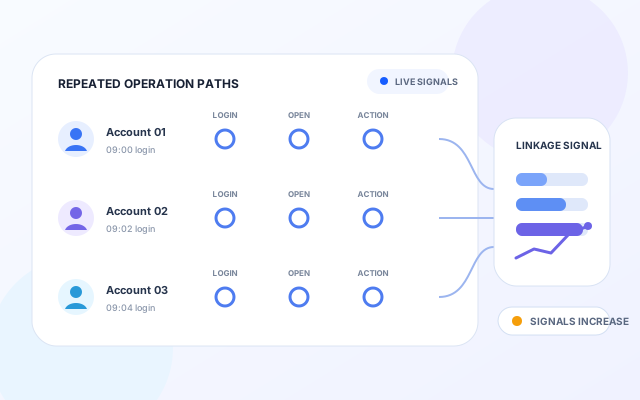
Repeating the same login timing, workflows, and setup mistakes across many accounts creates recognizable behavior patterns and increases operational risk.
Reliable multi-account operations are not about simply opening more browsers. They depend on giving every account an isolated, stable, and consistent environment.

Profile Isolation & Fingerprint Consistency
MasBrowser runs on a real Chromium core and gives every Profile its own browser fingerprint, cookies, local storage, language, timezone, proxy, and environment settings—keeping accounts isolated while maintaining consistent browser identities.
Run profiles on a real browser core for reliable site compatibility, natural browsing behavior, and flexible environment configuration.
Cookies, local storage, browser settings, and proxies are stored separately for every Profile, reducing cross-account data overlap.
Keep device, Canvas, WebGL, language, and timezone settings consistent to create a more natural and stable browser identity.
Multi-Account Management
Manage profiles, proxies, groups, and team permissions from one workspace. Use bulk creation, window sync, and automation to manage large-scale multi-account operations more efficiently.
From Profile isolation and fingerprint consistency to automation and team controls, MasBrowser brings the essential tools for multi-account operations into one workspace.
Create an isolated workspace for every Profile. Cookies, local storage, browser settings, and proxies are saved separately to reduce cross-account data overlap.
Supports configuration of resolution, language, timezone, WebGL, and Canvas to generate authentic environments and reduce detection probability.
Supports repetitive tasks like auto-login, posting, and data processing. Reduce human error and boost team efficiency.
One action syncs multiple accounts. Ideal for matrix operations and bulk management, significantly boosting efficiency and consistency.
Supports multiple proxy protocols and network policies. Flexibly manage IPs and access environments for stable cross-platform operations.
Supports member grouping, permission levels, and operation logs. Ensure data security while achieving efficient and standardized management.
Sensitive configurations and account data are stored separately. Permission controls and local data protection help teams operate more securely.
One-click migration or sharing of browser environments. Keep all fingerprints and configs to take over operational tasks instantly.
Support social media, affiliate marketing, cross-border e-commerce, and digital marketing with isolated Profiles, stable fingerprints, and practical automation.
Manage multiple social accounts with content-matrix workflows, automation, and bulk actions to help teams build stable, sustainable social operations.





Manage multiple advertising and promotion accounts with lower linking and platform risk. Run Facebook, Google Ads, and TikTok accounts independently to improve affiliate campaign execution and conversions.

Run stores across Amazon, eBay, Shopify, Shopee, and Lazada in separate environments to reduce linking risk and support stable, sustainable store operations.


Bulk manage marketing accounts. Combine automation and isolation to improve execution efficiency and conversion for scaled growth.
From stable fingerprints and Profile isolation to automation, value, and support, MasBrowser provides a complete foundation for multi-account operations.
MasBrowser brings stable fingerprints, profile isolation, automation, and team collaboration together in one platform, helping teams scale multi-account operations at a more reasonable cost.
Realistic environment parameters and consistency controls help every Profile maintain a natural, stable browser identity with fewer abnormal environment signals.
Account data, cookies, local storage, proxies, and browser settings are stored separately to reduce cross-account environment overlap.
Bulk actions, window sync, and automation reduce repetitive work and make large account sets easier to manage.
Built for stable everyday use, with a clear and responsive experience even when managing many Profiles.
Alongside product capabilities, MasBrowser provides practical guidance and automation support to help teams deploy workflows faster.
MasBrowser supports social media, e-commerce, advertising, content, and community workflows across the platforms your team relies on.














From stability and isolation to efficiency, value, and support, MasBrowser helps teams run multi-account workflows with more confidence.
Managing several campaign accounts became much more predictable after we moved to MasBrowser. Profiles stay clearly separated, and bulk actions save us time every day.
We manage stores across several marketplaces, so isolation and client stability matter most. The overall experience has been reliable, though more reusable setup templates would make it even better.
Window Sync and automation removed a lot of repetitive work from our process. Even as our account count grew, the workspace stayed clear and manageable.
The value was a major reason we chose MasBrowser. The core tools are complete and stable; simplifying a few advanced settings would make onboarding even faster.
Member permissions and Profile management work well for our team. Responsibilities are clearer and we have fewer setup mistakes, while more permission templates would help larger teams.
I use MasBrowser to manage accounts for different clients. Profile isolation, proxy setup, and bulk actions are straightforward, and the client has been dependable in daily use.
Get to know MasBrowser, its core features, use cases, and official information.