
Account Sharing Solution
Share Team Accounts Without Rebuilding the Browser Environment
MasBrowser combines independent Browser Profiles, team collaboration, and Profile Transfer to help different members use and hand over shared accounts with less repeated login, environment change, and operational confusion.
- Environment continuity
- Profile management
- Team collaboration
- Clearer access
- Profile handover
Shared account
Browser Profile
- Fingerprint
- Cookies
- Proxy
- Local Data
- Browser Settings
Member AMember BNew Operator
Traditional Account Sharing
The Real Problem Is Not Sharing an Account — It Is Changing the Entire Environment
When members sign in from their own computers and browsers, the device, fingerprint, cookies, network, timezone, and language can all change at once.
Traditional approach
Result: Environment Changed
With MasBrowser
The account stays connected to a more consistent Profile environment
Login Continuity
A New Team Member Should Not Always Mean a New Login
If cookies, local data, and browser state disappear during a handover, the next operator may need to sign in, verify, and configure everything again.
Traditional approach
- Previous member’s browser
- Cookies and local state are lost
- Sign in again
- Verification or reconfiguration
With MasBrowser
- Assigned or transferred Profile
- Selected environment data remains
- New member uses the corresponding Profile
- Less repeated login and setup
The target platform and account state may still require another login or verification
Browser Profile
Share the Browser Workspace Behind the Account
Keep the account fingerprint, cookies, local data, proxy, and browser settings together in a Profile so the team collaborates around one workspace instead of scattered setup notes.
Browser ProfileShared account
- Stable Fingerprint
- Cookies
- Local Storage
- Proxy
- Timezone
- Language
- Browser Settings
- Session
Team Management
See Who Is Responsible for Every Account
Connect members, Profile Groups, and access scope so each person works with the accounts and projects assigned to them.
Account Information
Pass Credentials Around Less
Bring accounts and Browser Profiles into one workspace to reduce repeated movement of credentials, proxies, and environment notes across chat, spreadsheets, documents, and email.
Traditional approach
- Chat
- Spreadsheet
- Document
MasBrowser Team Workspace
- Profiles
- Groups
- Members
Reduce unnecessary credential distribution across tools and team members
Environment Handover
Hand Over the Browser Environment with the Project
Use Profile Transfer to hand over the corresponding Browser Profile and selected environment data together, reducing repeated setup and sudden environment changes.
Previous Member
Browser Profile
- Cookie
- Local Storage
- Session
- Proxy
- Browser Fingerprint
- Browser Settings
Profile Transfer
New Operator
The recipient starts from a more continuous environment, while the platform may still request login or verification
Scalable Management
Scale Shared Account Management Beyond Spreadsheets
Use Groups, Profiles, and one workspace to organize shared accounts by team, project, client, or business line.
- Group by project
- Assign by team
- Organize by business line
Before and After
The Same Shared Accounts, Managed in a Completely Different Way
Move from scattered credentials and rebuilt environments to a Profile-based workflow in one team workspace.
Traditional approach
- Credentials move through chat or spreadsheets
- Members sign in again from different computers
- Cookies and browser state do not continue
- Account access scope is unclear
- New operators rebuild configuration
- More accounts create more disorder
With MasBrowser
- Each account maps to a Browser Profile
- The Profile environment is more continuous
- Profiles and Groups stay organized together
- Member access scope is clearer
- Profile Transfer simplifies handover
- More accounts remain manageable in one workspace
- More stable
- Clearer
- Easier handover
- Built for team scale
Team Account Workflow
From Account Setup to Team Handover in One Workspace
Use the Browser Profile as the operating unit for environment setup, team assignment, daily work, and handover.
- 01Create a Browser Profile
Prepare the workspace for the shared account
- 02Configure environment and Proxy
Set fingerprint, network, and browser parameters
- 03Sign in to the business account
Establish account state in the Profile
- 04Group by project or team
Organize Profiles with Groups
- 05Assign the responsible member
Clarify ownership and access scope
- 06Run daily team operations
Work through assigned Profiles
- 07Transfer the Profile
Hand over the environment when responsibility changes
Team Use Cases
For Teams That Manage Shared Business Accounts Together
Use Profile-based account sharing when accounts have multiple operators, project ownership, or regular handovers.
Marketing Teams
Coordinate multiple operators across marketing accounts and their Profiles.
Customer Operations
Assign business dashboards and platform accounts by responsibility.
Agency Teams
Organize account environments by client, project, and operator.
Remote Teams
Coordinate distributed members through one team workspace.
Project Handover
Move selected Profile environment data to the next operator.
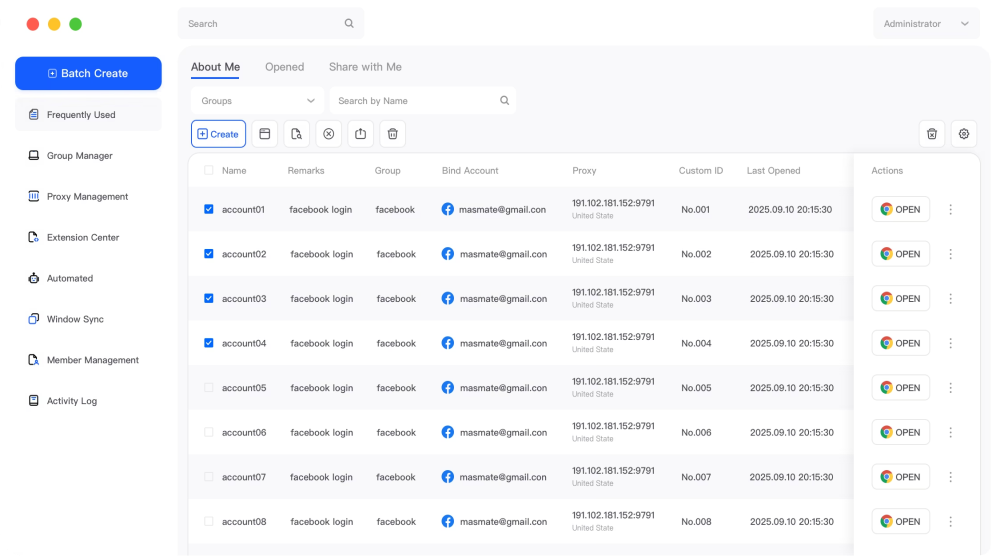
Real Product Workspace
Real Team Account Management Happens in One Workspace
View Browser Profiles, Groups, and Member Management from the MasBrowser client workspace.
Why MasBrowser
Why Teams Use MasBrowser for Shared Account Management
Bring environment continuity, team responsibility, Profile handover, and scalable organization into one workspace.
More Consistent
Keep the Profile environment more continuous.
Clearer Ownership
Map Members, Profiles, and Groups more clearly.
Less Scattered Information
Reduce repeated movement of credentials and setup notes.
Easier Handover
Transfer selected Profile environment data.
Easier to Scale
Organize more shared accounts with Groups and Profiles.
Team-Friendly Cost
Choose flexible plans for different team sizes.
Frequently Asked Questions
Team Account Sharing Questions
Learn how Browser Profiles, login continuity, member access, credentials, proxies, and Profile Transfer work together.
Start with MasBrowser
Make Team Account Sharing More Stable and Clear
Bring account environments, Profiles, members, and project handovers into one workspace to reduce repeated login, environment changes, and management confusion.