
Account linkage risk
Similar environment signals can connect otherwise separate accounts.
More reviews and account disruptionsLoading messages…
You are viewing a previous conversation.
Enter to send · Shift + Enter for a new line
Affiliate Marketing Solution
MasBrowser gives each marketing account an independent browser environment, then adds batch tools and automation to help teams reduce linkage risk and scale daily operations.
 Facebook
 TikTok
 Instagram
 Google
 YouTube
一个工作台 · 多个独立环境 · 多个营销账号
Multi-Account Operations
As account volume grows, environment overlap, repetitive work, and team coordination become harder to control.
Similar environment signals can connect otherwise separate accounts.
More reviews and account disruptionsDevices, browsers, proxies, and login contexts keep changing.
Less consistent operationsTeams repeat the same clicks, inputs, switching, and setup.
More time and avoidable errorsProfiles, proxies, permissions, and account data live in separate tools.
Harder ownership and handoffsRoot Cause
Platforms may evaluate fingerprints, cookies, device parameters, network context, and local data—not only credentials.
关联信号可能增加
环境彼此隔离
Manage accounts together while keeping environments separate
Multi-Account Safety
Create a clear, consistent browser identity for every affiliate account.
Run each account in its own Browser Profile.
Keep environment parameters internally consistent.
Store sessions, cache, and local data by Profile.
Configure the required network context per Profile.
Helps reduce account linkage and environment-change risk
Operational Efficiency
Centralize repeatable setup and operations so teams can focus on campaigns and growth.
Before
Account 01 → ManualAccount 02 → ManualAccount 03 → ManualAccount 04 → ManualCreate, group, and manage multiple Profiles together.
Explore Batch ManagementExplore Batch ManagementPerform a manual action once across selected windows.
Explore Window SyncExplore Window SyncTurn suitable repetitive tasks into reusable workflows.
Explore RPA AutomationExplore RPA AutomationTeam Collaboration
Manage members, Profiles, access, and handoffs from one workspace.
Assign Profiles and access by responsibility.
Explore Team CollaborationHand over selected Profiles with their environment.
Explore Profile TransferConnect Selenium, Puppeteer, and internal workflows.
Explore Local APIMove from solo operations to scalable teamwork in one workspace
Before and After
Move from fragmented manual work to organized operations built around independent Profiles.
使用前
使用 MasBrowser
Affiliate Workflow
A clear six-step workflow keeps account environments, daily work, and responsibilities organized.
Build an independent browser environment
Match the network context to the account
Use the account inside its assigned Profile
Organize by campaign, channel, or client
Use Batch, Window Sync, or RPA as needed
Assign access, transfer Profiles, and expand workflows
Affiliate Use Cases
Support traffic, advertising, campaign, content, and team operations—not just a wall of platform logos.
Primary scenario
 FacebookInstagram
 TikTok
 XYouTube
Separate environments and ownership by ad account, market, or campaign.
Organize Offers, channels, and promotion accounts in one workspace.
Keep content accounts in separate sessions and workspaces.
Assign accounts, clients, and projects to the right members.
Product Proof
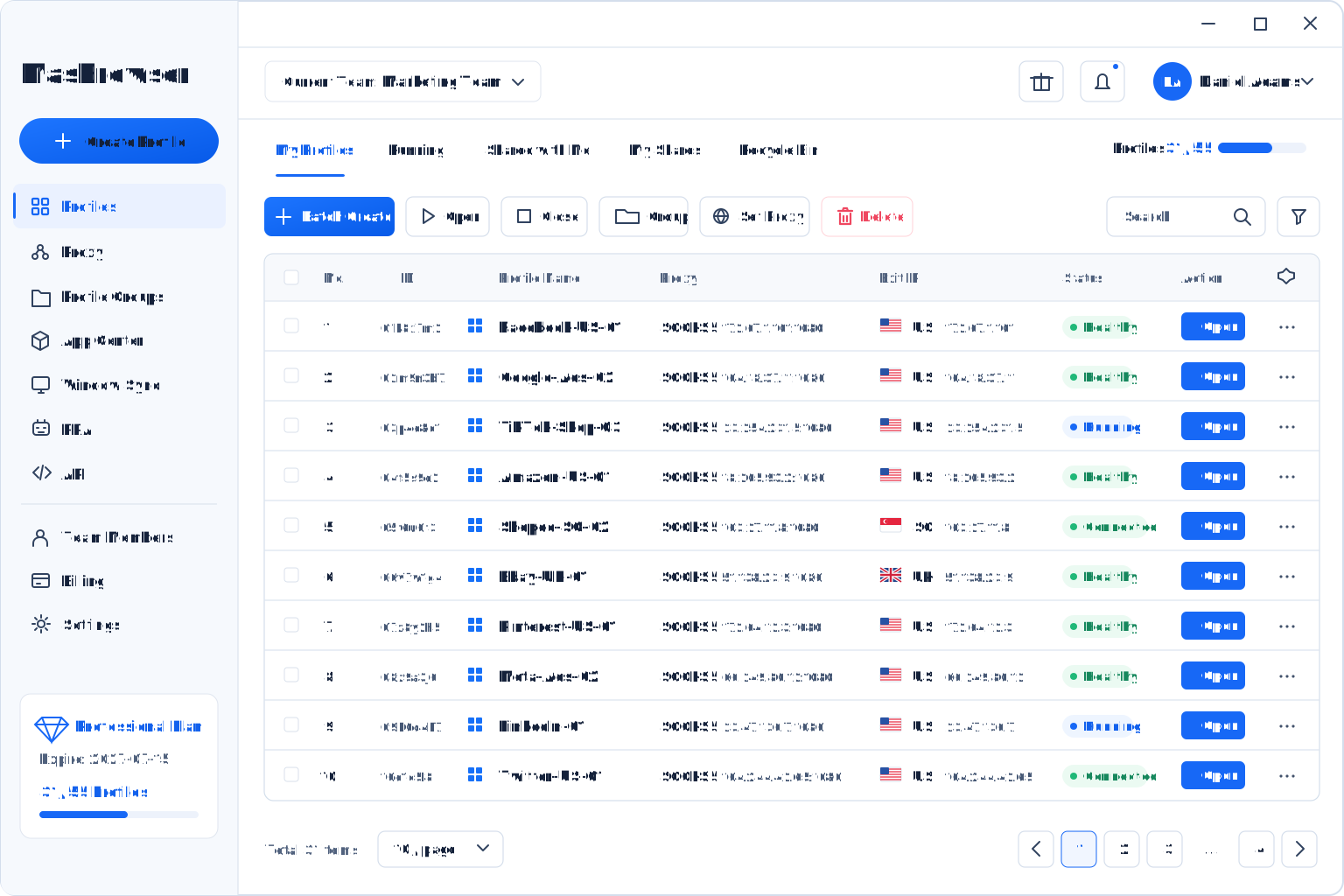
Profiles, groups, proxies, and batch actions are managed together in the MasBrowser client.
Customer Feedback
Approved feedback from affiliate and performance marketing teams.
We manage several affiliate backends and ad accounts. Separate environments and dedicated IPs make logins more consistent and troubleshooting faster.
.png) Ethan R.Affiliate Media Buyer · United States
Ethan R.Affiliate Media Buyer · United StatesProfile-level data separation keeps multi-channel tests and attribution paths clearer for our team.
.png) Sofia L.Performance Marketing Lead · Spain
Sofia L.Performance Marketing Lead · SpainPermissions and temporary access make outsourced campaign work easier to control and hand over.
.png) Chen Y.Affiliate Operations Lead · China
Chen Y.Affiliate Operations Lead · ChinaWhy MasBrowser
Bring safety, consistency, efficiency, collaboration, scale, and flexible cost control into one system.
Independent environments help reduce signal overlap between accounts.
Avoid frequent changes across browser and network settings.
Batch tools, Window Sync, and RPA reduce repeated work.
Manage members, Profiles, and access centrally.
Profile Transfer and Local API support mature workflows.
Short-cycle and annual options support changing Profile needs.
FAQ
Key answers about Profile isolation, automation, and team workflows.
Each Profile stores its own fingerprint, cookies, local data, and proxy configuration, reducing environment overlap and making operations clearer.
Platforms may combine device, fingerprint, cookie, network, and behavior signals. Reusing those signals across accounts can increase risk.
No. Isolated Profiles, stable fingerprints, and separate network settings can reduce linkage and environment-related risk, but outcomes also depend on platform policies, account behavior, and network quality.
Window Sync mirrors a manual action to selected windows; RPA runs suitable repeatable tasks through configured workflows.
Yes. Configure a proxy per Profile to keep the account and network context clearly matched.
Yes. Assign Profiles and access according to each member’s responsibilities.
It hands over a selected Profile and its environment without rebuilding the setup from scratch.
Teams connecting MasBrowser Profiles to Selenium, Puppeteer, or internal automation systems.
Get Started