Securely Manage Multi-Accounts, Start with Masbrowser
Reduce Association Risks, Boost Efficiency, Support Scaling

Setting up a clean browser environment in MasBrowser with residential proxies requires three layers working in sync: a static residential IP, a browser profile with locked and consistent fingerprint parameters, and geographic settings where timezone, language, and proxy location all align. When all three line up, platforms see an ordinary user. When any one of them is off, the mismatch itself becomes a risk control signal.
Most tutorials stop at "configure your proxy and you're done." That's no longer enough. This article breaks down each layer — what it does, how to configure it in MasBrowser, and how to verify it's actually working before you use it on a real account.
| Step | Action | Why It Matters |
|---|---|---|
| 1 | Select a static residential proxy | Session IP stays consistent across logins |
| 2 | Create a dedicated profile in MasBrowser | Each account gets isolated cookies, cache, and fingerprint |
| 3 | Match timezone to proxy region | All signals need to tell the same geographic story |
| 4 | Set the correct proxy protocol (HTTPS or SOCKS5) | Wrong protocol = connection failure, not always with a clear error message |
| 5 | Test connection before saving | Catch configuration errors before touching real accounts |
| 6 | Verify via BrowserLeaks and IPinfo.io | Confirm what platforms actually detect, not what you think they see |
Residential proxies route your connection through IP addresses assigned by internet service providers to real home users. When a platform sees your connection, it sees an address belonging to a real residence, a real ISP, a real city — not a server in an AWS data center.
This distinction matters more than most people realize. Platforms cross-reference IP addresses against commercial hosting provider databases. AWS, Google Cloud, DigitalOcean — these IP ranges are extensively documented and get flagged routinely. Residential IPs are different. The EFF's Cover Your Tracks research confirms that IP type is one of the primary classification signals platforms use to determine whether a connection is automated behavior.
Static vs. rotating proxies is where most people trip up. Rotating proxies sound like better coverage — a new IP every few minutes, hard to track. In practice, an IP change mid-session — while you're already logged into an account — is anomalous behavior that platforms notice immediately. Static residential proxies maintain the same IP throughout a session, which is what a real user connection actually looks like.
We've tested both approaches on the same batch of accounts. Rotating proxies triggered security checks within 48 hours. Static proxies ran stably for weeks. The difference wasn't IP quality — it was consistency.
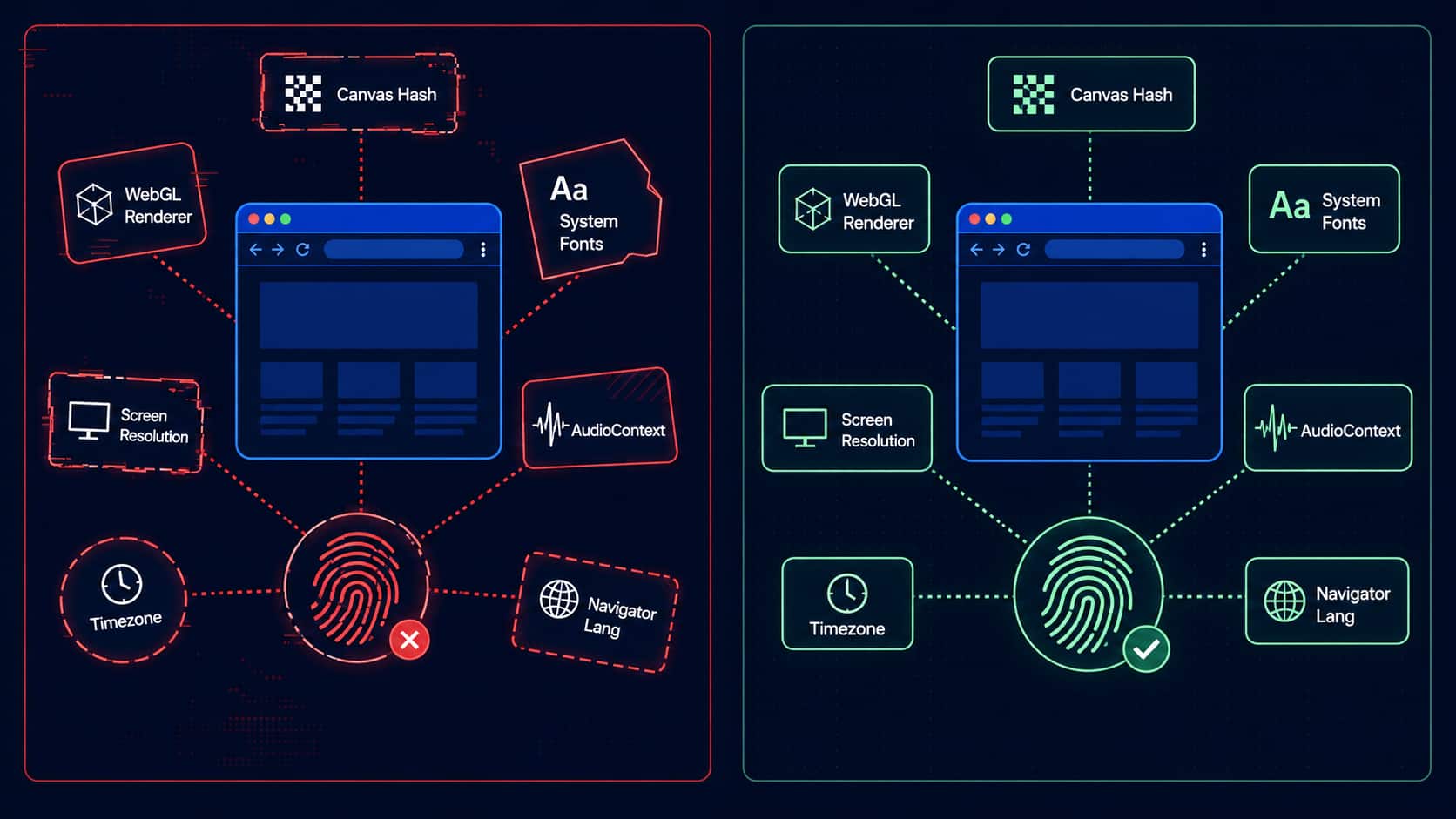
You may have changed IPs and still gotten banned. The reason is almost always fingerprinting. Platforms don't just check your IP — they collect and correlate dozens of browser and device attributes that form a unique identifier regardless of what IP you use:
EFF research shows that even collecting only a subset of attributes, over 99% of browser fingerprints are unique. Five accounts on five different IPs sharing the same fingerprint will still get associated. We've seen this happen — clean proxy configuration, accounts still associated, because no one had touched the fingerprint configuration.
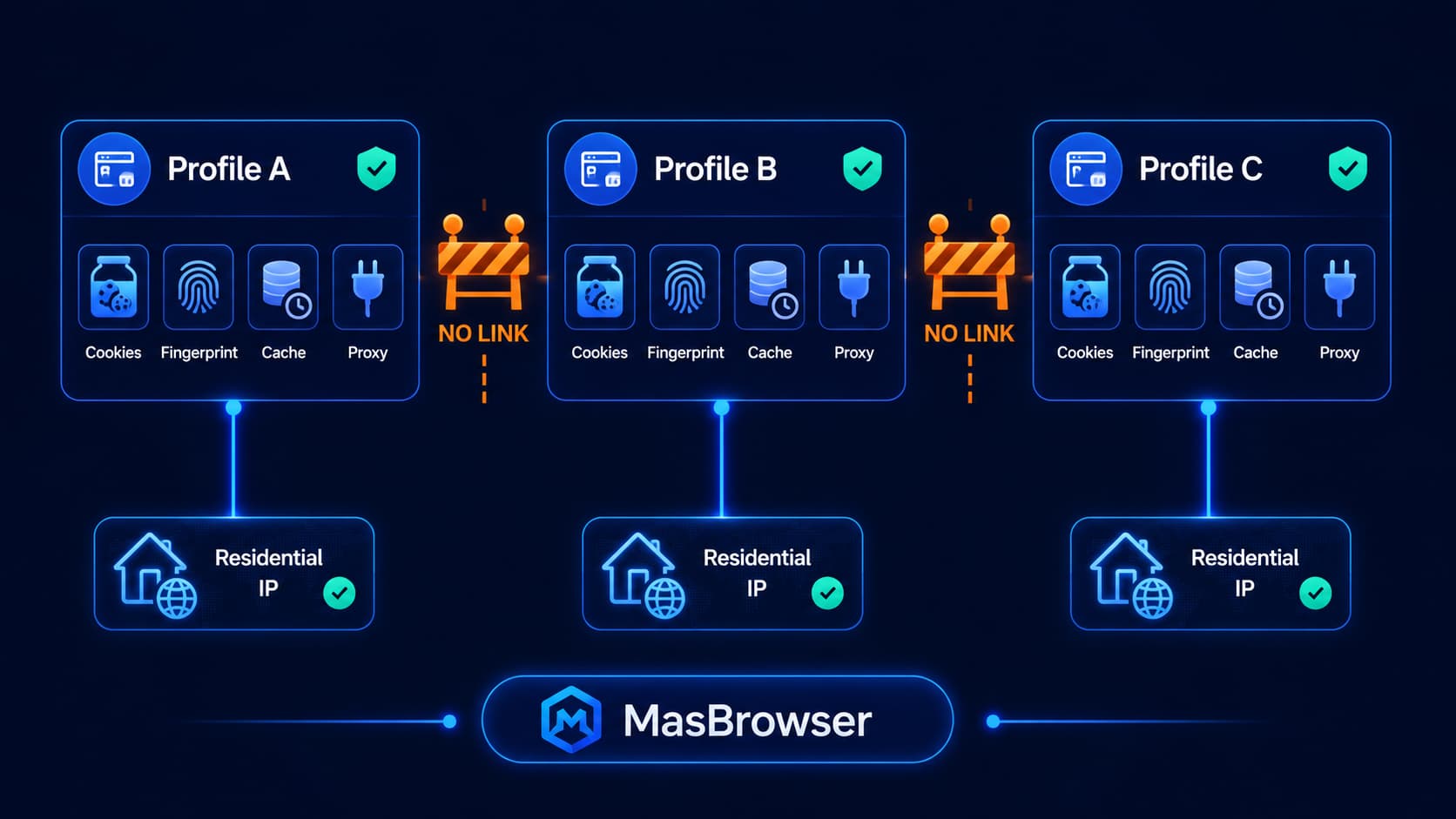
MasBrowser solves this at the profile level. Each browser profile runs in a fully isolated environment with its own fingerprint configuration — independent cookies, cache, local storage, and fingerprint values. Open one profile and no data from any other profile can be accessed or detected.
The key word is stable. MasBrowser doesn't randomize fingerprints between sessions. Randomization is itself a detection signal — real browsers don't change their graphics card or screen resolution between visits. Each profile locks a consistent set of fingerprint parameters that present the same values every time it opens, which is exactly how a real device behaves.
Do this step before opening MasBrowser. The proxy provider you choose is the foundation of the entire system — everything else is built on top of it. An unstable foundation puts the accounts you've invested time in at risk.
Static or native residential IPs — confirm this explicitly. Some providers describe rotating IP pools as "residential proxies" because the IPs technically originate from residential ranges but rotate automatically. That's fine for scraping, not appropriate for account management that requires consistency. Ask directly or read the documentation carefully to confirm.
Geographic coverage that matches your actual needs — if the accounts you're managing need to appear in specific cities or countries, verify the provider actually has available IPs in those regions. A Southeast Asian e-commerce account logging in through a Frankfurt IP creates a geographic inconsistency that security systems will notice immediately.
Authentication method — reputable providers support username/password or IP whitelist authentication. Confirm which method the provider uses before purchasing, because you'll need to enter credentials in exactly the right format in MasBrowser's proxy settings.
IP history cleanliness — low-cost proxies typically resell IPs that have already been flagged by other users. A flagged proxy IP doesn't just stop working — it can drag down the accounts associated with it. The price difference between a $3 proxy and a $15 proxy is far less than the cost of rebuilding a flagged account.
Once your proxy credentials are ready, open MasBrowser and create a new browser profile. Don't rush through the defaults — every parameter here affects whether your environment looks like a real device.
Browser type and operating system — choose a combination that's common in your target region. Chrome on Windows dominates globally; Safari on macOS is more prevalent in some markets. This combination needs to make logical sense for the geographic region of your proxy IP, not just match your actual computer.
Language and locale settings — set the browser language to match the target region. An account operating in Germany with English (US) language settings plus a Pacific timezone is three signals pointing in three different directions. You need to set both the primary language and locale (date/time format, number format) so they tell the same story.
Timezone — must match the proxy's geographic location. Proxy in Frankfurt, timezone should be Europe/Berlin. Timezone mismatch is one of the most direct detection signals — platforms quickly identify when the browser and IP aren't in the same place.
Screen resolution — check StatCounter resolution data for common resolutions in your target region and choose from those. An unusual resolution combined with a mismatched OS raises questions.
Fingerprint parameters — MasBrowser generates values for Canvas, WebGL, fonts, and other attributes that are internally consistent with the OS and browser you've selected. Check that these values look plausible. GPU information should be consistent with the browser version. The overall combination should look like a device that actually exists.
Build each profile from scratch for each use case. Copying settings between profiles that need to represent independent entities completely undermines the isolation that multi-account management depends on.
In the proxy settings section of the new profile:
Don't skip the test and assume it's working. We've seen misconfigured proxies run for days unnoticed — accounts operating through the wrong region's connection the entire time.
Activating a profile isn't the finish line — verifying what platforms actually see is. Open the new profile and run these checks before using it for anything important.
IP verification — visit IPinfo.io or Whoer.net. Confirm: IP matches the proxy, location displays correctly, ISP is recognized as residential (not a data center provider), no proxy or VPN flags on record.
Fingerprint verification — visit BrowserLeaks for a full parameter breakdown. Check that timezone matches proxy location, language matches configured locale, WebGL renderer and Canvas values look like a real device (not obviously generated values), and User-Agent is consistent with the configured browser/OS combination.
Consistency cross-check — open EFF's Cover Your Tracks and see how unique and trackable your fingerprint is. Any parameter that looks anomalous compared to a real browser is worth adjusting.
Finding a timezone mismatch now takes two minutes to fix. Finding it after an account has been flagged takes much longer to recover from.
Switching profiles in MasBrowser isn't switching browser tabs or windows — it's a complete environment switch. Each profile has entirely independent cookie storage, cache, local storage, fingerprint configuration, and proxy connection. No data from one profile can leak into another.
This isolation is the core of what prevents account association. Platforms are good at detecting shared environmental signals across accounts — shared cookies, identical fingerprints, overlapping local storage patterns. Any one of these can trigger an association flag, even if IP addresses are completely different. Complete profile isolation eliminates those connection points.
Stability matters equally. Real browsers don't change hardware characteristics between sessions. Your actual laptop has the same GPU and screen resolution every time it connects. MasBrowser profiles work the same way — each profile presents the same fingerprint every session, which is exactly what real long-term browser behavior looks like.
For multi-account management in cross-border e-commerce, social media management, or ad account scenarios, the combination of isolation and stability that MasBrowser provides is the core difference between accounts that survive long-term and accounts that get banned frequently. Every account looks like a completely independent device to the platform — that's the underlying logic of the whole approach.
Mixing proxy quality tiers within an associated account group — putting one data center proxy among residential proxies in an account group that needs to appear unrelated creates an obvious inconsistency. All profiles in the same associated group should use the same quality tier of proxy. Even one low-quality proxy in a group is enough to create a detectable pattern.
Contradictory geographic signals — German proxy, English (US) language, Pacific timezone. Three signals pointing in three different directions. Every geographic parameter needs to point to the same location.
Copying profile settings to save time — copying fingerprint configurations between profiles that represent independent entities completely destroys isolation. The time saved on setup isn't worth gambling accounts on.
Not monitoring proxy quality after initial configuration — residential IPs do get flagged over time. Run verification checks periodically, not just during the initial setup. Once a proxy starts triggering flags, stop using it for account operations immediately and contact the provider.
Treating technical configuration as a substitute for compliance — no browser environment or proxy configuration provides grounds for violating platform terms of service. These tools serve legitimate multi-account management: separate client accounts, regional market access, business operations across independent entities. They don't change what's permitted under platform rules.
If you're managing one or two personal accounts, you don't need this. Standard browser use is completely sufficient.
In the following scenarios, this setup shifts from optional to necessary:
Cross-region e-commerce operations — accounts that need to appear as local users in specific markets need appropriately located access. Running five stores across five different regions from a single standard browser connection is actively creating association flags.
Social media management — genuine isolation is needed between client accounts and between client accounts and your personal profile. A shared environment means shared risk.
Multi-market ad campaigns — ad accounts targeting specific regions need IPs that match those regions. Geographic mismatch is one of the fastest paths to ad account scrutiny.
Long-term account building — accounts you've invested months in nurturing are worth protecting from the start. Retrofitting a clean environment after an account is already established is harder and riskier than starting correctly.
In our experience, accounts managed in stable, consistent, isolated environments encounter significantly less security intervention and run substantially longer. The upfront configuration time pays itself back quickly.
Residential proxies use IP addresses assigned by ISPs to real home users. Data center proxies come from commercial hosting providers. Platforms maintain blacklists of known data center IP ranges; these get flagged routinely. Residential IPs are hard to classify as non-human access. For account management, residential proxies are the correct choice.
If profiles represent independently unrelated entities — different clients, different businesses — yes, each needs its own proxy. If multiple profiles represent the same entity operating from the same location, sharing a proxy is more defensible. The test: what would a real user's connection look like in this scenario?
Open BrowserLeaks.com with the profile active. Check that all displayed parameters are internally consistent: timezone matching the proxy's country, language matching locale settings, GPU and Canvas data looking like a real device. Then close the profile and reopen it, run the check again — the fingerprint should be identical to the last time. Cross-session consistency is the signal that the configuration is working correctly.
Yes — that's MasBrowser's core function. Each MasBrowser profile integrates isolated browser environment, fingerprint configuration, and proxy binding into a single setup workflow. Configure each profile once and it presents a completely consistent environment every time it opens. For teams managing multiple accounts, the member permissions system ensures each operator can only access authorized profiles — even within the same team, isolation is maintained between accounts.
Free proxies are almost universally heavily used, frequently flagged, repeatedly recycled data center IPs — not suitable for account management. The risk isn't just "they don't work well" — they can actively trigger risk control flags on accounts you've carefully built. The price differential isn't worth that risk.
Stop using it on active accounts immediately. Contact the proxy provider — reputable providers will replace flagged IPs. For accounts that operated using that IP, carefully migrate them to a new clean proxy in the same geographic region to maintain location consistency. This is why choosing a provider with a responsive support team from the start matters.