
MasBrowser
Customer supportLoading messages…
Loading messages…
You are viewing a previous conversation.
Enter to send · Shift + Enter for a new line
Loading messages…
You are viewing a previous conversation.
Enter to send · Shift + Enter for a new line
Have you ever had this experience: you open incognito mode, clear cookies and browsing history, but when you visit a website again, the ads still chase you with uncanny precision, as if the site knows your preferences inside out.
In a world where cookies are increasingly restricted, advertisers and platforms can still identify you accurately — not through cookies, but through browser fingerprinting.

Browser fingerprinting is the process by which a website collects a series of characteristic details about your browser and device to generate a nearly unique identifier. Just as no two fingerprints are alike, the combination of parameters every device exposes when opening a webpage almost never repeats. Based on this, a website can tell "you" apart from everyone else — even if you change accounts or switch networks, it can still recognize that this is "the same device."
The biggest difference from cookies: cookies are files stored on your computer — delete them and they are gone, and you can also choose to refuse them. Browser fingerprints come from the properties of the browser itself — they cannot be cleared or turned off. As long as you open a webpage, they are passively exposed, and you may not even notice you are being collected.
Websites piece together a fingerprint from dozens of parameters, which can be grouped into four categories: basic information, hardware information, rendering characteristics, and environment & network information. Let's walk through the most critical elements in each category — we will publish dedicated articles on each element later, so let's first build the foundation.
Mozilla/5.0 (Windows NT 10.0; Win64; x64) AppleWebKit/537.36 (KHTML, like Gecko) Chrome/149.0.7827.54 Safari/537.36. It seems ordinary, but combined with the OS and platform version it is highly identifying.accept-language header, time zone is read from Date.getTimezoneOffset(), and geographic location is resolved via IP or browser APIs. All three must match the proxy IP region, or the anomaly is flagged immediately.navigator.screen, navigator.hardwareConcurrency, and navigator.deviceMemory. Whether it's 1920×1080 or 1366×768, 4 cores or 8 cores, 8G or 16G — the combination further raises identifiability.document.fonts. The same OS with different language packs yields different font combinations, a common technique for profiling users.WEBGL_debug_renderer_info), shader precision, and more are all fingerprint sources.Element.getBoundingClientRect(), and subtle differences in rendering engines show up in the returned values.speechSynthesis.getVoices(). Different operating systems / language packs / browser versions yield different voice lists, which can form a unique fingerprint.Looking at any single item, most people look alike; but combine dozens of parameters and the distinctiveness becomes very high. As an analogy: height plus accent plus walking style means you can almost never find two identical people — browser fingerprints work the same way, and "two completely identical browser fingerprints" almost never exist.
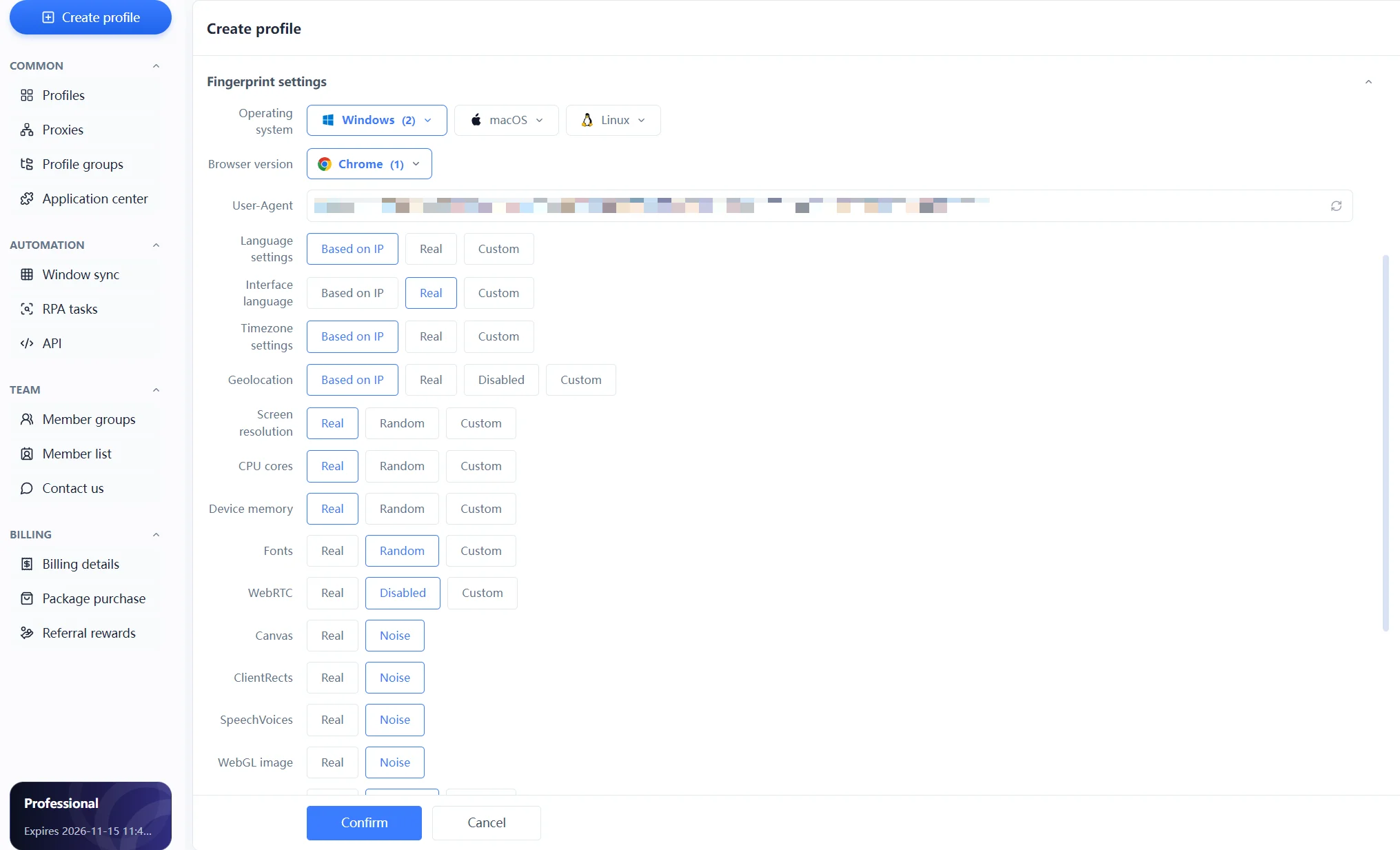
MasBrowser turns all the parameters above into independently configurable options in its fingerprint settings panel (see the image below). Each environment can individually choose strategies like "real / random / block / custom / noise," combined with automatic "configure based on IP" linkage for language, time zone, and geography, generating a set of realistic fingerprints matching the target market's user profile for each account.
MasBrowser fingerprint settings panel
For people running multiple accounts, the third point directly affects account security: if you open several store accounts on the same computer, the fingerprints are completely identical, and the platform can tell at a glance that they are "one family."
Different industries are affected by fingerprint tracking differently: cross-border e-commerce sellers worry about multiple stores being judged as associated, social media operators worry about account matrices being banned in batches, advertisers worry about multi-account campaigns being hit by risk control, and ordinary users care more about privacy leakage. The response is consistent — make different accounts present different digital identities.
Want to know what your fingerprint looks like? It's simple:
Environment management page
 Runtime details after the environment launches
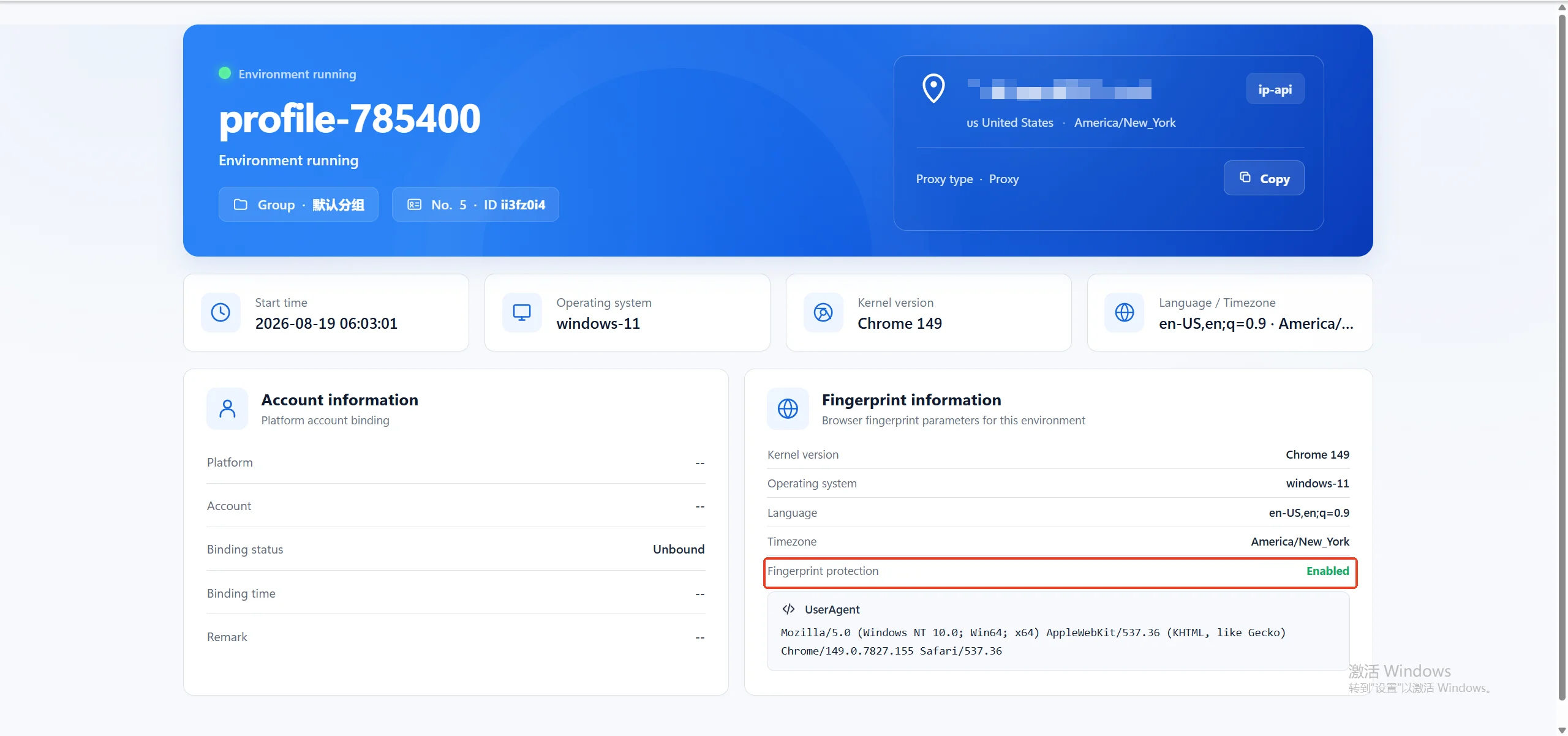
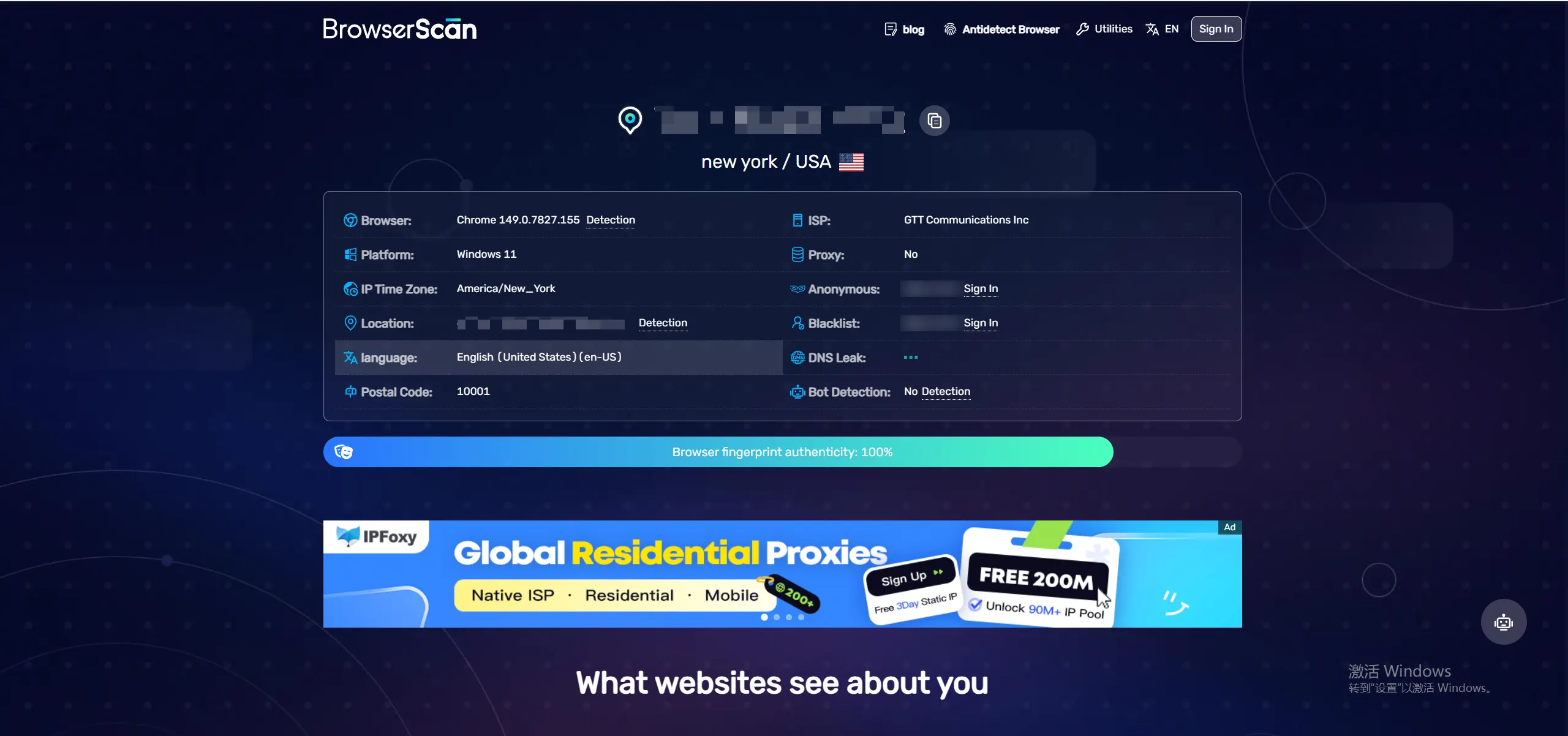
The meaning of the check: if you log into multiple accounts with a regular browser, the fingerprints are completely identical and the association risk is obvious at a glance; after giving each account an independent environment, the fingerprints are all different, and association problems are eliminated at the root.
When reading the results, focus on three items: Canvas, WebGL, and fonts — these three are the hardest to disguise, the most distinctive, and the indicators platforms most often reference when judging account association. If the accounts you manage are completely identical on these parameters, it is time to consider assigning an independent environment to each account.
Conventional methods basically don't work:
What really works is changing the fingerprint itself. Fingerprint browsers simulate device parameters, support customization of more than 20 fingerprint settings, and combine independent environments with proxy IPs so that each account presents a different digital identity — this is the core idea behind multi-account anti-association for cross-border e-commerce and social media matrix operations. You can check the specific configuration of independent environments and fingerprint isolation on the MasBrowser multi-account security management page.
No. Cookies and browser fingerprints are two separate mechanisms: the former is stored locally and can be cleared, while the latter comes from the browser's own properties. After you clear cookies, the fingerprint still exists and websites can still identify you.
No. Incognito mode only stops saving browsing history and cookies; the device parameters reported by the browser remain exactly the same, and advertisers and platforms can still lock onto you through your fingerprint.
Theoretically there is a tiny chance of coincidence, but after dozens of parameters are combined, two completely identical fingerprints almost never exist — which is why platforms dare to use them for account association judgments.
Browser fingerprints do not disappear when you clear cookies or enable incognito mode — they come from the browser's own properties and exist as long as you go online.
For ordinary users, understanding it is the first step to protecting privacy; for multi-account operators, managing it well is the basic skill of account security.
MasBrowser gives every account a different digital identity through independent browser environments and fingerprint configuration, solving account association problems at the root.
Download MasBrowser and start by checking your own fingerprint to build a safer operating environment.


