
MasBrowser
Customer supportLoading messages…
Loading messages…
You are viewing a previous conversation.
Enter to send · Shift + Enter for a new line
Loading messages…
You are viewing a previous conversation.
Enter to send · Shift + Enter for a new line
Core takeaway: After a team switches on collaboration, the easiest thing to miscount isn't the price — it's the seats. Many people treat "member seats" as a kind of environment quota, and end up either buying capacity they never use or squeezing two people into one login, then failing to trace who did what when something goes wrong. The correct understanding: environments and seats are two independent quota lines — environments govern "how many accounts," seats govern "how many people." This article covers only the seat line: which type of collaborator deserves a seat, why logins must never be shared, the right way to use the free plan's two seats, and the three signals that say it's time to expand. For permission tiers and environment handover, fingerprint browser team collaboration already has the full breakdown — no repetition here.
Member seats count "people"; environment count counts "accounts" — conflating the two is the first mistake in team setup.
A common misunderstanding: assuming that buying more environments lets you add more people, or conversely, that inviting someone eats into your environment allowance. The two are unrelated — environments are where accounts live, seats are how people sign in. The free plan gives 2 environments with 2 member seats; the numbers matching is pure coincidence. After upgrading, environments far outnumber people (a hundred environments run by three or five operators), and the ratio keeps widening.
Once you see this line, the planning order becomes clear: decide people first, then environments. How many hands does this business need, and how many of them must sign in to the client directly? Those numbers are the floor of your seat requirement — not the other way around, where you buy environments on a hunch and then force-fit people into what you bought.
A seat is essentially a unit of trust: giving someone a login means handing them the keys to part of your environment assets. Sort collaborators into four types by that standard:
One-line test: when this person leaves, is there anything you need to take back? If you'd need to recover environments, accounts or login sessions, they're touching core assets — that's the kind of relationship worth a seat. If there's nothing to recover, other forms of collaboration will do.
When two operators share one member account, the seat money you save comes back with interest the day something breaks.
Walk through the scenario: A and B share a login. One day a store's proxy gets swapped and risk control triggers. You pull the operation logs and find only "changed by this member account" — whether it was A or B, there is no answer. Worse than the incident itself is the cleanup: you don't know who to talk to, or whose permissions to tighten. Linking risk born of login chaos has nothing to do with how well the fingerprint environments isolate — the breach came from inside.
So the seat rule has exactly one iron line: one login per person, enforced from the very first member. With few people, sharing "seems harmless," but habits grow with scale — sloppy at three people becomes a disaster at thirty. Members sign in to the client with their own accounts and can immediately do the work assigned to them, without ever touching any platform's credentials. The whole mechanism's value rests on "attributable logins" — sharing it is dismantling it from within.
The two seats aren't a "trial allowance" — they're a complete configuration for getting your collaboration flow working.
Recommended opening move: seat one goes to the owner (holds the main account, builds and configures environments); seat two goes to the first teammate, and you use real work to smooth out the whole path — invite to join, scope environments by group, each side signing in on their own device. Expanding before the flow works is like putting five people who don't know the kitchen into it at once. Paired with environment groups and the registration habits from the multi-account asset inventory, two people can keep fifty environments in order.
 When any one of the following three signals shows up, consider expanding:
When expanding, just check that both lines — environments and seats — are sufficient. For plan tiers and yearly billing, see the fingerprint browser pricing guide; pick by the actual gap and don't pay for capacity you won't use.
A seat's lifecycle has only two moments that deserve ceremony: the invitation that brings someone in, and the removal that lets them out.
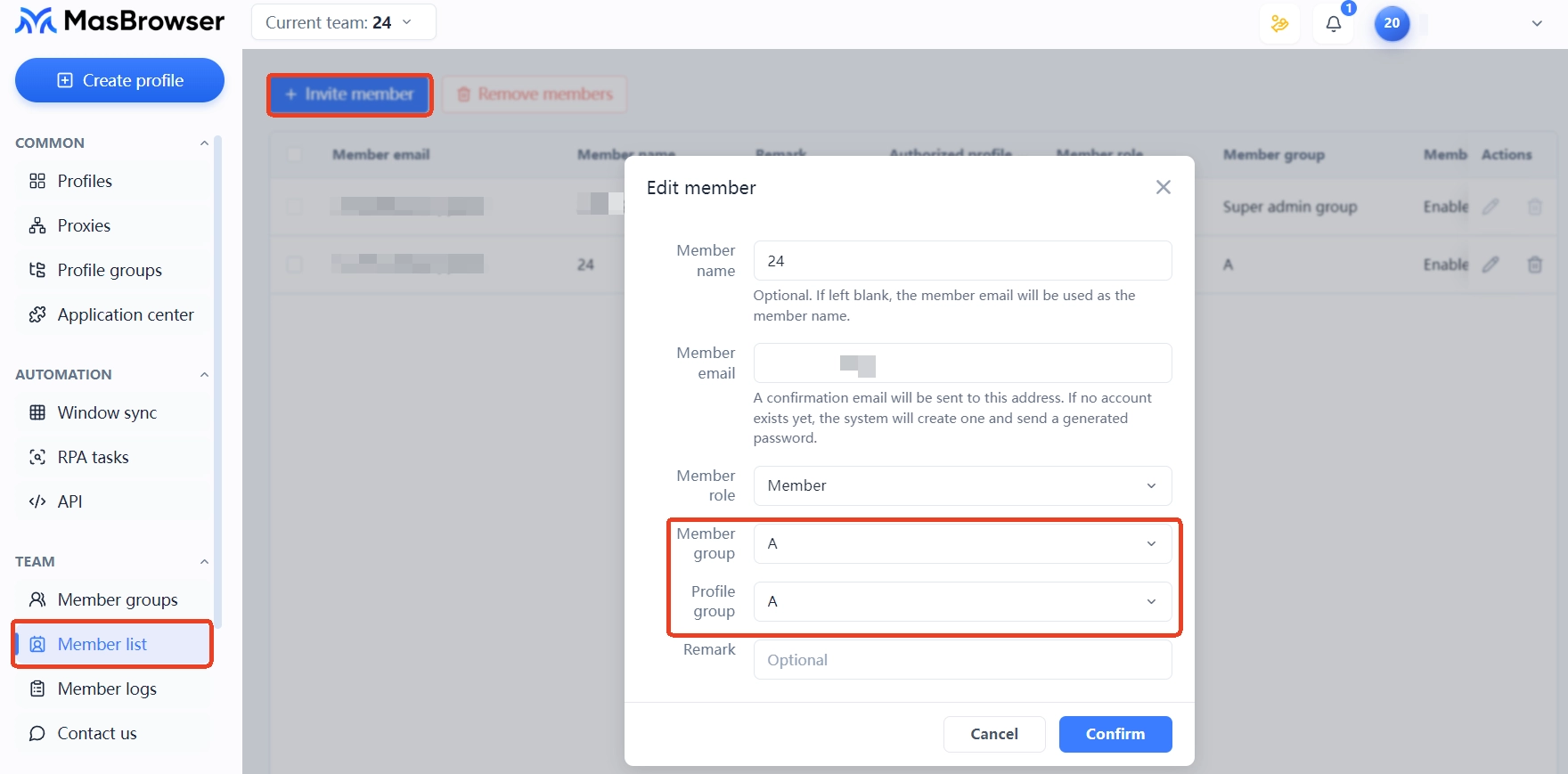
Before inviting, check three things: is this member's email their regular one or a throwaway (it determines whether you can reach them after they leave); which group will they join (create the group first, invite second — nobody lands empty); and do the notes on the environments they'll inherit clearly state ownership and proxy batch. Send the invite only when all three are in place — the member signs in with their own account, and the main account's password never leaves your hands.
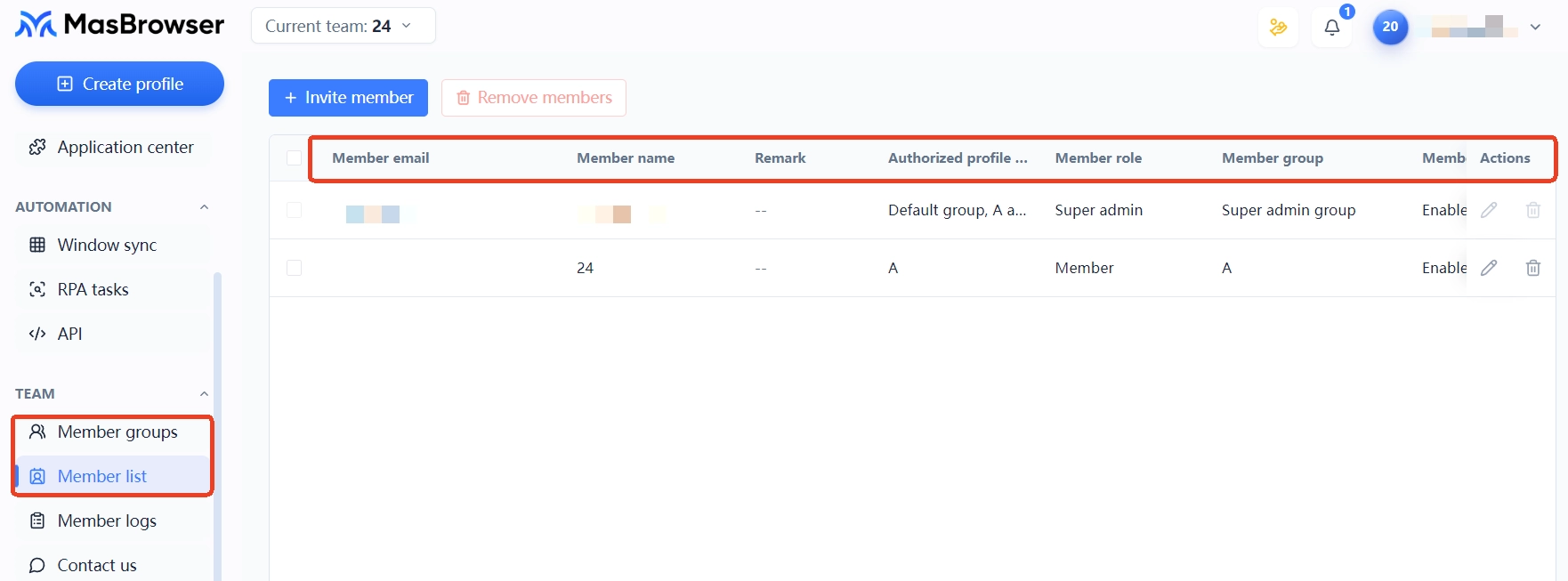 Before removing, check two things: have all their environments been transferred to a successor (transfer first, remove second — always in that order); and does their group still hold environments pending handover. Once both are clear, reclaim the seat — a reclaimed seat is released immediately and can be used for a new invite, with no waiting for a billing cycle.
Yes. The two quota lines are independent: environment count is governed by the environment quota and has nothing to do with member seats — and vice versa. Just budget them separately.
No. For temporary, one-off help, executing centrally under the main account is safer — environment assets stay in your hands. Only long-term part-timers on a fixed schedule who steadily own a specific environment group deserve a seat.
It stops working the moment their membership is removed. That's why transfers must be completed before removal — reversing the order leaves environments hanging under a deactivated member, and auditing becomes a mess.
That depends on the permission settings. The common practice: daily execution covers launching and operating, while configuration changes are reserved for a few; see the permission matrix section in the team collaboration article for tiering advice.
In team setup, the environment number is easy to decide — seats are hard, because they involve people and trust. Hand out seats like units of trust: only long-term hands get one, one login per person without exception, checks on the way in and the way out. The free plan's two seats are enough to get order running, and every expansion step lands where it counts. Download MasBrowser, switch on team collaboration, start with the two-seat setup — and make sure every permission has a clear owner.


