
MasBrowser
Customer supportLoading messages…
Loading messages…
You are viewing a previous conversation.
Enter to send · Shift + Enter for a new line
Loading messages…
You are viewing a previous conversation.
Enter to send · Shift + Enter for a new line
For most people, the first lesson in managing multiple accounts is "just use a VPN."
Install the client, connect to a US node, open a website and check that your IP shows as US — you feel relieved, thinking this time everything will be fine. But what happens? Accounts still get banned, and new accounts can even get flagged by risk control on the very day they are registered.
The problem comes down to a deep-rooted misconception: a VPN changes your IP, not "you." Once the division of labor between VPN and fingerprint browsers is clear, you will understand why a VPN alone is not enough.
A VPN can only change your IP, not your "device identity" — and platforms judge account association by the latter. That is exactly why a VPN cannot prevent association. There are five traps in particular, and each one can make your VPN useless:
In short: a VPN makes you "look like you are somewhere else," but it cannot make you "look like someone else."
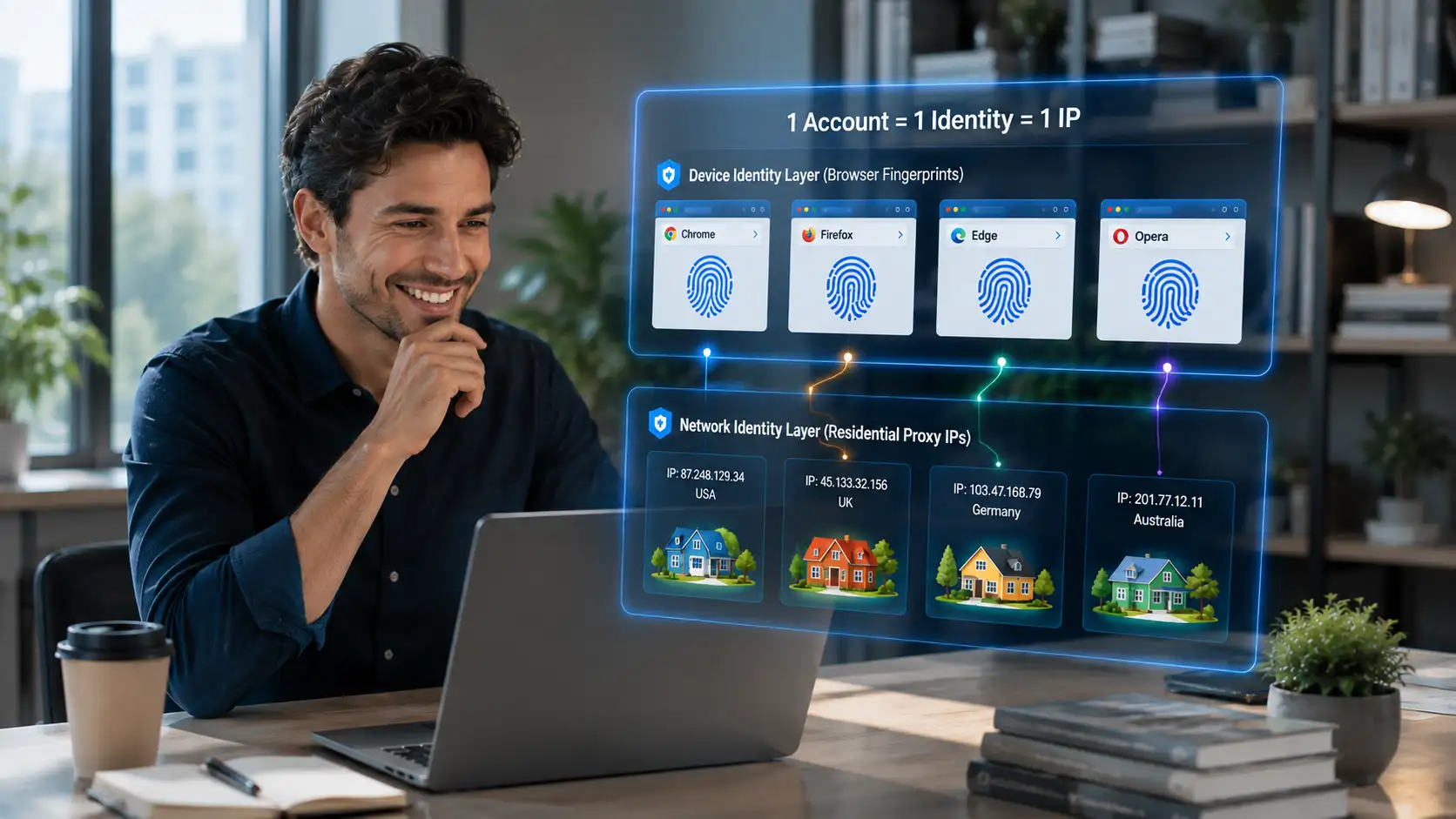
These three are not even on the same level: VPN encrypts and changes your IP, a proxy only changes your IP, and a fingerprint browser changes your "identity" — none can replace another. Their isolation levels differ greatly:
| Dimension | VPN | Proxy IP | Fingerprint browser |
|---|---|---|---|
| Layer it manages | Network encryption + exit IP | Exit IP only | Device identity (fingerprint) + environment isolation |
| Encrypts traffic | Yes | No | No (relies on proxy for the network layer) |
| Changes fingerprint | No | No | Yes (20+ programmable parameters) |
| Isolates multiple accounts | No | No | Yes (one environment per account) |
| Typical use | Access restricted sites, private browsing | Change region, rotate IP for scraping | Multi-account anti-association operations |
A proxy is a "slimmed-down VPN" (only changes IP, no encryption), and a fingerprint browser is "software that manages device identity." The three serve different purposes, but for multi-account operations, only the fingerprint browser was built for this scenario — it makes "an independent identity for every account" its core capability. You can see how environment isolation, fingerprint configuration, and proxy management work together on theMasBrowser multi-account security management page.
One principle for choosing a proxy: residential IP > mobile IP > datacenter IP. Since VPN nodes are unreliable, what IP should you use? Proxies on the market roughly fall into three categories, and they differ a lot:
| Type | Features | Cost | Best for |
|---|---|---|---|
| Datacenter IP | Fast and abundant, but IP ranges are heavily monitored by platforms | Low | Scraping, bulk registration (high risk) |
| Residential IP | From real home broadband, highest disguise quality and "cleanest" | High (by traffic or per IP) | Multi-account operations, store login (first choice) |
| Mobile IP | From 4G/5G mobile networks, dynamically rotating, slightly less stable | Medium-high | Social media account growth, scenarios with low IP stability requirements |
The priority for multi-account operations is clear: residential IP > mobile IP > datacenter IP. Residential IPs correspond to real home addresses, and platform risk control trusts them the most; datacenter IPs are cheap but their ranges are already heavily flagged, so accounts using them are easily caught up in collateral bans.
Two details in choosing a proxy are easy to overlook: first, try to choose a static residential IP (fixed long-term) instead of dynamic IPs that change every few minutes — frequent IP changes on an account are themselves an anomaly signal; second, bind a dedicated IP to each environment and never share one across environments — duplicate IPs trigger association just like duplicate fingerprints.
Do not choose between a VPN and a fingerprint browser. The right approach is a two-layer combo: "residential proxy + fingerprint browser." A VPN alone does not change your identity, and a fingerprint browser alone does not change your network. The layers are as follows:
TakeMasBrowser as an example — the actual operation is simple:
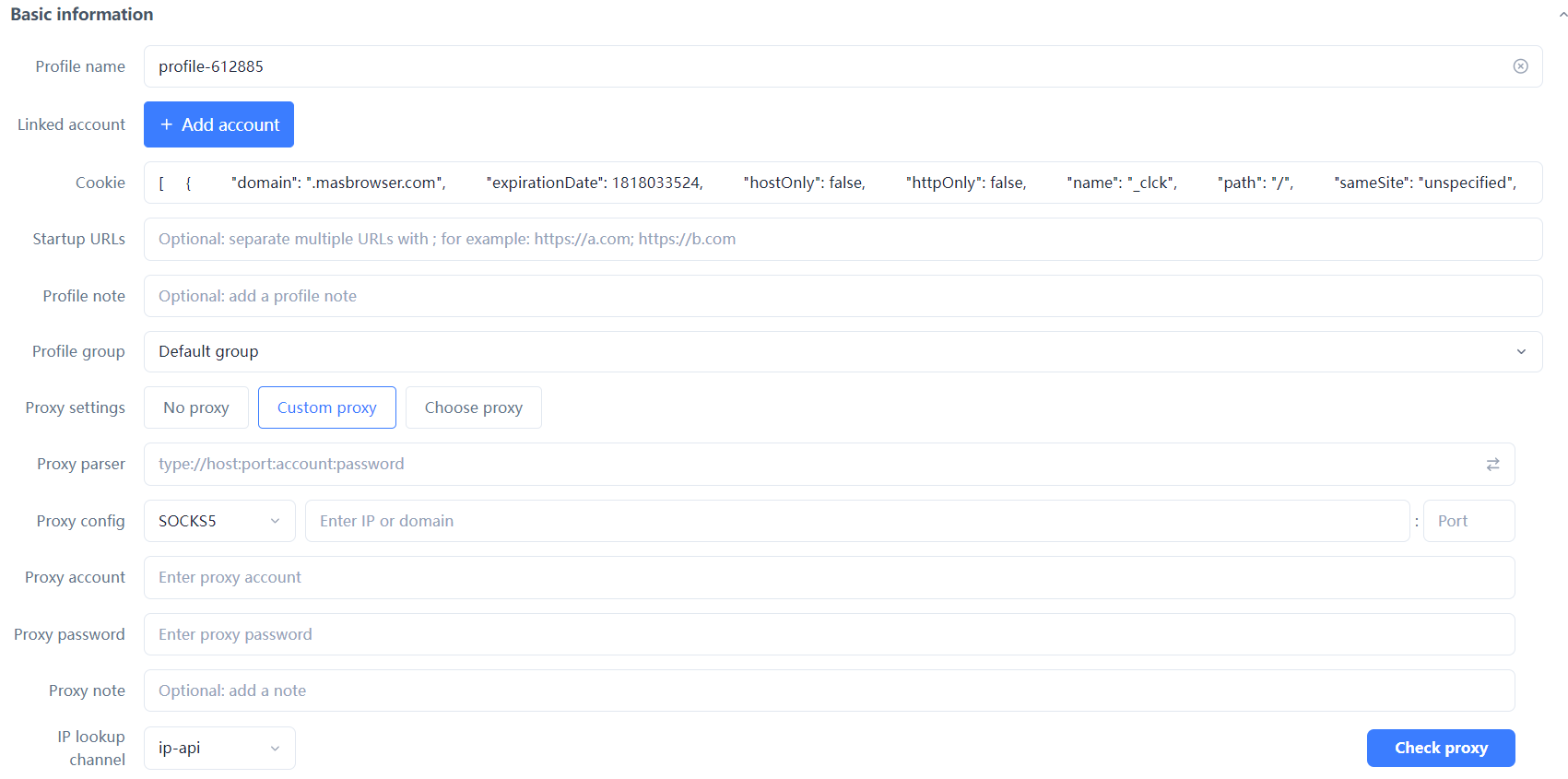
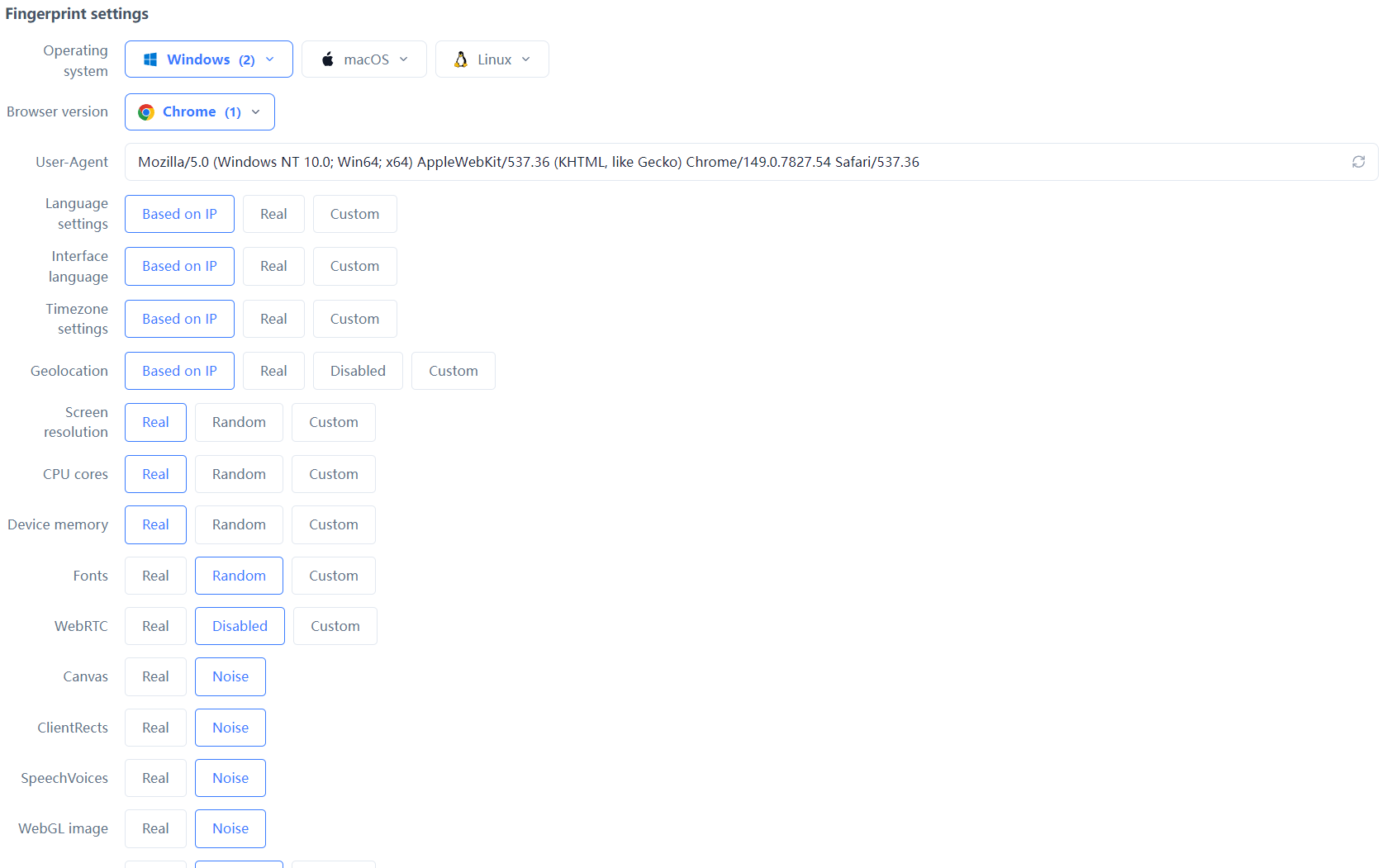
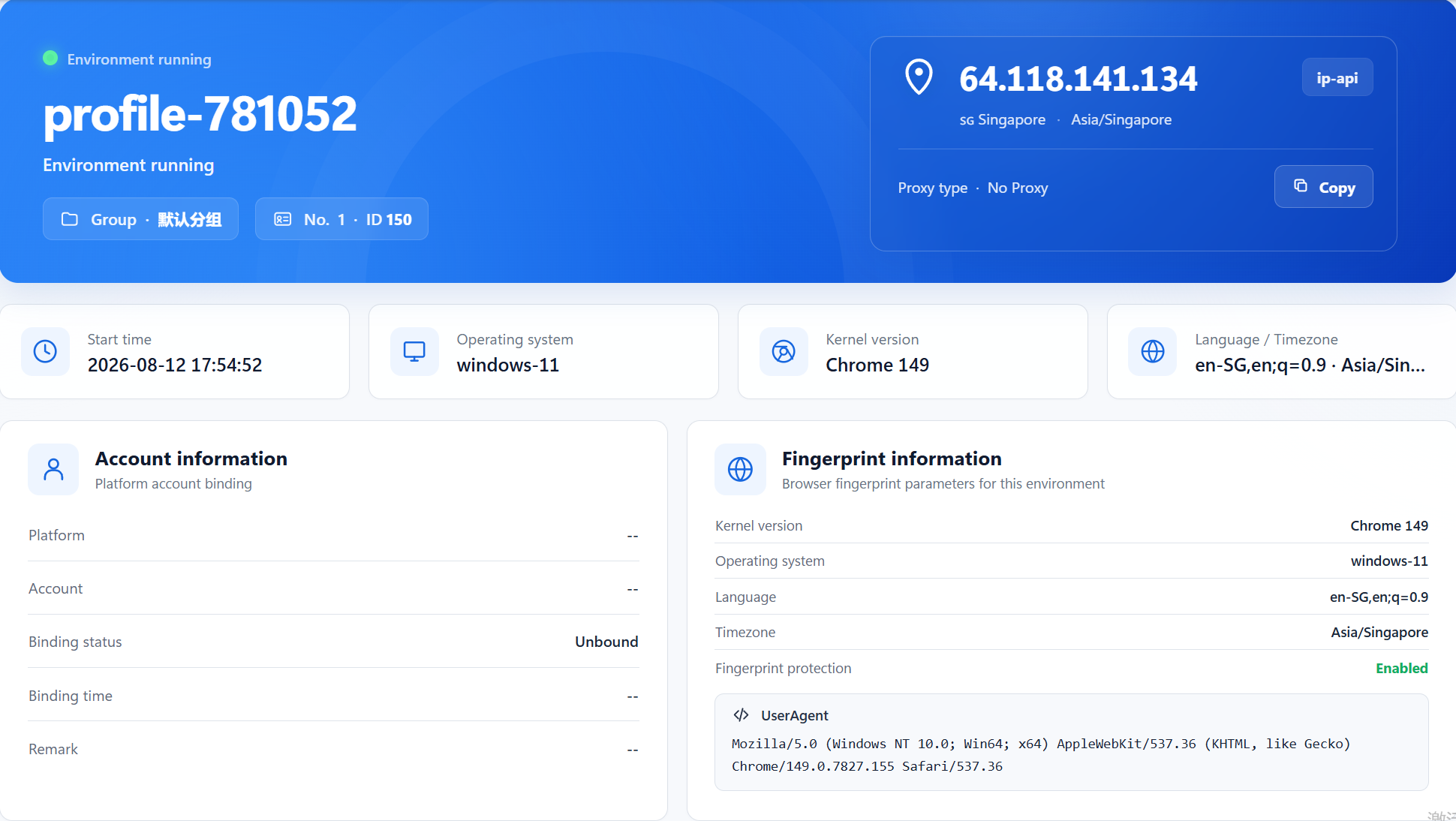
How do you confirm you are not "running naked"? Two steps are enough:
As long as the detection results are clean, this combo is complete — every account has an independent IP, an independent fingerprint, and matching timezone and language. In the platform's eyes, you are just one independent person after another. That is the correct way to run multiple accounts.
Not useless — it is only "half enough." A VPN is fine for personal private browsing and accessing restricted sites; but for multi-account operations, the shared flagged nodes, WebRTC leaks, and unchanged fingerprint make a VPN unable to support anti-association needs.
A VPN encrypts traffic and changes the exit IP, while a proxy only changes the exit IP without encryption. For multi-account operations, proxies are more controllable (one dedicated IP per account), and the "cleanliness" of residential proxies is far higher than shared VPN nodes.
Yes. Set WebRTC to "Blocked" in the fingerprint browser, and the browser will no longer probe your local network interfaces through WebRTC, so your real IP no longer leaks. After configuring, you can verify with ipleak.net or browserscan.net.
Not recommended for multi-account use. Free VPNs usually make money by selling user data, their nodes are lower quality and more heavily flagged, and they may route your real traffic somewhere unsafe. Do not cut corners on IP costs for multi-account operations.
You can, but there is no need. The fingerprint browser itself can bind a proxy IP and achieve the VPN's "change IP" function; stacking a VPN on top may instead introduce shared-node risks. The right approach is fingerprint browser + residential proxy, not VPN.
A VPN changes your "location," while a fingerprint browser changes your "identity." For multi-account operations, changing only the location without changing the identity is like wearing a disguise to the bank counter — the monitoring camera recognizes you at a glance.
Stop gambling your accounts on whether a VPN node is clean. The free plan already includes 2 environment slots.Download MasBrowser and start with your first environment — get the "independent identity" right from day one.


