
MasBrowser
Customer supportLoading messages…
Loading messages…
You are viewing a previous conversation.
Enter to send · Shift + Enter for a new line
Loading messages…
You are viewing a previous conversation.
Enter to send · Shift + Enter for a new line
If you sell on Amazon, you have probably been through this: your store just started doing well, you want to open another account to spread the risk, so you use Chrome's "switch profile" feature to create a second account. The first few days go fine — then a week later both stores receive review emails one after another: association.
You have also tried other tricks: incognito windows for your second account, installing several different browsers, logging in on rotation... and in the end the bans still come.
Where does the problem lie? In treating a regular browser as a multi-account tool. This article explains one thing clearly: what is the real, essential difference between an anti-association browser and a regular browser.
Let's start with a question many people have never considered: why do platforms treat "one person running multiple accounts" as a violation?
Not because of technical purism, but because of business logic. A platform's core asset is the "one person, one account" trust system: ad systems need to bid based on independent users, e-commerce needs to prevent sellers from self-praising and faking orders, and content platforms need to stop water-army comment manipulation. Once the same operator manipulates traffic, sales, or ad bidding with dozens of accounts, the fairness of the entire ecosystem collapses.
So platform risk control is not about "whether they want to check" — it is about "having to check." It does not look at one specific action, but at the association between accounts — device, network, behavioral habits; any clue proving "these accounts belong to the same group of people" triggers risk control.
This also explains why "rotating logins" and "incognito mode" do not work: you are just changing clothes on the same device, while the platform is looking at the "person."
A regular browser is not incapable of multi-opening — the problem is that its multi-open all stays at the interface layer, while the device identity and data underneath have never been separated.
These four approaches range from low to higher isolation, but none of them achieves "device identity"-level isolation. This is also why the more accounts you run with a regular browser, the faster they die.
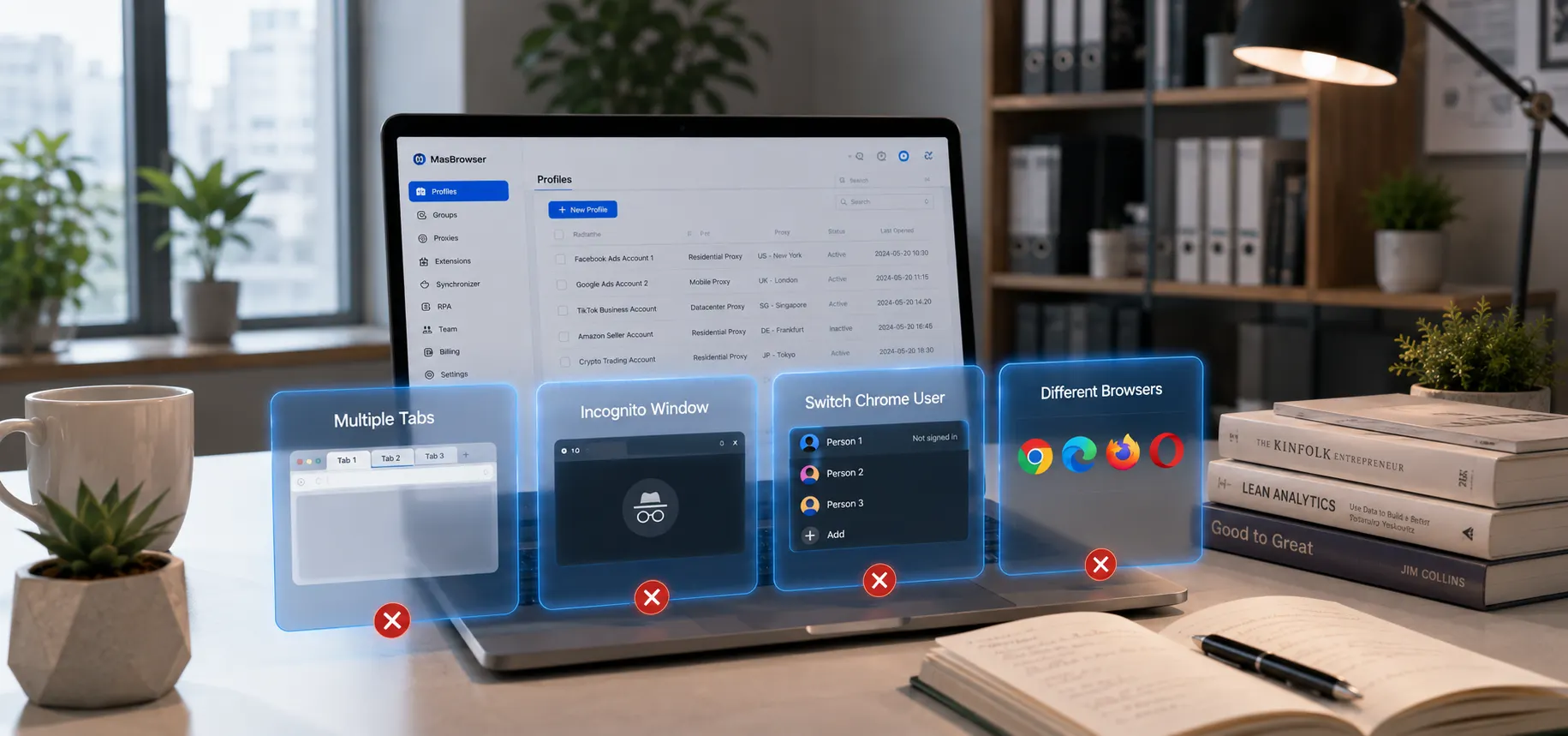
An anti-association browser (also called an anti-fingerprint browser or multi-login browser) belongs to the same technical family as a fingerprint browser: the fingerprint browser is the means, and anti-association is the goal. What it solves is not "opening several windows" but "making every account look, from device to network to data, like it belongs to a different person."
The key lies in the "data-domain isolation" mechanism. A regular browser's multi-open lives at the interface layer, while an anti-association browser's multi-open lives at the kernel layer — each environment has its own configuration directory, its own local storage, and its own kernel runtime instance, and environments share no data at all from the bottom up. As for the composition and identification principles of browser fingerprints, you can read the full breakdown in that explainer; here we will not expand on it, only explain the difference between an anti-association browser and a regular browser at the mechanism level.
Taking MasBrowser as an example, it is built on a private Chrome kernel, generates independent fingerprint parameters for each environment, and supports more than 20 parameters — language, time zone, geographic location, and more — linked with the proxy IP. These capabilities solve not "multi-opening" but "accounts staying independent of each other after multi-opening."
| Dimension | Regular browser | Anti-association browser |
|---|---|---|
| Fingerprint | One fixed set, cannot be modified | One set per environment, 20+ programmable parameters |
| Data isolation | Interface-layer isolation, shared kernel | Directory-level isolation, environments never read each other |
| Network | All accounts share the same IP | Each environment can bind a dedicated proxy IP |
| Environment management | No such concept, relies on memory | Full lifecycle management: create/copy/group/share/handover |
| Collaboration | One computer, one person | Permission levels, operation logs, multi-person collaboration |
The first three points solve "whether you will be associated"; the last two solve "whether you can keep up when there are too many accounts" — and the latter is the part that breaks down first when a regular browser's account scale grows.
There is also one easily overlooked difference in actual use: a regular browser's environment is "one-time" — close the window and nothing is left behind; an anti-association browser's environment is "persistent" — login state, cookies, and fingerprints are all solidified in the environment, and you continue where you left off next time. When I first built my first environment in MasBrowser, the biggest impression was exactly this — no need to log in again every time, and the environment does not "lose its memory" after a restart.
The judgment standard is actually simple: do you have two or more accounts that need long-term operation and must not be known by the platform to be related?
Scenarios you do not need it: single-account personal users, and small sellers who are fully served by a regular browser — buying it would be a pure waste.
Scenarios where you must have it:
If your business already hits any of the above, an anti-association browser is no longer a question of "should I use it" but a cost question of "one more day of delay, one more account banned." The unified management of accounts, environments, proxies, and owners can be seen concretely on the MasBrowser multi-account security management page.
Enough talk — let's verify it hands-on. This check is not complicated, but it lets you see with your own eyes the difference between "fake multi-open" and "real isolation."
About the tools: to see browser fingerprints (UA, Canvas, WebGL, fonts, UUID, etc.), you must use professional tools like Browserscan (browserscan.net), CreepJS, or Pixelscan. Ordinary IP geolocation tools (such as ip-api.com) only show the country/city/time zone of the IP and cannot see fingerprint details, so they cannot verify isolation.
As shown, UA/OS/IP time zone/hardware fingerprint are almost identical
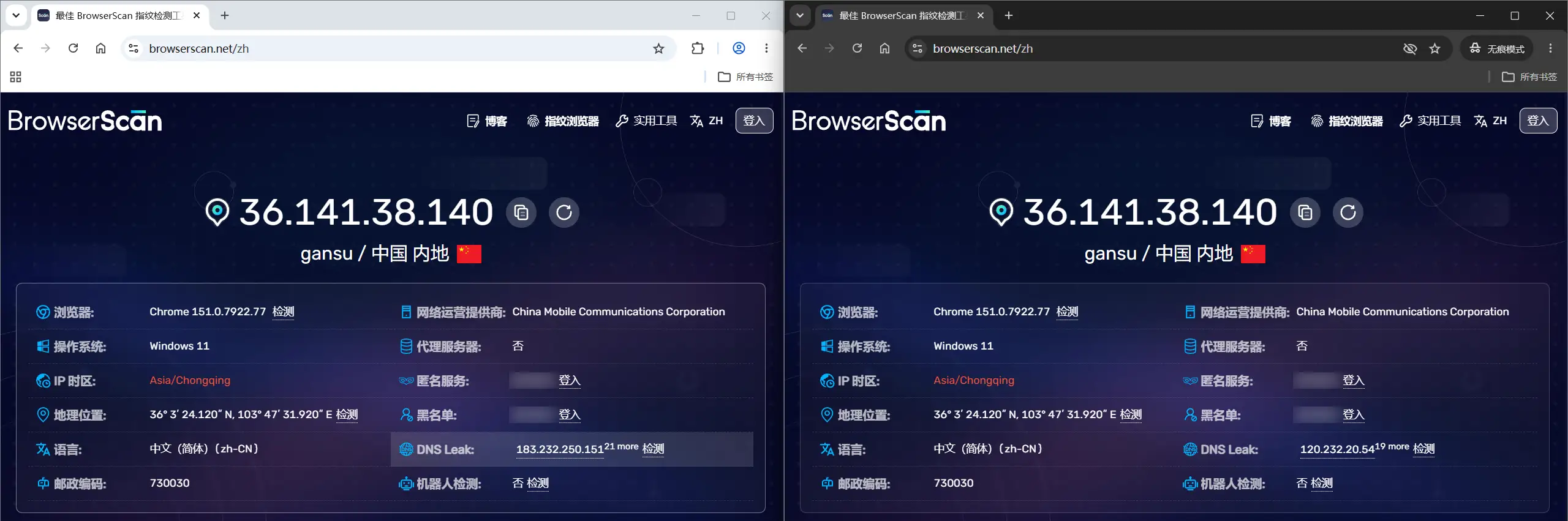
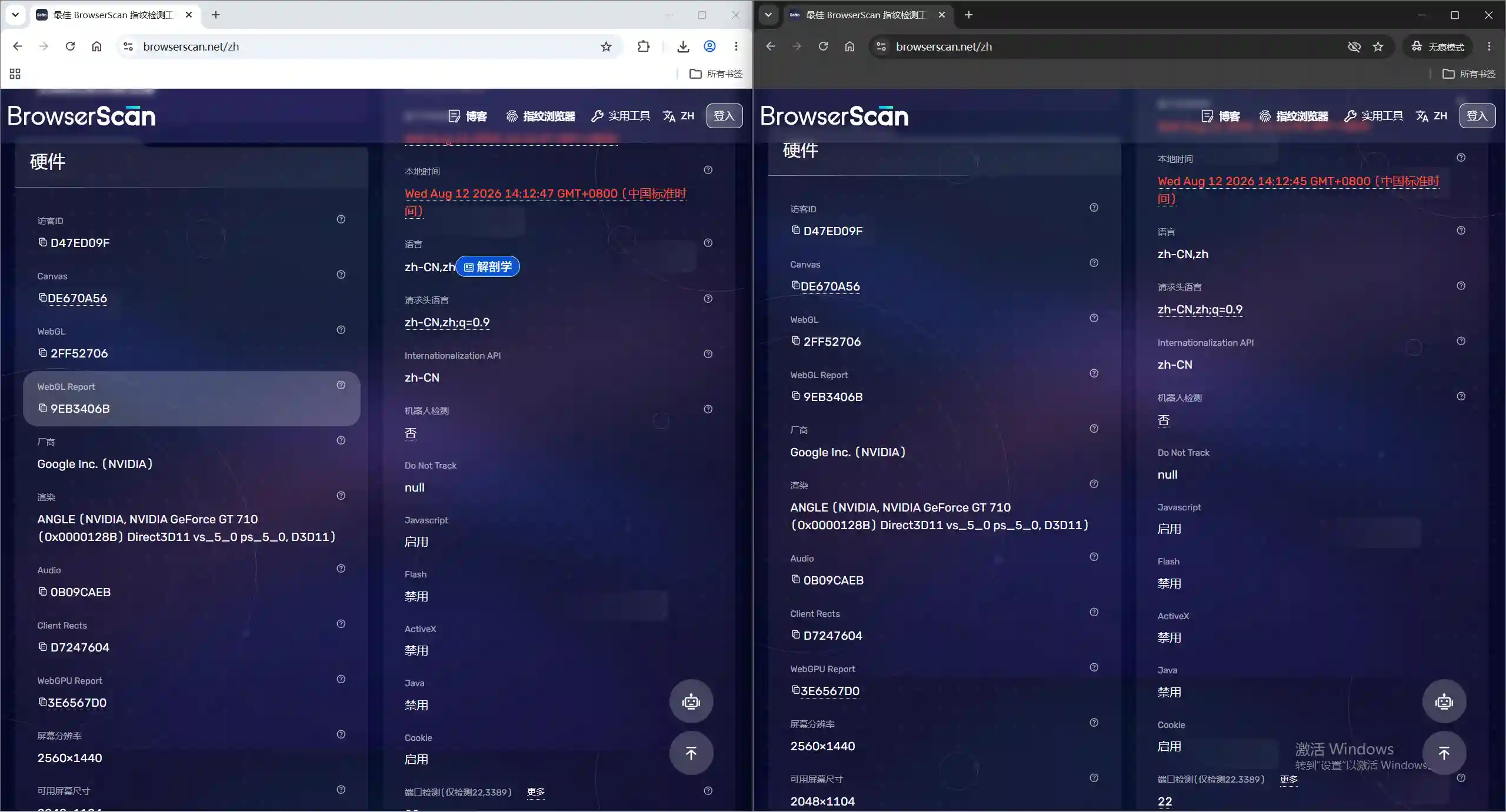 2. Create two independent environments (optionally bind proxies): open MasBrowser, create two environments on the environment management page, bind proxy IPs from different regions respectively, and choose "Configure based on IP" for fingerprint parameters to match automatically. The two environments in the environment list, marked with different proxy regions or different environment names.
 3. Check inside both environments separately: launch both environments, visit the same Browserscan page in each, and compare the browser/UA, Canvas, WebGL, fonts, and UUID columns one by one.
4. Compare the three results: the two fingerprints of the regular browser are almost identical → "fake multi-open" confirmed; the two environments of MasBrowser, even with the same IP, show completely different Canvas/WebGL/fonts/UUID → isolation is effective. If the two environments' fingerprints are close, it means the proxy did not take effect or the fingerprint configuration is wrong — go back and check the environment configuration.
3. Check inside both environments separately: launch both environments, visit the same Browserscan page in each, and compare the browser/UA, Canvas, WebGL, fonts, and UUID columns one by one.
4. Compare the three results: the two fingerprints of the regular browser are almost identical → "fake multi-open" confirmed; the two environments of MasBrowser, even with the same IP, show completely different Canvas/WebGL/fonts/UUID → isolation is effective. If the two environments' fingerprints are close, it means the proxy did not take effect or the fingerprint configuration is wrong — go back and check the environment configuration.
After this check, you will have a very intuitive understanding of "what is the difference between an anti-association browser and a regular browser" — the difference is not in the interface, but in whether the platform sees you as one person or many people.
They belong to the same technical family. A fingerprint browser emphasizes the "modify the fingerprint" means, while an anti-association browser emphasizes the "multiple accounts are not associated" goal. Most products on the market offer both; the difference is in naming, not capability.
Yes. Chrome profiles isolate cookies and local data, but the fingerprint, kernel, and hardware information remain completely identical, and it is exactly these that platform association detection relies on.
No. A regular browser is fully sufficient for a single account; the value of an anti-association browser lies in "multiple accounts being independent of each other," so it only matters when you have many accounts.
It consumes a certain amount of memory, but far less than running multiple virtual machines. Thanks to lightweight kernel-level isolation, an ordinary computer can run a dozen or more environments without problems — which is also why it replaces the virtual-machine approach.
A regular browser is "one person's browser"; an anti-association browser is "many people's browser." The biggest difference between the two is not in the interface, but in the underlying layers — fingerprint, data, network, and environment lifecycle, each designed so that accounts are "completely unrelated" to each other.
If your multi-account business is still barely holding on with profile switching and incognito mode, it is time to change your approach. The free version already includes a quota of 2 environments, enough for you to run through the whole workflow. Download MasBrowser and start from building your first independent environment, giving every account its own "identity."


