
MasBrowser
Customer supportLoading messages…
Loading messages…
You are viewing a previous conversation.
Enter to send · Shift + Enter for a new line
Loading messages…
You are viewing a previous conversation.
Enter to send · Shift + Enter for a new line
If you run accounts on residential proxies, you may have hit this wall: the proxy is residential, the region is right, the configuration is clean — yet on hard-risk-control platforms your accounts still struggle: throttled reach, constant verification, repeated face-check demands. Then someone tells you: "Get mobile proxies — that's the ceiling." You check the price — several times more expensive than residential — and get even more conflicted: what exactly are mobile proxies? Are they worth it? Does my business need them?
The short answer first: mobile proxies (4G/5G cellular network IPs) are currently the highest-trust IP type; they solve "extreme risk control" scenarios. But for most multi-account operations, residential proxies remain the best value-for-money choice. This article explains the unique mechanics of mobile proxies, a four-dimension comparison with residential, and when they're actually worth paying for.
After residential and datacenter IPs (the basics of IP origin are fully covered in Residential vs Datacenter IP), the IP world has a third origin — cellular network IPs:
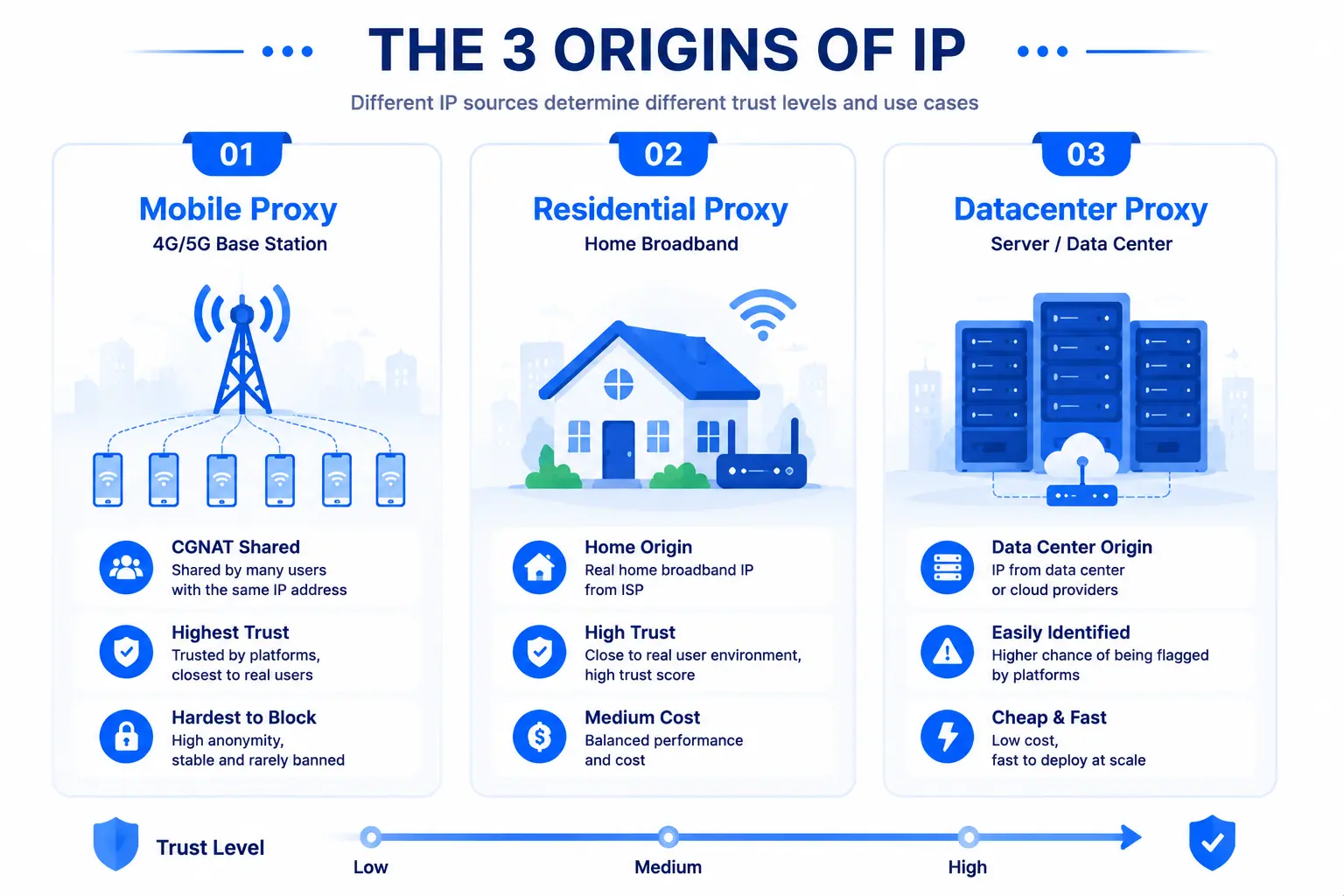
That's the core reason mobile proxies price with confidence: a residential IP "looks like a real person," while a mobile IP "is a crowd of real people sharing" by network architecture. It has costs too: expensive traffic billing, signal-dependent speed, and IPs in the pool drifting as devices hand off between base stations — more on those below.
Put the two side by side and the differences are clear:
One line on their temperaments: residential seeks stability, mobile seeks unblockability — one suits long-term garrison duty, the other strikes into high-risk territory.
Since mobile proxies are this strong, should everything switch to them? No — the premium only pays off in specific cases:
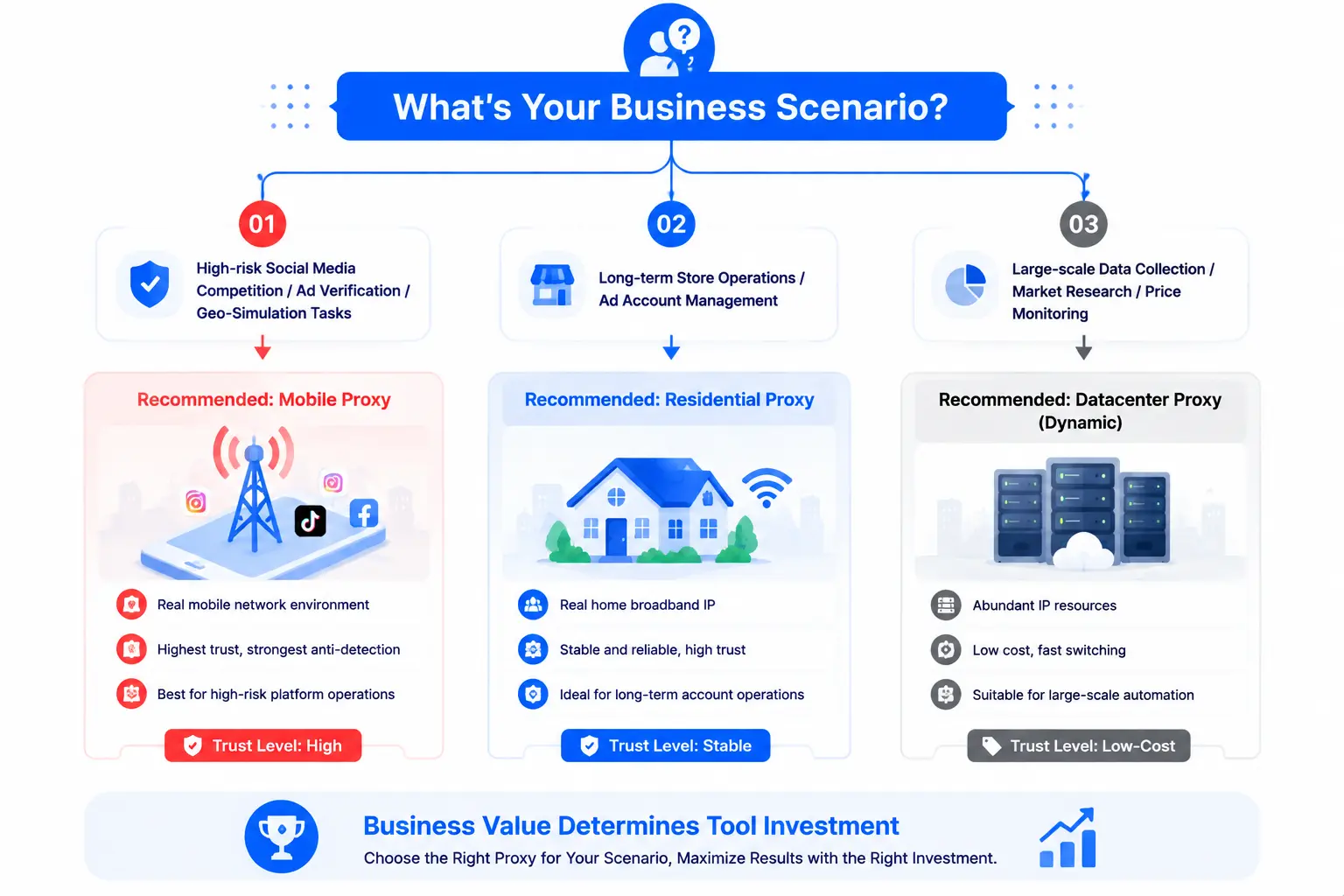
Conversely, stay honestly on residential for: long-term store operation (stability over rotation), daily ad-account management (migrations trigger verification instead), bulk collection (mobile traffic costs won't hold). First calculate each account's business value, then decide whether it deserves a "mobile-grade" price tag.
The common thread: every "strength" of mobile proxies carries preconditions — high trust assumes fingerprint and behavior support, high prices demand careful budgeting, and speed depends entirely on which provider you pick.
Not "better" — "specialized". Mobile wins on trust and ban resistance, loses on price, speed and billing complexity. For e-commerce stores and other long-term stable needs, residential remains the value king; only under extreme risk control does mobile's premium pay off.
Mainstream providers typically offer SOCKS5 and HTTP(S) access; a fingerprint browser (like MasBrowser) binds by selecting the matching type and running a connection test — the protocol-level access is identical to residential, no compatibility barrier.
Usually not. Amazon stores favor stability over change; static residential + isolated environments is the accepted pairing. Only when an account is stuck in a "repeated appeal - repeated verification" death loop is it worth trying mobile proxies as a transitional assist — and even then, audit environment and behavior first; don't bet everything on swapping IPs.
Yes, by business tiers: primary accounts garrison in static-residential environments; temporary high-risk operations (new-region expansion, abnormal-verification handling) run in mobile-proxy environments — the two IP classes keep separate duties, never cross-logging into the same account, avoiding the messy signal of one account appearing both on home broadband and cellular towers.
Two signals: ① on residential, accounts already show sustained suppression like repeated verification or zero content recommendations; ② the business depends heavily on high-risk-control mobile App scenarios. If neither applies, stay comfortably on residential — exhaust residential optimization room first (switch provider/region/re-audit environment fingerprints), then consider upgrading.
Mobile proxies aren't a residential upgrade — they're a different specialized weapon: the former earns its "platforms dare not ban" trust through CGNAT sharing, built for extreme-risk-control assaults; the latter is steady, cheap, predictable — the base camp of multi-account long-term operations.
The underlying logic stays the same: business value determines tool investment. In most scenarios residential is enough; only a few high-confrontation cases break through with mobile — know both, and you'll know where the money goes. Whichever you pick, bind the proxy into a fingerprint browser's isolated environment and run a connectivity test plus environment-fingerprint self-check — only when the IP leg stands firm is the whole isolation system complete.
The free plan's 2-profile quota lets you test your current proxy setup in MasBrowser first (bind → test connectivity → fingerprint check), see clearly where you stand, then decide about mobile — Download MasBrowser and start the verification workflow.


