Securely Manage Multi-Accounts, Start with Masbrowser
Reduce Association Risks, Boost Efficiency, Support Scaling

Dozens of browser tools on the market claim to offer "anti-association" protection, but very few actually understand how association detection works and build their architecture around that understanding. Most tools do something like this: randomly swap a few parameters, change the User-Agent, switch the IP — this fools the most basic detection methods, but as platform risk control models grow increasingly sophisticated, the survival window for these approaches keeps shrinking.
This article isn't a guide on how to use an anti-detect browser. It's an attempt to explain what's happening under the hood: what parameters make up a browser fingerprint, how platforms use those parameters to identify associations, what environment isolation actually means at the technical level, and why fingerprint consistency matters more than fingerprint randomization. Once you understand these things, you can judge whether a tool actually solves the problem — rather than gambling on a solution that just looks like it works.
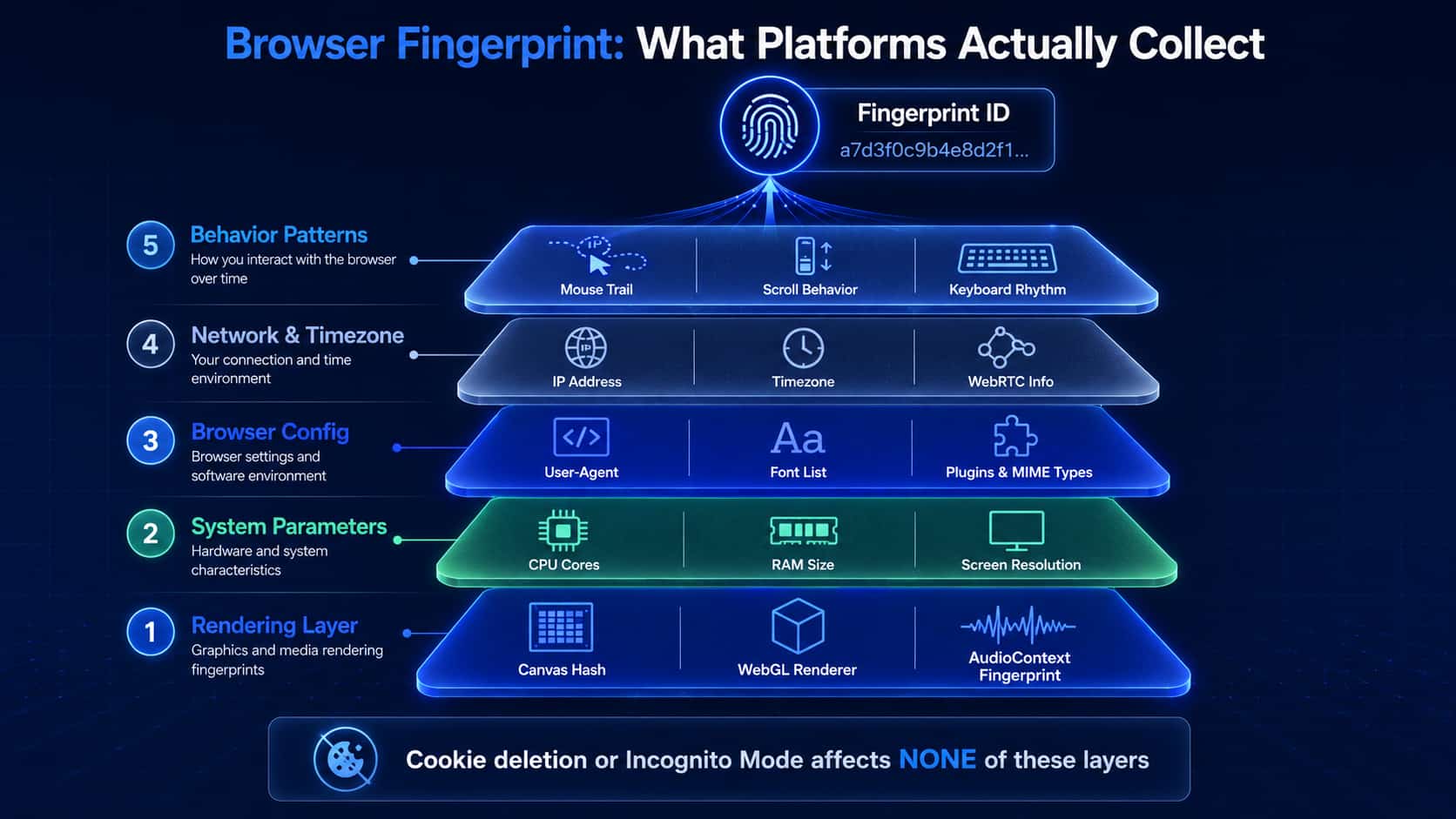
A browser fingerprint refers to a set of device and environment parameters passively collected by webpage scripts. The combination of these parameters uniquely identifies a device or browser instance. Unlike cookies, fingerprinting doesn't require storing any data on the client side — users can't eliminate it by clearing cookies or using incognito mode.
Fingerprint parameters fall into roughly five layers. The first layer is rendering characteristics — the hardest part to fake. Canvas fingerprinting works by instructing the browser to render specific text and graphics on a hidden <canvas> element, then reading the pixel-level output to generate a hash. Because different GPUs, different driver versions, and different operating systems render fonts and graphics with subtle variations, this hash almost never repeats across different devices. WebGL fingerprinting uses a similar principle, leveraging 3D graphics rendering to expose GPU model, driver version, and rendering capabilities. AudioContext fingerprinting exploits floating-point arithmetic differences in audio processors to generate a unique identifier. These three dimensions together form the most stable and hardest-to-fake layer of device characteristics.
The second layer is system environment parameters: operating system version, logical CPU core count (navigator.hardwareConcurrency), estimated device memory (navigator.deviceMemory), screen resolution and color depth, and touch point count. The third layer is browser configuration parameters: User-Agent string, installed font list, supported MIME types, browser plugin list (navigator.plugins), and language preference (navigator.language). The fourth layer is network and timezone parameters: IP address, timezone (Intl.DateTimeFormat().resolvedOptions().timeZone), and WebRTC local IP leakage. The fifth layer is behavioral characteristics: scroll speed, mouse movement patterns, and keyboard input rhythm — this layer feeds primarily into behavioral analysis models.
Platforms don't rely on any single parameter. They feed data from all of the above dimensions into machine learning models to calculate the probability that an account belongs to a specific device. This is why "changing your IP" or "modifying your User-Agent" doesn't remotely solve the problem — you've touched one parameter while dozens of others still point directly at you.
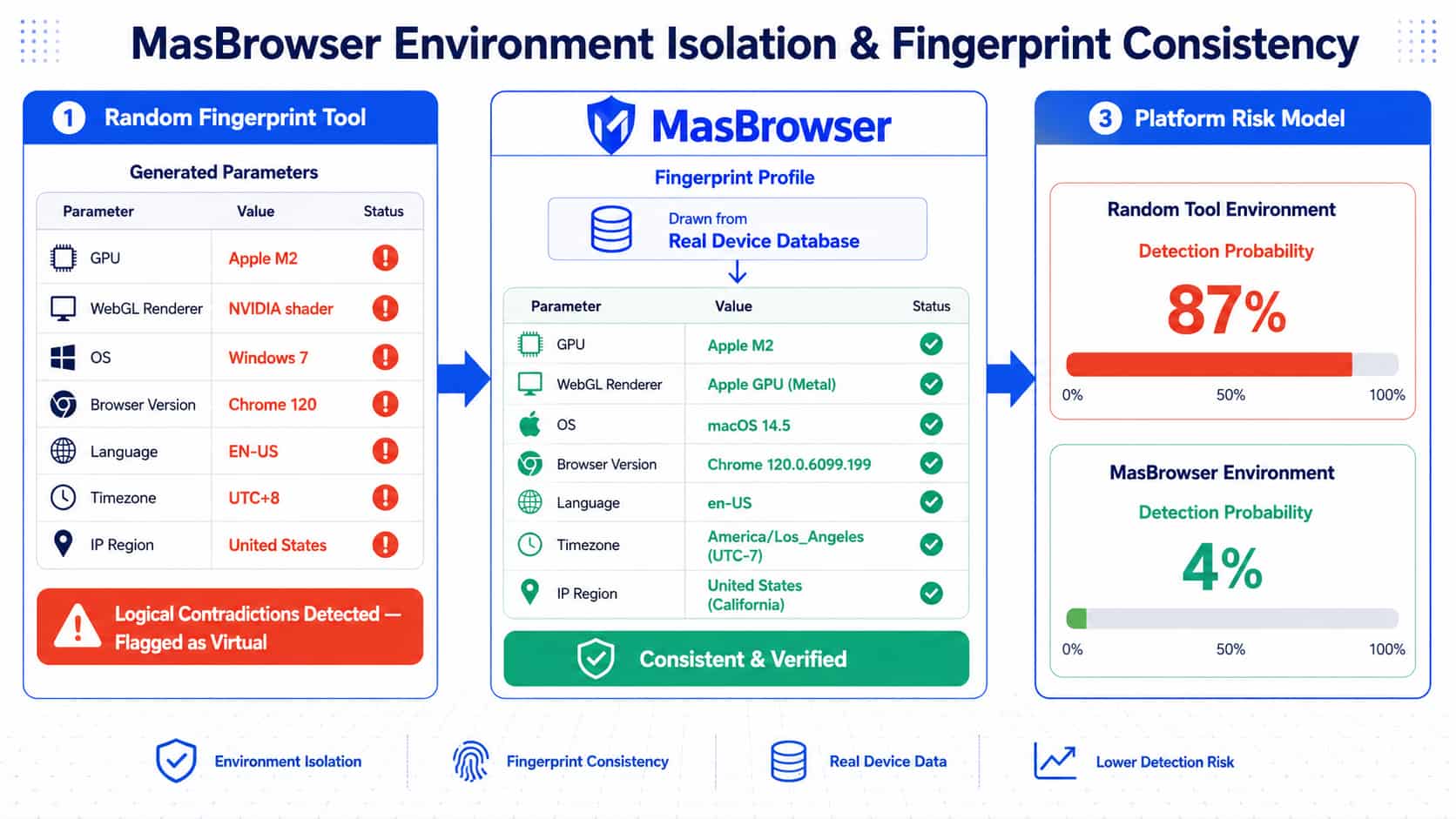
This is a counterintuitive conclusion that surprises many people: randomly generated fingerprints are more easily detected as anomalous by platforms than fingerprints from real devices.
The reason is that parameters have strict logical relationships with each other. Real device parameter combinations follow predictable patterns, and random generation frequently breaks those patterns, producing combinations that cannot exist in the real world. A few concrete examples:
The GPU model is Apple M2, but the WebGL shader output looks like typical NVIDIA output — a combination that's impossible on any real device. The operating system is Windows 7, but the Chrome version in the User-Agent is 120 — Chrome stopped supporting Windows 7 before its end-of-life cycle even finished. The screen resolution is 1920×1080, but devicePixelRatio is 3.0 — a combination that only appears on high-density mobile devices, directly contradicting the desktop resolution. The language is set to English (US), the timezone is UTC+8, but the proxy IP is German — all three dimensions are inconsistent with each other.
Platform risk control models are trained on massive amounts of real device data and have highly precise models of the statistical distribution of real device parameter combinations. The more a fingerprint deviates from that distribution, the higher the probability it gets flagged as a virtual environment. Randomized fingerprinting doesn't simulate real devices — it generates "bizarre devices" that don't exist in reality, which is itself an extremely strong detection signal.
This is exactly why MasBrowser uses a real device fingerprint library rather than randomly generating parameters. The fingerprints originate from real device models, the logical relationships between all parameters genuinely hold, and the platform's distribution model cannot distinguish them from real users.
"Environment isolation" is a term that has been badly overused in the market. What many tools call "isolation" is actually just cookie isolation between browser tabs, or at most separate processes. This level of isolation is nowhere near sufficient, for a simple reason: Canvas fingerprints, WebGL fingerprints, and similar parameters are read from underlying hardware and drivers. Tab-level data isolation has no effect on them whatsoever.
True environment isolation requires all of the following layers to be independently separated simultaneously: Cookie and Session storage isolated — the baseline requirement. LocalStorage and IndexedDB isolated — many websites use these to track user state, and isolating cookies alone isn't enough. Browser cache, browsing history, and download history isolated — these can be accessed by scripts and create information leakage risks. Extension plugin environments isolated — the same plugin used across different account environments should have independent storage and IDs, as plugin IDs are themselves part of the fingerprint. Network proxy independently bound — each environment has its own proxy configuration that automatically follows account switches without any manual intervention, eliminating the risk of a misconfigured proxy exposing the real IP.
MasBrowser's isolation is implemented at the system level, allocating independent storage space and network stacks to each account environment rather than intercepting and rewriting at the browser application layer. The fundamental difference between these two approaches: application-layer interception can potentially be bypassed; system-level isolation is physical separation, where data paths between accounts simply don't cross at the operating system level.
The Qt-based architecture also delivers a performance advantage. Traditional approaches typically require launching a complete browser process for each account, with memory usage growing linearly with account count — 50 accounts means 50 full Chrome processes. Qt architecture allows multiple account environments to share portions of the underlying rendering engine's resources while maintaining complete data-layer isolation. This makes MasBrowser significantly more memory-efficient and responsive than traditional solutions when managing hundreds of account environments simultaneously.
Fingerprint consistency is a harder technical challenge than environment isolation, and it's the core metric that separates genuinely capable tools from surface-level ones.
Consistency involves two dimensions: intra-parameter consistency and cross-session stability.
Intra-parameter consistency means that at any given point in time, all logical relationships between fingerprint parameters must hold. This requires deep modeling of real device parameter distributions: which GPU models correspond to which WebGL rendering characteristics, which OS versions correspond to which available font sets, which device types correspond to which plausible screen resolution ranges. MasBrowser's fingerprint library is sourced from collected data from a large number of real devices — every fingerprint profile is a parameter snapshot read from a real device, not a manually constructed parameter combination. This fundamentally guarantees internal consistency.
Cross-session stability means that the fingerprint parameters remain unchanged when the same account logs in at different times. This matters equally, because real users don't switch devices every day. An account using one Canvas hash today and a different one tomorrow is itself an anomaly signal. MasBrowser binds each account environment to a fixed fingerprint profile that remains stable throughout the account's entire lifecycle. This is one of the key factors in long-term account survival — account data we've tracked shows that accounts with stable fingerprints have an average survival cycle 4–6 times longer than accounts with randomly changing fingerprints.
There's also a consistency dimension that's easy to overlook: geographic consistency between fingerprint parameters and proxy IP. A fingerprint indicating a US device (English language, UTC-5 timezone, US keyboard layout) paired with a Southeast Asian proxy IP is an obvious contradiction in any risk control system. A complete consistency solution needs to manage both fingerprint parameters and the network layer's geographic information, ensuring the two are logically corroborated.
Theory only goes so far — nothing beats verifying it yourself. Several publicly available tools can be used to inspect the fingerprint profile of your current browser environment:
BrowserLeaks is the most comprehensive fingerprint testing tool, covering nearly every fingerprint dimension including Canvas, WebGL, fonts, WebRTC, timezone, and language. Each dimension provides detailed parameter values, making it easy to compare differences between account environments side by side. CreepJS goes deeper, with anti-detection tests specifically designed to probe various fingerprint spoofing techniques, capable of identifying logical contradictions between parameters.
The correct verification process: open BrowserLeaks in two different account environments and compare the Canvas hash, WebGL renderer information, font list, and screen resolution. If these parameters are identical, the two environments haven't achieved real fingerprint isolation. If the parameters differ, use CreepJS to check for logical contradictions between them. A low "Trust Score" from CreepJS indicates detectable problems in the fingerprint configuration.
We ran systematic comparisons of this verification process in internal testing. Different account environments created with MasBrowser each produced different Canvas hashes and WebGL information on BrowserLeaks, and all showed CreepJS Trust Scores within normal ranges with no parameter contradiction warnings. This result can be independently reproduced by any user.
When the technical principles translate into actual business use, a few typical application patterns emerge.
Multi-store cross-border e-commerce operations are the highest-frequency use case. Amazon and eBay's association detection is highly mature, and device fingerprinting is one of its core detection dimensions. A seller uses MasBrowser to create an isolated browser environment for each store account, configuring a fixed fingerprint from the real device library and binding a residential IP for the corresponding region. From the platform's perspective, these stores operate on different devices, dramatically reducing the probability of triggering association detection. In practice, MasBrowser's bulk environment creation feature can generate dozens of independently configured account environments in minutes, with each environment's fingerprint parameters automatically matched from the real device library — no manual parameter configuration required.
Ad account matrix management is another typical use case. Rebuilding Facebook or Google ad accounts after a ban is extremely costly, and multiple accounts under the same entity are easily cross-associated. Managing each ad account in an isolated browser environment with its own proxy IP and stable fingerprint profile significantly reduces the risk of inter-account association. In team collaboration scenarios, all members access their authorized account environments through a unified platform, and the device characteristics the account presents externally remain fixed regardless of differences in team members' local devices, preventing fingerprint contamination.
Social media matrix operations place especially high demands on fingerprint stability, because platforms' long-term behavioral tracking of accounts is a key basis for association detection. An account with frequently changing fingerprint parameters gets flagged in the platform's data model as an unstable anomaly; an account with a long-stable fingerprint and natural behavior progressively accumulates trust weight in the platform's systems, with the probability of getting banned declining over time.
Can browser fingerprints be completely faked?
Technically, Canvas and WebGL fingerprints can be modified — but "modifying" and "convincingly faking a real device" are two different things. Modification is easy. Getting the modified result to pass the statistical tests of distribution models, maintain intra-parameter consistency, and sustain cross-session stability simultaneously is genuinely difficult. The most reliable approach currently is to use fingerprint data sourced from real devices rather than trying to manually construct parameters that merely "look real."
Can incognito mode achieve environment isolation?
No. Incognito mode only clears cookies and browsing history — it has no effect on any fingerprint parameters. Canvas hash, WebGL characteristics, and font lists are identical in incognito and normal mode. Using incognito mode for different accounts is indistinguishable from a fingerprinting perspective.
Can a VPN solve the device fingerprint problem?
VPNs only address the IP layer and have zero impact on device fingerprints. Switching your IP with a VPN leaves your fingerprint completely unchanged. Worse, VPNs typically route multiple users through shared exit nodes, making logging into multiple accounts from the same VPN IP a high-risk operation in itself.
Will running multiple account environments simultaneously cause performance issues?
That depends on the tool's architecture. Traditional solutions based on full browser processes require one complete process per account — 50 accounts means 50 full processes, with very high memory usage. MasBrowser's Qt-based architecture allows multiple environments to share underlying rendering resources, keeping memory usage for 100 simultaneous accounts significantly lower than comparable tools, running smoothly even on standard-spec business laptops.
Do fingerprint configurations need to be rotated periodically?
No — and they shouldn't be. Frequently changing fingerprints is itself an anomaly signal; real users don't swap devices every week. The correct approach is to assign each account a fixed fingerprint profile and keep it stable throughout the account's entire lifecycle, so the platform's models recognize it as "a normal user with a history."