
MasBrowser
Customer supportLoading messages…
Loading messages…
You are viewing a previous conversation.
Enter to send · Shift + Enter for a new line
Loading messages…
You are viewing a previous conversation.
Enter to send · Shift + Enter for a new line
Anyone running multiple accounts has hit this dilemma when buying proxies: first you agonize over residential vs. datacenter, then over static vs. rotating — and once you finally get that straight, you discover something called a "rotating residential proxy": pricier, marketed as "residential-grade IPs + automatic IP rotation", sounds professional. But do you actually need it for multi-account operations? Where does it fit? Opinions vary — some call it "essential for account nurturing", others say "it makes you MORE likely to trigger risk control".
Here's the bottom line: a rotating residential proxy is "residential-grade origins + automatic rotation" combined. It suits "non-login" tasks (scraping, clicking, traffic-driving, testing) — not account login or long-term operation. Accounts need "stability"; a rotating IP is actually a liability. This article explains what a rotating residential proxy is, how it differs from static residential, when multi-account operations should use it, and when you absolutely shouldn't.
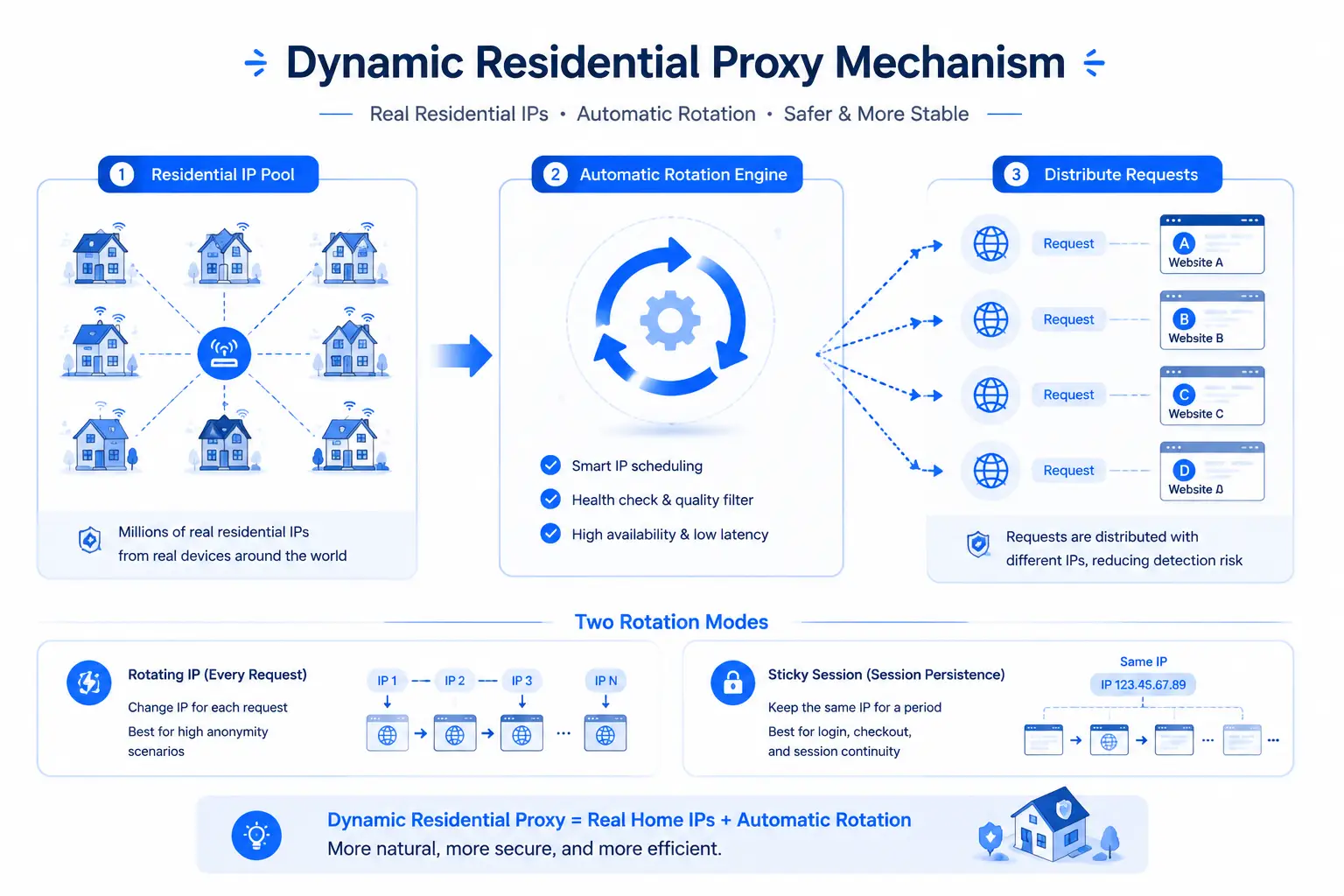
A rotating residential proxy (Rotating Residential Proxy) is made of two parts (the concept of IP "origins" is fully broken down in Residential vs. Datacenter IPs; here we focus on what's unique to rotating residential):
Combined, rotating residential proxies are characterized by IPs that are always "clean" (residential origin) and "changing" (automatic rotation). They are essentially designed for "anonymous, high-volume, distributed" operations — making every request look like it comes from a different real user.
One common confusion to clear up: "rotating residential" and "dynamic IP" are NOT the same thing. A dynamic IP is any IP that changes automatically (it can be datacenter); rotating residential specifically means the full "residential origin + rotation" package — the most expensive, most "human-like" tier of dynamic IPs (the full static vs. dynamic comparison is in Static IP vs. Dynamic IP).
Both are "residential IPs", but rotating and static follow completely different usage logic:
One sentence to remember the difference: static residential is "one person using one address long-term"; rotating residential is "a crowd sharing one big pool" — one seeks stability, the other seeks distribution.
This difference means they can't replace each other: using rotating residential for account login means your account's IP keeps changing, and the platform will flag "abnormal login / login environment changing too frequently"; using static residential for scraping means sending massive repetitive requests from a "real-person IP", which also gets flagged easily. Use the wrong scenario, and the expensive option is worse than the cheap one.
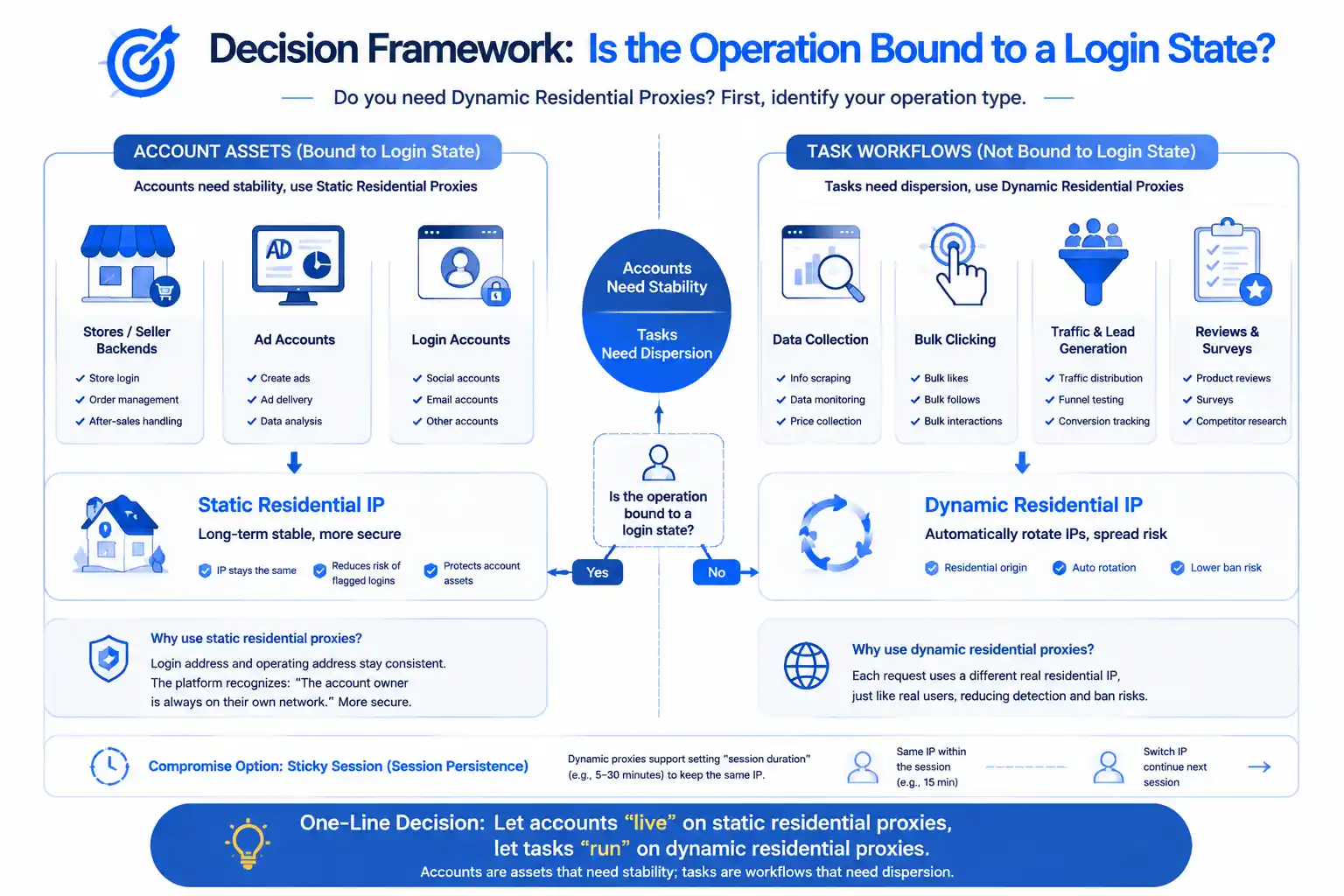
Multi-account operations cover many scenarios. To decide whether to use rotating residential, keep one thread in mind: whether the operation is tied to a login state — the deeper the login-state binding, the more you should avoid rotating residential.
One-sentence decision: let accounts "live" on static residential, let tasks "run" on rotating residential — accounts are assets that need stability, tasks are flows that need distribution; mixing them up leads to trouble either way.
Even with the right scenario, rotating residential has its traps:
Behind all four pitfalls is one logic: rotating residential is a dedicated tool for "high-traffic, low-identity" scenarios — used in the wrong scenario (login, real-time, high-value operations), it's both the expensive choice and the bad choice.
Once you've decided to use rotating residential, evaluate providers on 5 checkpoints:
When selecting, verify with a fingerprint browser: bind the rotating residential proxy to a test environment in MasBrowser, run a fingerprint check + open the target site to see whether the IP region matches and whether it's flagged — validate before batch use (the concrete steps for configuring proxies in MasBrowser are fully covered in Fingerprint Browser Proxy Setup Guide; no need to repeat them here). After binding, you can also test connectivity in one click, making environment self-checks easy.
No. The core needs of multi-account operations are "anti-association + stability", and the default should be static residential (account login, stores, ad accounts); rotating residential is for "non-login" tasks (scraping, clicking, traffic testing, product testing). Using rotating residential for account operations actually makes risk control more likely — frequent IP changes are themselves an "abnormal login" signal.
Rotating residential is usually more expensive (billed by traffic, high volume = high cost; static residential is monthly rent per IP). But "expensive" doesn't equal "better" — whether to spend more or less depends on the scenario: account operations use static residential (you pay for stability), task scraping uses rotating residential (you pay for distribution); the "expensive" spent on the wrong scenario is waste.
It depends. "Browsing-type" nurturing (watching videos, viewing content, following — no login or rare login) can use rotating residential + sticky sessions; "login-type" nurturing (logging in to operate accounts, posting content) should NEVER use rotating residential — the IP changes at every login, which is actively triggering "abnormal login" verification. Nurturing needs stability, so use static residential.
It depends on the task type: pure scraping (fetching pages, crawling data) can use high-frequency rotation (a new IP per request); tasks needing consecutive operations (multiple requests within one session) use sticky sessions, keeping an IP for 5-30 minutes before rotating. There's no "optimal frequency", only a "frequency that matches the task".
Three-step verification: ① check IP purity commitments (do they clean flagged IPs); ② small batch test — buy the smallest plan, run 50-100 requests, check success rate, latency, and IP region distribution; ③ bind a test environment in a fingerprint browser, run a fingerprint check + visit target sites, confirm the IP isn't flagged and the region matches — use at full scale only after verification passes.
A rotating residential proxy is "residential origins + automatic rotation" combined — a weapon for task scenarios and a pitfall for account scenarios: right scenario, efficiency; wrong scenario, risk.
Remember three decision lines: accounts need stability → static residential; tasks need distribution → rotating residential; login-state-bound operations → never use rotating IPs. First classify what in your business is "account assets" (stores, ads, login accounts) and what is "task flows" (scraping, clicking, traffic testing), then decide whether to buy rotating residential.
Rotating residential is not a "standard part" of multi-account operations — it's a "scenario-specific part". With 2 free environments, validate your proxy plan in MasBrowser's test environment first (bind → test connectivity → fingerprint check), and only pay once the solution fits your business — Download MasBrowser and get your proxy plan validated.


