
MasBrowser
Customer supportLoading messages…
Loading messages…
You are viewing a previous conversation.
Enter to send · Shift + Enter for a new line
Loading messages…
You are viewing a previous conversation.
Enter to send · Shift + Enter for a new line
If you run a social media matrix, you have probably experienced this kind of "setback": the new account you carefully registered shows "Your account has been locked" the next day, asking you to upload a photo to verify your identity; or you nurture the account for a week, and just as you are about to start posting, you find it has been banned.
Facebook's bans never show mercy, especially with new accounts — the first few weeks are the highest-risk period, and one wrong move wipes out everything before it.
This article explains Facebook account nurturing and ban prevention thoroughly: why the platform loves to ban new accounts, which registration details decide life and death, how to nurture during the cold start period, which actions trigger bans instantly, and how to nurture accounts in bulk without association.
In one sentence: new accounts have no "trust accumulation", and any abnormal behavior is magnified — Facebook's risk control tolerance for new accounts is far lower than for old ones.
New accounts look inherently "suspicious" in the platform's eyes: no friends, no interactions, no history — the only thing that proves "you are a real user" is normal behavior accumulated slowly. The risk control system evaluates new accounts on several dimensions:
Many beginners treat Facebook like a domestic social app — on the day of registration they add dozens of friends and join groups to post ads, then get asked to verify the next day. It is not bad luck; the behavior rhythm gave them away.
The registration stage is where landmines are most easily buried. Pay attention to these points:
Registration is not "done once the form is filled out" — it is the first step of nurturing. Environment, profile, and rhythm all need to be in place.
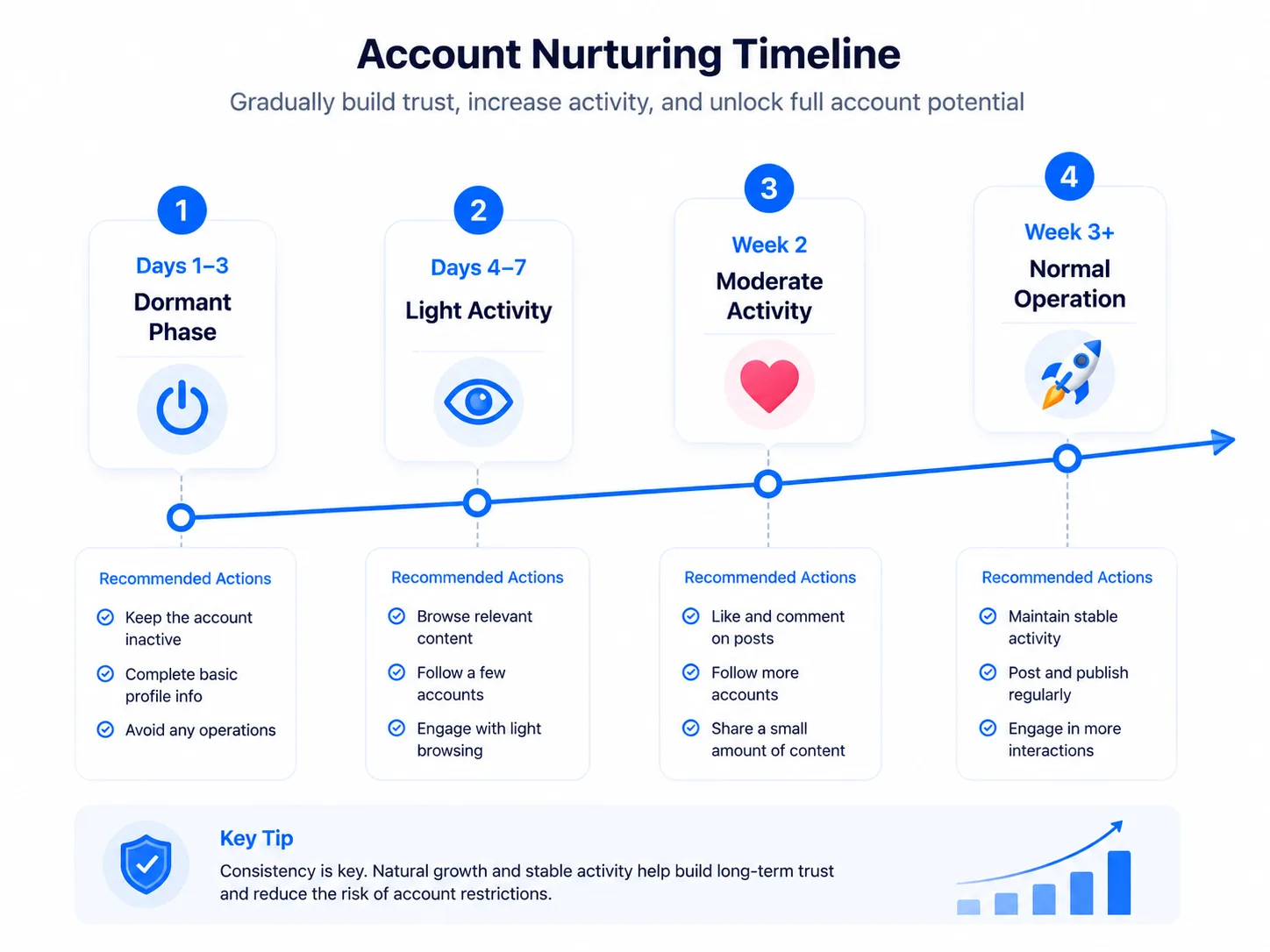
The core of nurturing is making the account's behavior rhythm look like a real person — move step by step, do not skip levels. You can refer to this ladder (adjust the rhythm to your account's purpose):
The key to this timeline is every action should "take small steps" — jumping from 0 to 100 in activity is the most typical signal risk control recognizes.
Facebook account nurturing ladder diagram
Even after surviving the cold start period, these actions can still "flip" your account:
Remember: Facebook's risk control is not about "whether you violated the rules" but "whether your behavior looks like a real person". Anything that does not look like a real person is a risk.
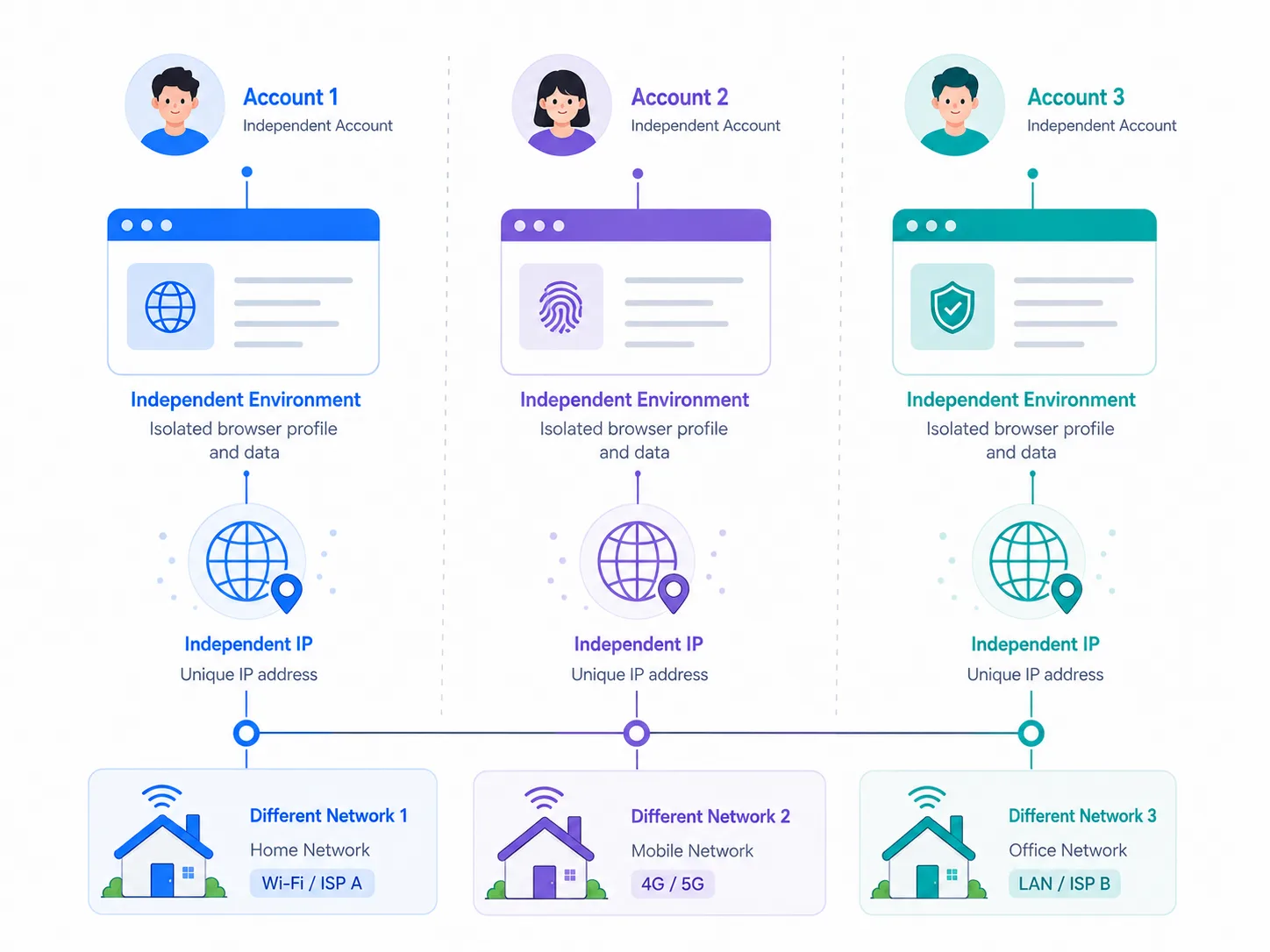
To build a matrix, isolation between accounts is the bottom line: one account = one isolated environment + one dedicated IP, with no crossover. Using MasBrowser as an example, each environment independently configures fingerprints (UA, Canvas, WebGL, WebRTC, etc., with a full breakdown of fingerprint composition in this what is browser fingerprinting guide) and a proxy IP, so accounts are completely isolated from device to network, and the platform cannot tell "they are in the same gang".
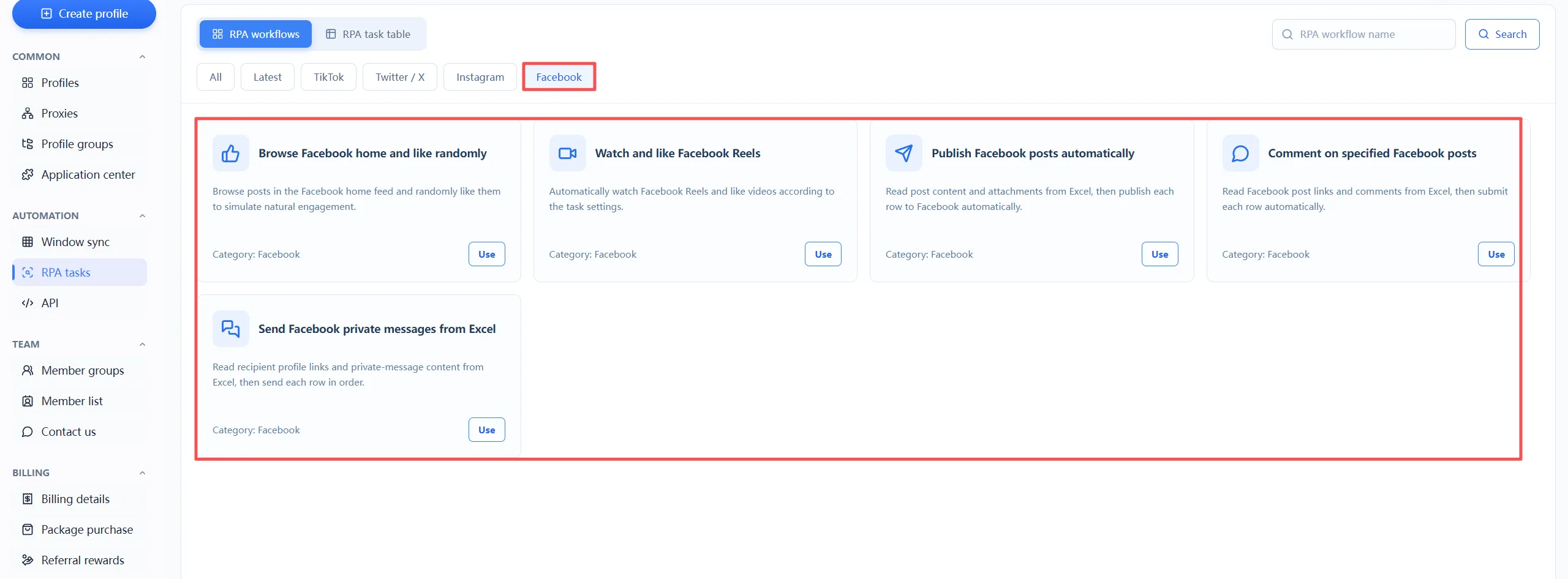
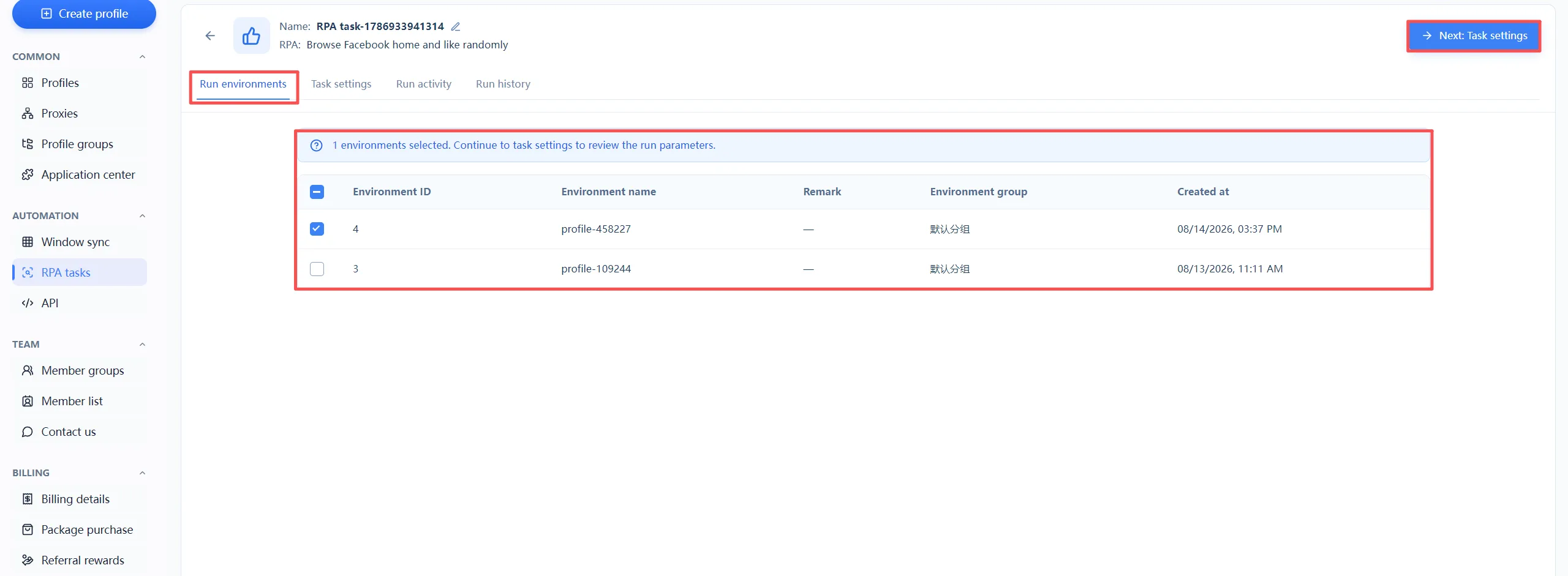
 Even more convenient, MasBrowser's RPA flow library includes dedicated Facebook nurturing templates — FB home feed browsing with random likes, video browsing with likes, auto mutual-like posts, commenting on specified posts, and auto mass DMs. The repetitive "browse-like-comment" actions during the nurturing period can be handed to RPA to execute automatically at the right rhythm, simulating real human behavior while saving a huge amount of manual time. For complete isolated environment and fingerprint configuration, see the MasBrowser multi-account security management page.
Specific steps for RPA nurturing:
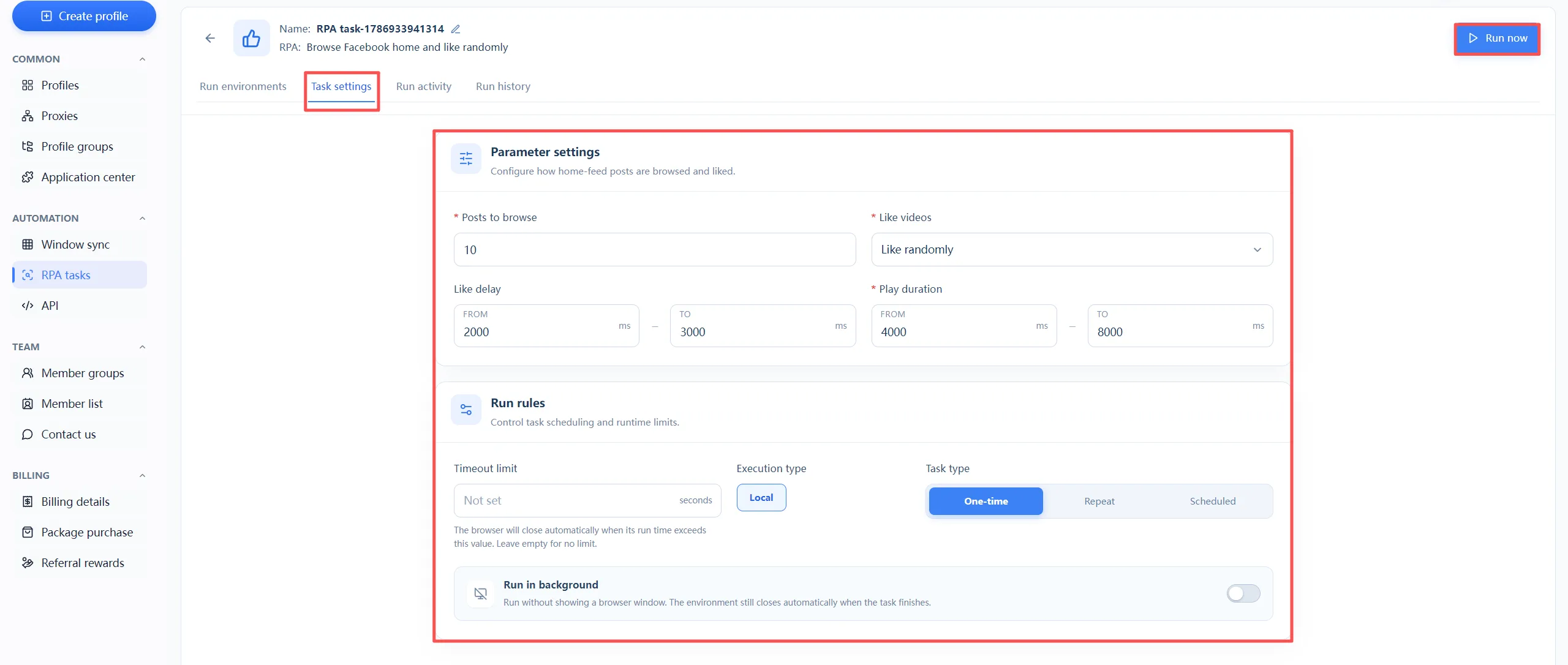
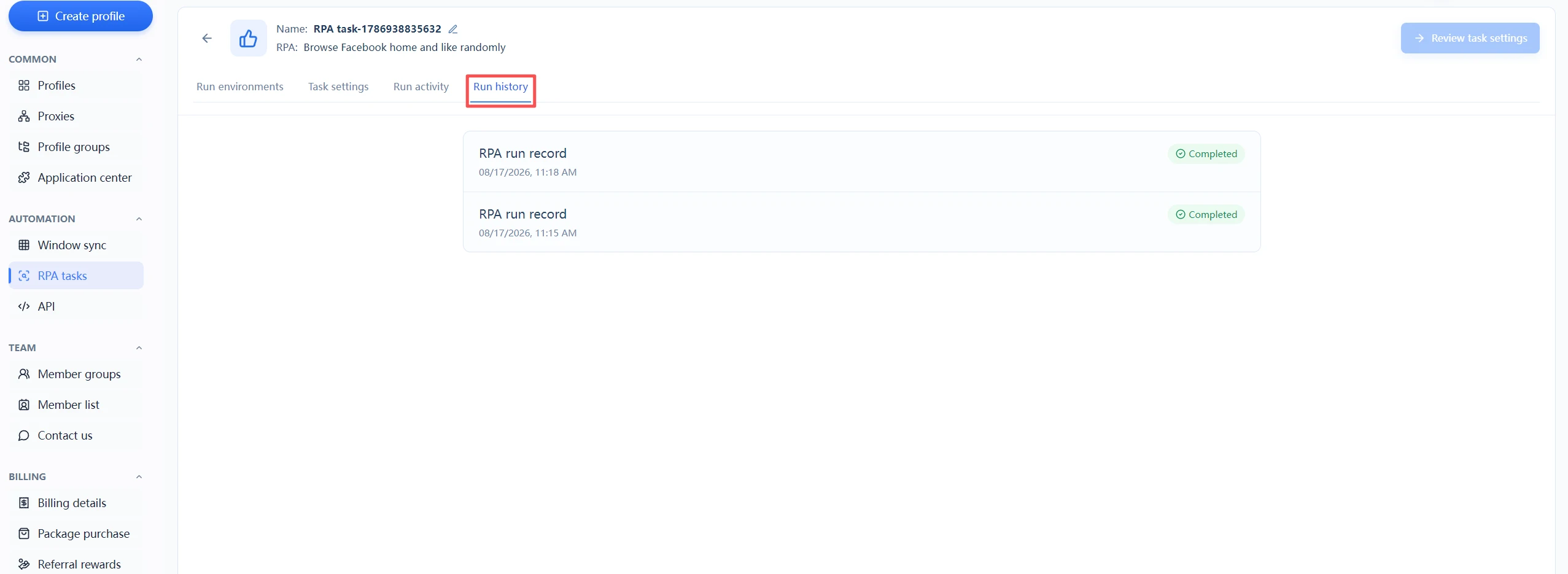
If your account is locked or banned, do not panic. Handle it in order:
Rather than waiting until you are banned and then appealing, it is better to get the environment, profile, and rhythm right from day one of registration — appealing is a remedy, nurturing is prevention.
Generally at least 2-3 weeks is recommended — wait until the account has some friends and interaction accumulation before starting normal operation. Accounts that rush to post content are the easiest to be flagged as marketing accounts during the cold start period.
If you are registering one account normally with your own real identity, that is fine; but if you operate multiple accounts, a home IP becomes dangerous — when the platform sees "multiple accounts under one IP", association is confirmed directly. For multiple accounts, definitely use one IP per account.
For a single account, a normal browser is fine; but when building a matrix and needing isolation between multiple accounts, a fingerprint browser is a must — it gives each account an independent device identity and avoids association at the root.
Normally only one. To register more, you need different phone numbers, and both the phone numbers and accounts should ideally be "clean" — never banned and never linked to other accounts.
There is no shortcut to Facebook nurturing. The core comes down to three things: a clean environment, real profile info, and human-like rhythm. Set up the environment properly at registration, take small steps during the cold start period, and avoid "not-like-a-real-person" operations in daily use — and your account's chance of surviving rises significantly.
If you are building a matrix, isolation is the bottom line — one account, one environment, one IP, combined with RPA to automate repetitive actions. The free plan already includes 2 environment quotas. Download MasBrowser, create one environment to nurture your Facebook account, run through the process, then scale up.


