
MasBrowser
Customer supportLoading messages…
Loading messages…
You are viewing a previous conversation.
Enter to send · Shift + Enter for a new line
Loading messages…
You are viewing a previous conversation.
Enter to send · Shift + Enter for a new line
If you sell on Amazon, you have probably heard this kind of "overnight zero" story: a seller who had been running a store for two years suddenly receives an email — "Your account has been deactivated" — because the platform detected association with another account. What is more devastating is that the second store linked to the same registration details also goes down, and the money in the account is stuck in the review process.
Amazon's "association" is different from other platforms: once it is confirmed, it is collective punishment — all associated accounts are dealt with together, and the appeal success rate is extremely low.
This article explains Amazon multi-account anti-association thoroughly: what the platform relies on to determine association, what the correct architecture for multiple stores looks like, how to build a second store from scratch, and the 5 pitfalls sellers fall into most easily.
In one sentence: on other platforms, association may only get you throttled or downranked; on Amazon, association gets your store banned directly — and all associated accounts are banned together, with your funds locked in.
The root lies in Amazon's seller policy: according to the official rules, the same entity (same identity/company) is in principle only allowed to register one seller account, and exceptions can be requested only in very few compliant cases — such as multiple brands operating independently, or supplying for different companies, scenarios with real business support. The platform treats "one person, multiple accounts" as a violation in itself — so it is not just preventing "abnormal operations" but directly preventing "multiple accounts existing".
The consequences stack up on three levels:
That is also why sellers running multiple Amazon stores treat anti-association as a "red line" — unlike other platforms, there is no room for trial and error.
Amazon's association criteria are among the most comprehensive of any mainstream platform — from devices to funds, not a single thread is left unchecked.
Each item alone may seem "excusable", but Amazon's risk control uses multi-factor cross-scoring — the more overlapping items, the higher the probability of an association finding. That is why the crude "just change the IP" trick is completely useless against Amazon.
Remember one sentence: one store = one isolated environment + one dedicated IP + one separate payout + one separate set of registration info — all four are indispensable.
Let us break down the four elements:
The core logic of this architecture is: make the "person" the platform sees completely independent — different device, network, funds, and identity, with no intersection on any of the four levels, so association simply does not exist at the root.
Using MasBrowser as an example, the complete process has five steps:
store2-us); in the account binding field, click "Add Account" and leave it empty for now (Image 3: MasBrowser environment management page, list of multiple store environments).
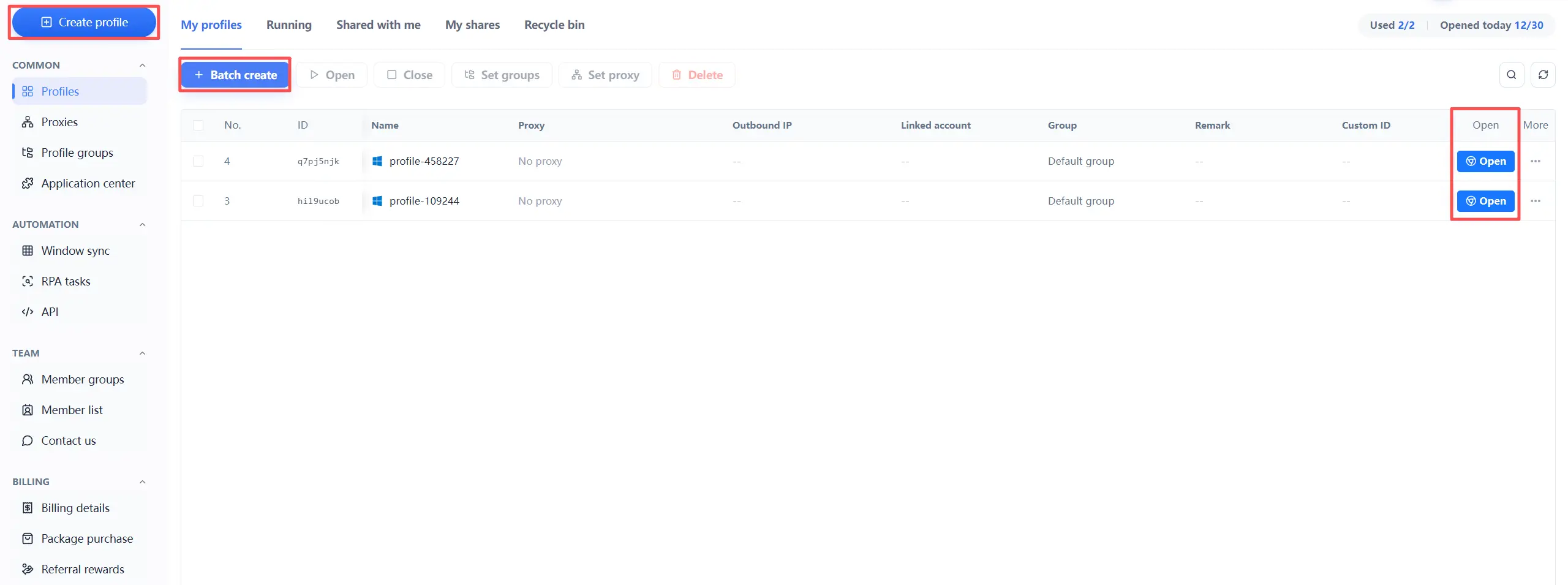
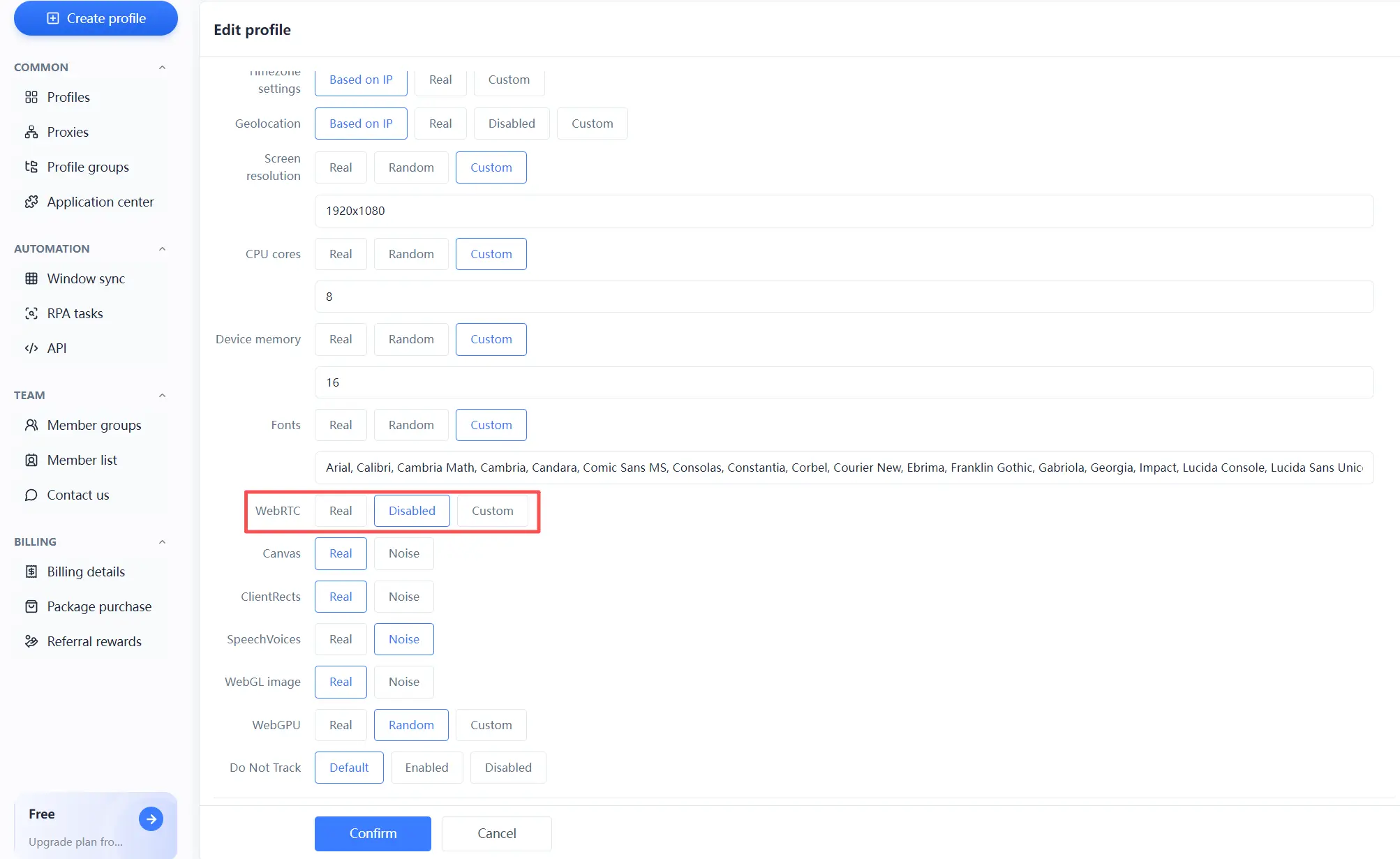
Every step carries out the "four-element isolation". Once this process works, adding a third or fourth store is just repeating the same actions. For complete isolated environment and fingerprint configuration, see the MasBrowser multi-account security management page.
Once you have more stores, efficiency matters too: MasBrowser's window sync lets you batch operations in the main window while other environments follow along — no more switching windows one by one. RPA automation suits repetitive actions on social platforms (the flow library includes built-in account-warming and publishing templates for TikTok, Facebook, and other common platforms). Anti-association and efficiency do not conflict — with isolation done right, batch operations become safer and more effortless.
Even if the architecture is right, these details can undo all your work:
Remember: anti-association is a full-chain effort — miss one link, and all the isolation before it counts for nothing.
Most likely, yes. Association is a high-risk violation on Amazon. Once determined, the minimum outcome is removal of selling privileges, and at worst, all associated accounts are taken down together. That is why every seller treats it as a red line.
Not enough. IP is only one dimension of Amazon's association determination — any overlap in device fingerprint, payout, or registration info can trigger it. Only changing the IP treats the symptom; four-element isolation is the real solution.
Per Amazon's policy, the same entity can in principle only have one seller account. Multiple accounts must meet the compliant circumstances defined by the official rules and go through an application process; otherwise, it is a violation risk. Before expanding to multiple stores, make sure your situation is compliant.
Yes, but only if each store's environment is fully isolated. Opening two stores in a normal browser on the same computer mixes fingerprints, cookies, and IPs — that is proactively exposing association. Only by creating an isolated environment for each store with a fingerprint browser can you claim "safe multi-store operation on the same computer".
The EU sites have KYC verification (company and bank information checks), while North America focuses more on tax information — but the core anti-association logic is the same: four-element isolation applies universally. During EU KYC, consistency requirements for payout accounts and company details are stricter, so be extra careful.
Amazon association is a "veto-level" risk: once confirmed, all associated accounts are handled together and funds get frozen. To operate multiple stores safely, the core comes down to one sentence — make every store completely independent from device, network, funds, to identity.
This architecture is not complicated; the hard part is full-chain execution. The free plan already includes 2 environment quotas. Download MasBrowser, create two environments to run through the "one store, one environment, one IP, one payout" flow, then decide whether to scale — this step determines how solid the foundation of your multi-store business is.


