
MasBrowser
Customer supportLoading messages…
Loading messages…
You are viewing a previous conversation.
Enter to send · Shift + Enter for a new line
Loading messages…
You are viewing a previous conversation.
Enter to send · Shift + Enter for a new line
Anyone running multiple accounts has probably felt this frustration: Whoer scores near-perfect, IP, DNS and WebRTC are all green — and the account gets banned anyway. What went wrong? You may be missing a harsher test — CreepJS.
Unlike regular detection tools, CreepJS doesn't "score and rank" fingerprints; it does one thing: verifies whether your browser is "lying". This article explains why it's called one of the harshest fingerprint detectors, how to read its results, and where it belongs in your verification flow.
Fingerprint detection tools come in two schools (a full tool roundup with comparisons is in the Fingerprint Detection Tools Guide; here we focus on the layer difference):
To put it plainly: regular tools are like medical checkups (measuring blood pressure and temperature), while CreepJS is like a polygraph (listening for contradictions in what you say). Someone who passes every checkup can still be caught by a polygraph — that's why "Whoer full score still gets banned": in platform risk-control logic, beyond parameters, they check whether parameters are trustworthy.
CreepJS's most famous capability is Lies detection — specifically identifying whether native browser APIs have been tampered with by scripts. The principle in plain language:
toString() checks (a native function's toString should return function xxx() { [native code] }; wrapped ones expose custom code); ② abnormal call behavior (e.g., calling the same collection function twice in a row yields inconsistent outputs, meaning it was intercepted in between).For multi-account operators this information is enormously valuable: platform risk control uses exactly this kind of detection logic — the more "lies" in an environment, the more easily its user gets identified as a fingerprint browser user. A perfect score on ordinary tools only means parameters are complete; the Lies count shows disguise quality.
Beyond Lies, CreepJS has several angles nobody else covers (all centered on "authenticity"):
The common thread across these dimensions: not checking whether a value is right, but whether the whole environment "is a genuine browser" — a capability Whoer/BrowserScan don't cover at all.
Visit the CreepJS page and wait for detection to finish (the first run takes tens of seconds; it runs heavy cross-validation in the background), then watch three spots (specific layout follows the actual page):
An important reminder: CreepJS is extremely strict — nobody gets a "perfect report" from it — even excellent fingerprint browsers expose some modification traces. So don't chase "zero Lies"; use it as a comparison tool: compare multiple environments on the same machine, before-and-after comparisons — the environment with fewer Lies is the better environment.
This is the key question: detection found Lies in your environment, what next? Direct conclusion — mature fingerprint browsers like MasBrowser can mitigate and reduce them, but no one can promise zero. The reason is simple: CreepJS and fingerprint browsers are in constant back-and-forth — detectors keep finding new tamper traces (new probe methods), defenders keep improving injection so traces hide better; this isn't a match of "who wins eventually", but whose version iteration keeps up.
On the practical side, do four things by priority:
Note the final layer: after each config change, rerun CreepJS for a before-after comparison — confirm the change actually improved things, not that it "feels better". Data speaks louder than any trick.
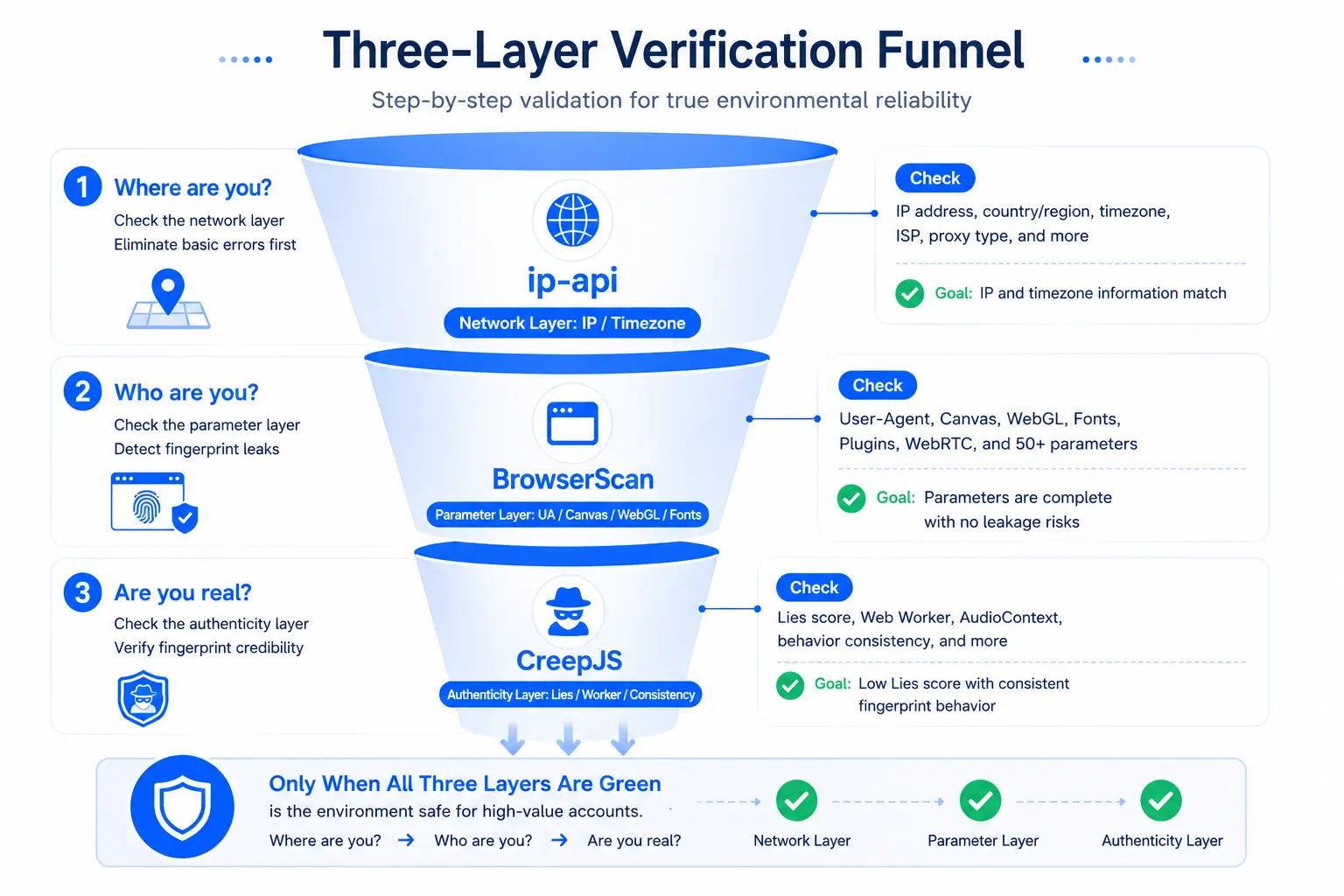
Where should CreepJS go in the verification flow? Recommended ordering (the first two layers have detailed flows in the "ip-api + BrowserScan dual-tool test" section of How to Verify Isolation):
The three layers map to "where you are → who you are → whether you're real" — only when all three layers are green dare you put high-value accounts in this environment. Teams building environments at scale can turn this funnel into an SOP: run three steps before each new environment goes live; logging into accounts is step four.
Yes. CreepJS is an open-source project; the web version is free, no registration needed — which is why many people don't know it but everyone who tries it says it's brutal: it has zero commercial motive to give you "pretty" scores.
Totally normal — almost all fingerprint browsers leave API modification traces somewhere; a target of exactly zero is neither realistic nor necessary. The right approach is using CreepJS as a comparison baseline: if environment A's Lies are fewer than B's, log more valuable accounts into A.
It doesn't directly conclude "you're using XX browser", but the Lies details it exposes (which APIs were changed, how) do indirectly reflect the implementation quality of the product you use — which is why some vendors care about their products' performance on CreepJS.
Follow the four steps above under "Found Lies, now what": upgrade to latest → compare configs for the best one → tier high-value accounts → feed details back to the vendor. Also, don't over-worry: Lies are universal across fingerprint browsers — your competitors have them too. Aim to be cleaner than competitors, not zero.
No — they complement each other. Whoer-type tools are fast (seconds), cover network-layer items like IP/DNS/WebRTC, good for daily quick checks; CreepJS is slow but deep (tens of seconds per run), suited for deep checks before critical environments go live. Use Whoer daily, add CreepJS at key checkpoints — both layers are cheap.
Always download from your fingerprint browser's official site — installers from third-party sites or file-sharing links carry bundled plugins or repackaging risks; once installed, however many tests you run won't help. Verify the official domain spelling before downloading (phishing sites often mimic official sites); if antivirus alerts after installation or the UI looks odd, stop immediately and re-download the genuine version from the official site.
CreepJS fills the hardest and most important gap in the fingerprint verification system: parameters can look pretty, but cracks hide in details — Lies detection, Worker cross-verification, engine trait checks, pressing layer by layer on "are you real".
Adding it to your verification flow costs little: ip-api for network, BrowserScan for parameters, CreepJS for authenticity — the three-layer funnel takes minutes and buys the confidence "high-value accounts can go in here". Remember the key mindset shift: don't chase zero cracks; use comparisons to make environments better and better.
The free plan's 2 environments make perfect comparison experiments: build two, run the three-layer funnel on each, see which has fewer Lies — download MasBrowser from the official website, and start auditing your environments with a "polygraph" today.


