
MasBrowser
Customer supportLoading messages…
Loading messages…
You are viewing a previous conversation.
Enter to send · Shift + Enter for a new line
Loading messages…
You are viewing a previous conversation.
Enter to send · Shift + Enter for a new line
"Which fingerprint browser is the best in 2026?" — almost everyone running multiple accounts has searched this question, then got even more confused by all the rankings: one says A is #1, another says B is the strongest, the parameter tables are dense, and after reading them you still don't know which to pick.
Honestly: there is no "absolute #1" fingerprint browser — only "what fits you". The rankings change with ad campaigns and version updates, but your business needs don't change.
This article skips the "1st to 10th place" ranking and gives you a more practical approach: first understand the 5 judging dimensions, then look at the positioning of 10 mainstream tools, and finally match yourself by scenario — plus how to verify whether a ranking is trustworthy yourself.
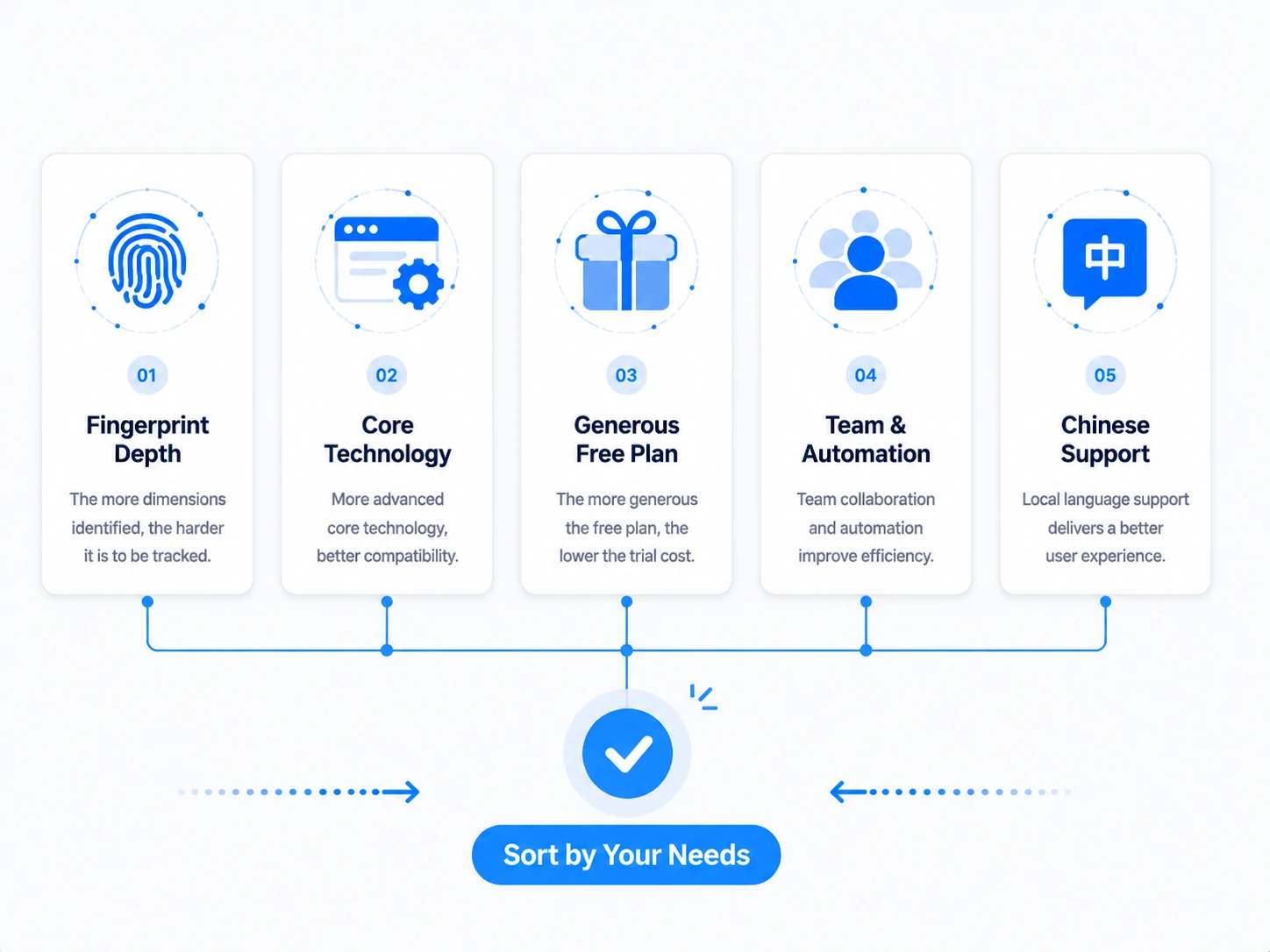
To judge whether a fingerprint browser is good, 5 dimensions are enough: fingerprint depth, engine, free quota, team & automation, and Chinese support. Rankings change, but comparing by these 5 criteria won't lead you wrong.
Rank these 5 by your business first, then look at tools — far more reliable than directly checking "who's #1".
5-dimension selection framework diagram
There are dozens of active fingerprint browsers on the market; here are 10 representative ones, quickly reviewed by "who it fits" — no parameter dumps, just positioning differences.
| Product | One-line positioning | Best for |
|---|---|---|
| MasBrowser | Enterprise-grade multi-account security operations, environment virtualization + 20+ fingerprint parameters + RPA/window sync | Cross-border e-commerce, social media matrix, ad campaigns, team collaboration |
| AdsPower | Large user base, comprehensive features, dual-engine + built-in proxy resources | Teams with comprehensive needs, Chinese support and automation |
| Multilogin | Veteran product, fingerprint precision widely regarded as top tier, dual-engine | Strict risk-control platforms, heavy users with ample budget |
| GoLogin | Cloud-first, clean interface, profiles stored in the cloud | Individual users, remote work, cross-device use |
| Dolphin Anty | Strong scenario automation, affiliate-friendly | Affiliate marketing, Facebook ad campaigns |
| Incogniton | Cookie robot and other automation, solid team collaboration | Small teams needing automated nurturing |
| BitBrowser | Dual-engine, generous free quota, domestic team | Domestic users, budget-sensitive, batch operations |
| Ziniao Browser | Cross-border e-commerce ecosystem, store management + IP bundled | Amazon and other e-commerce multi-store sellers |
| Octo Browser | Kernel-level camouflage, fast, European team | Professional users with high anti-detection requirements |
| Kameleo | Veteran, local install, multi-engine support | Users who value local deployment and data control |
Two notes: first, prices and free quotas change often; check the official sites for details — no hard numbers here; second, the nuance of rankings — each of the above has its strengths, some win on fingerprint precision, some on automation, some on the Chinese ecosystem; none dominates all.
The overview only narrows candidates; decisions need hard metrics — put the core dimensions of all 10 in one table and the differences become obvious.
| Product | Free quota | Engine | Fingerprint coverage | Automation | Chinese support |
|---|---|---|---|---|---|
| MasBrowser | 2 environments (permanent) | Chromium private kernel | 20+ parameters (incl. WebGPU/WebRTC etc.) | RPA + window sync + API | Yes |
| AdsPower | 2 environments (permanent) | Chrome + Firefox dual-engine | Comprehensive (incl. audio/hardware acceleration etc.) | RPA + window sync + Local API | Yes |
| Multilogin | 5 environments (trial) | Mimic + Stealthfox dual-engine | Top-tier precision | RPA + API | No |
| GoLogin | 3 environments (7-day trial) | Chromium (Orbita) | Basic items complete | AI Assistant + API | No |
| Dolphin Anty | 5 environments (permanent) | Chromium | Basic items complete | Scenario automation + window sync | No |
| Incogniton | 3 after trial | Chromium | Basic items complete | Cookie robot + team collaboration | No |
| BitBrowser | 10 environments (limited daily opens) | Chrome + Firefox dual-engine | Basic items complete | RPA + extension marketplace | Yes |
| Ziniao Browser | Gift voucher on registration | Chromium | E-commerce scenario optimized | Store tool ecosystem | Yes |
| Octo Browser | No free plan | Chromium | Kernel-level camouflage | API + quick sync | No |
| Kameleo | Trial | Multi-engine (Chrome/Firefox etc.) | Local install deep camouflage | API | No |
Reading this table, a few signals are worth noting:
Budget sets the floor, needs set the ceiling — narrow the range by your budget tier, then compare features within the tier.
Free tier ($0): use free quotas to validate the workflow first. MasBrowser, AdsPower, and Dolphin Anty all have permanent free quotas; GoLogin and BitBrowser are also generous. The goal at this stage isn't "long-term use" but "running the validation" — create two environments, configure fingerprints, bind proxies, and test with detection tools
Value tier (tens of dollars per month): the main range for teams with 10-50 accounts. The comparison is "per-environment cost + automation capability" — how many environments the same money opens, whether RPA and window sync are free, whether team collaboration costs extra. MasBrowser, AdsPower, and BitBrowser are competitive in this range — check the latest official plans for details.
Premium tier (hundreds of dollars per month and up): professional teams with hundreds or thousands of accounts, or extremely high fingerprint-precision requirements. Multilogin and Octo Browser represent this class — fingerprint precision and anti-detection strength are the selling points, but so is the price. Worth it when the budget is ample and the business is asset-heavy; otherwise the value tier is fully sufficient.
Budget tier diagram
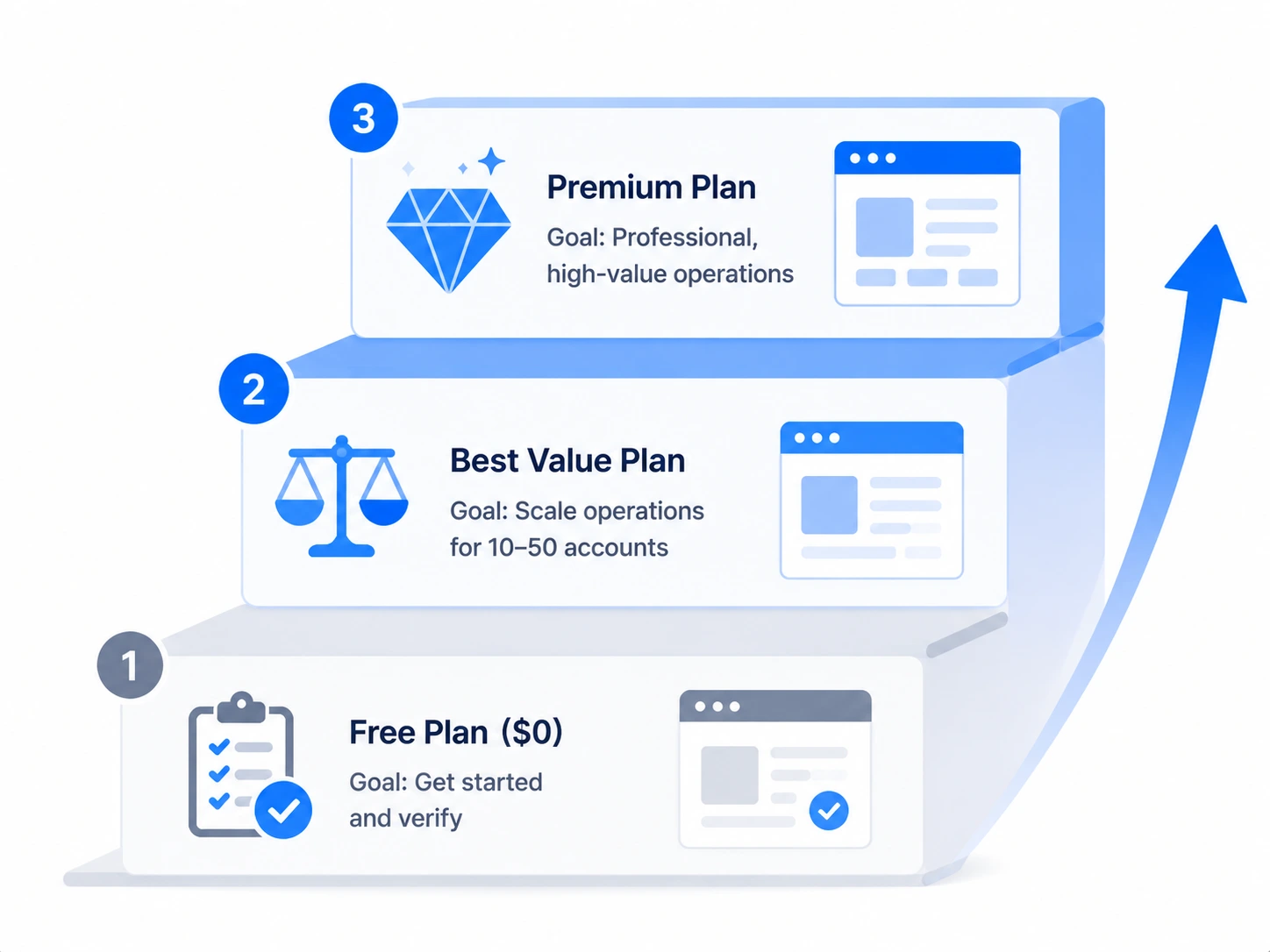
In one sentence: validate on the free tier first, move to the value tier by account scale, and only asset-heavy professional scenarios need the premium tier.
Don't ask "which is the best"; ask "what does my scenario need" — match these 4 categories and the choice set shrinks instantly.
Scenario card 1: Cross-border e-commerce multi-store
Store accounts are high-value and strictly risk-controlled; fingerprint depth and team collaboration matter most. Operating multiple stores on one device makes environment isolation the baseline (the full framework of one store, one environment, one IP is in Cross-Border E-commerce Multi-Account Anti-Association). Prioritize: products with complete fingerprint parameters, Chinese support, environment grouping and permission management — MasBrowser, AdsPower, and Ziniao all sit in this range.
Scenario card 2: Social media matrix nurturing
Many accounts, repetitive operations; automation and isolation efficiency matter most. Whether the repetitive "browse-like-comment" actions during nurturing can be handed to RPA, and whether multiple accounts can sync windows, directly determines people-efficiency. Prioritize: products with mature RPA/window sync and enough free quota to validate — MasBrowser, Dolphin Anty, and Incogniton each have their strengths.
Scenario card 3: Ad campaigns
Ad accounts are most sensitive to "environment authenticity"; fingerprint consistency and IP quality determine account survival. Prioritize: products with high fingerprint precision and timely engine updates — Multilogin is the veteran choice here; budget-sensitive teams can also validate with free quotas first.
Scenario card 4: Individual / small team starting out
Limited budget, running the workflow first; free quota is the first filter. Prioritize: products with enough free environments and low onboarding barriers — GoLogin and BitBrowser are generous with free quotas, and MasBrowser's free plan also includes 2 environment slots, enough to validate the full workflow.
However good a ranking is, it's only a first filter — the last step is always testing it yourself: create two free environments and run the full flow before deciding to pay.
Using MasBrowser as an example, you can verify the judging criteria above: create 2 environments on the free plan, check in fingerprint settings whether Canvas, WebGL, WebGPU, WebRTC, and other parameters can truly be configured independently; create two environments binding different proxies, launch, and compare fingerprints and IPs with detection tools. Experiencing it for real once beats reading ten rankings.
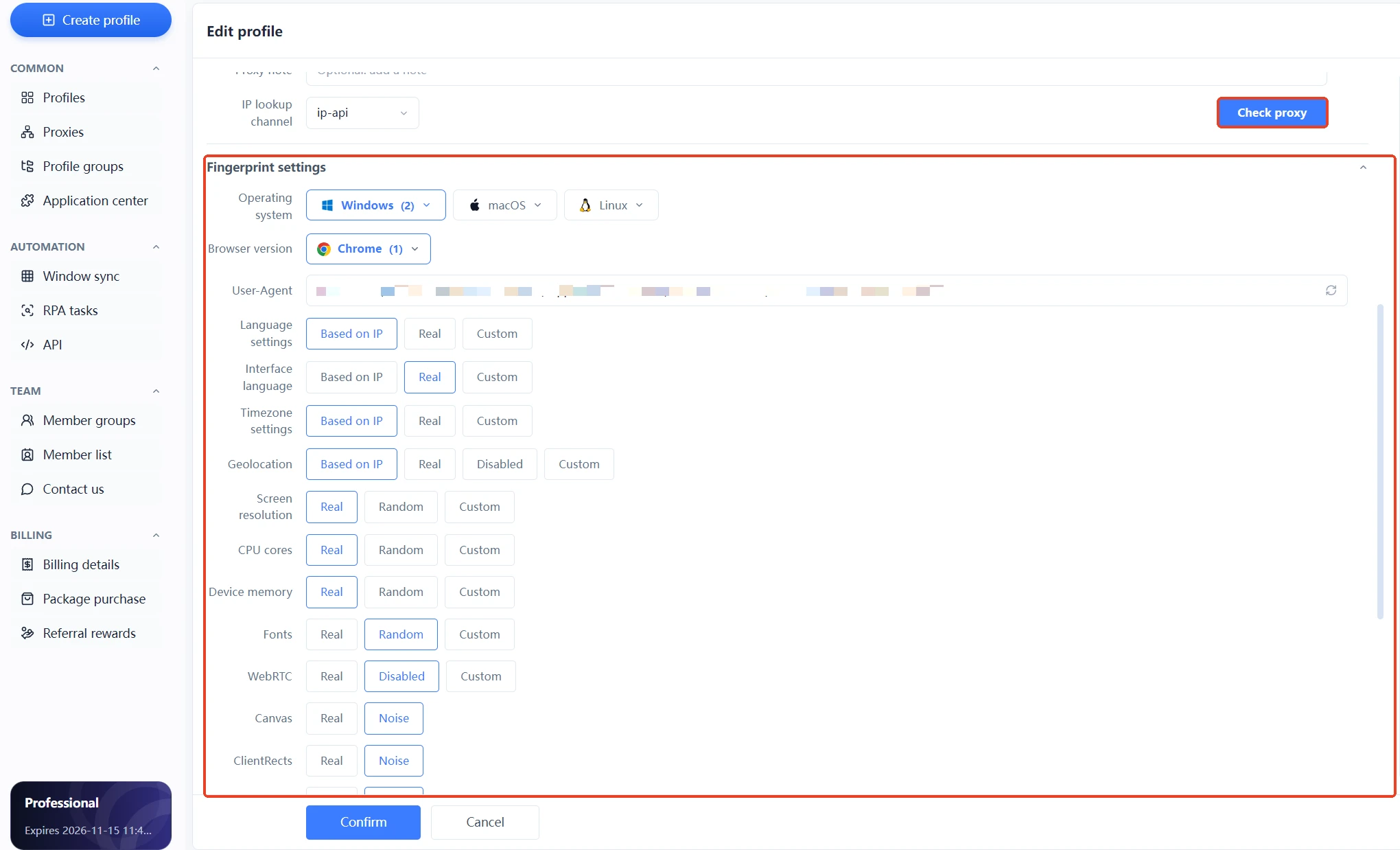 There is no god in the fingerprint browser market — the one that fits your business and passes real testing is your "#1". For complete independent environments and fingerprint isolation configuration, see the MasBrowser multi-account security management page.
Use them as reference, but don't fully trust them. Rankings are heavily influenced by ad campaigns and product updates, and "composite #1" doesn't equal "fits you". The right use: find a candidate list from rankings → filter by the 5 dimensions → verify by your own testing.
Depends on the stage. For validating the workflow and running 1-2 accounts, the free plan is fully sufficient; for formal scaled operations (dozens or hundreds of accounts), you'll need a paid quota. Validating on free first, then upgrading, is the most economical path.
Not absolute, but it covers more ground. Some platforms detect certain engines more strictly, and dual-engine (Chrome + Firefox) adds a path. Still, for most scenarios, a single-engine product with timely updates is enough — the timeliness of engine updates matters more than the number of engines.
Official sites and third-party reviews can both lag or be biased. The most accurate method is testing yourself: create environments, configure fingerprints, and verify with detection tools. Real test results always beat descriptions.
No absolute winner; it depends on needs. Domestic products (MasBrowser, Ziniao, BitBrowser) win on Chinese interface, Chinese support, and fast onboarding — suitable for domestic teams and cross-border e-commerce scenarios; overseas products (Multilogin, Octo, Kameleo) have accumulated depth in fingerprint precision and anti-detection, suitable for professional scenarios with extremely strict risk-control requirements. Budget-sensitive or Chinese-first communication teams should pick domestic; only consider high-end overseas options if you pursue extreme anti-detection and can accept an English environment.
Fingerprint browser rankings come every year with different versions, but the selection logic stays the same: first sort out needs by the 5 dimensions, then narrow candidates among the 10 mainstream tools, and finally verify by your own testing. Don't be carried away by "#1" or hooked by free quotas — the one that fits your business and passes real testing is the best.
The free plan already includes 2 environment slots; download MasBrowser, create two environments per this article and run one round of real testing — let results, not rankings, do the talking.


