
MasBrowser
Customer supportLoading messages…
Loading messages…
You are viewing a previous conversation.
Enter to send · Shift + Enter for a new line
Loading messages…
You are viewing a previous conversation.
Enter to send · Shift + Enter for a new line
"There are free fingerprint browsers, why would I pay?" — many people new to multi-account operations think this way. And there really are stories of "running multiple accounts at zero cost". But on the other side, veteran players warn just as sharply: "The free version is bait; you'll upgrade sooner or later."
Both sides have a point, but neither is complete. Whether the free version is usable depends on what you use it for — verifying your workflow and running a small number of accounts, it's completely enough; expecting it to support a matrix of dozens or hundreds of accounts is asking too much.
This article explains the differences between free and paid versions thoroughly: which dimensions they differ on, the hidden limits of the free version, how to maximize free quota, and which signals mean it's time to upgrade.
Yes, but with boundaries — the free version is a "test flight zone", not a "main battlefield". It's best for three things: verifying your workflow, running small-scale accounts, and evaluating whether a product is worth paying for.
Using the free version for "real work" is legitimate:
But the free version can't support scale: environment limits are low, team collaboration is restricted, automation features usually require payment — once accounts grow, you hit the free version's ceiling immediately.
The judgment is simple: do your account count + collaboration needs exceed the free version's ceiling? If not, the free version is enough; if yes, don't tough it out — upgrading is worth it.
The difference is not "can it be used" but "how far it can be used" — mainly four dimensions: environment count, member count, feature permissions, and support.
| Dimension | Free version | Paid version |
|---|---|---|
| Environment count | Usually 2-10 (varies, see official sites) | Scales by plan, dozens to thousands |
| Member count | Usually 1 admin, no sub-accounts | Multi-member + permission tiers |
| Advanced features | RPA/window sync/API often limited or paid | Full feature access |
| Support | Community/docs mainly | Priority support / technical help |
| Stability commitment | Basic guarantee | Higher SLA / data security commitments |
Free quotas also vary in "generosity" (check official sites):
In one sentence: the free version is a "stripped-down tier" of the same product — core isolation capability is not reduced, but scaling capability (count, collaboration, automation) is restricted. When evaluating, don't just look at "how many environments they give" — also check "whether advanced features require separate payment" — that's the hidden cost of the free version.
Free quota isn't a trap, but there are a few hidden limits worth knowing in advance:
This isn't telling you to avoid the free version, but reminding you: the free version is an "entry point", not a "destination" — use it to verify and evaluate, don't treat it as a long-term production environment.
Using the MasBrowser free version (2 environment slots) as an example, run this flow and you'll have your answer on "whether to upgrade":

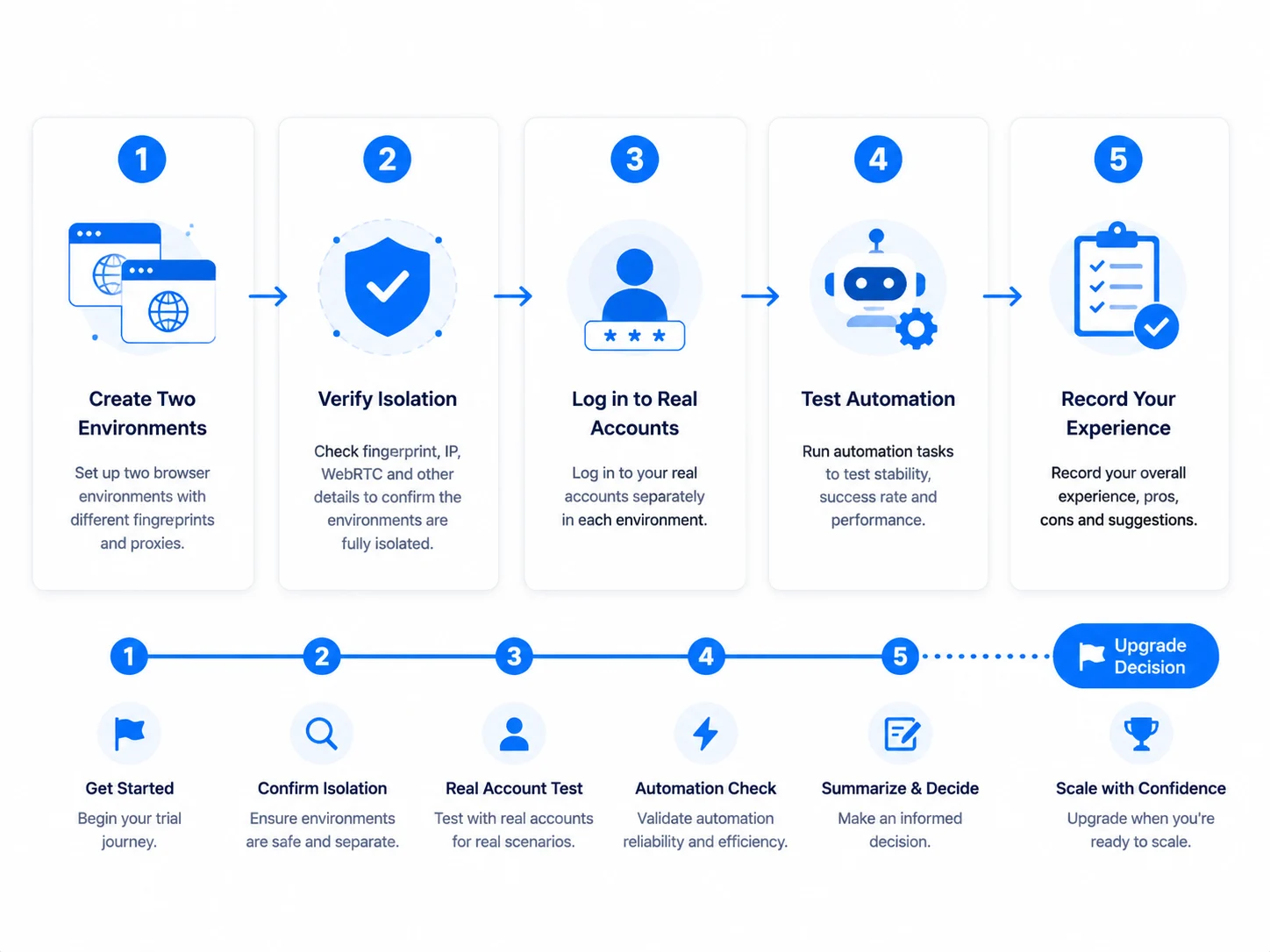 After running this flow, you'll know "whether to pay" better than any review — because you tested it with your own business.
After verifying with the free version, if any of these signals appears, upgrading isn't "being trapped" — it's "money well spent":
Upgrading is essentially "spending money for efficiency and peace of mind": environment isolation doesn't get better because you paid, but scaling capability (count, collaboration, automation, support) is what you pay for.
On security, reputable products use the same fingerprint isolation technology in free and paid versions — core capability isn't reduced. The difference is "service commitment" — free tiers mainly have community support, paid tiers have priority support and data security commitments. The higher the account value, the more you should consider paid-tier support.
Depends on the product, usually 2-10 (check official sites). Whether it's enough depends on your business: 1-2 accounts for verification is plenty; 10+ for scale-up isn't. Environment count = the floor for account count; once accounts exceed the free quota, you must upgrade.
Reputable products don't "silently charge" — upgrades are always explicit actions. But watch out for "trial-type" free quotas (e.g. 7-day trials); after expiry, environments may be disabled or data affected. Choosing a "permanent free" product (like MasBrowser, AdsPower) is more stable and won't suddenly stop working.
Generally no. After upgrading, existing environments, Cookie and proxy configs are all kept — the quota just expands. But it's recommended to back up environment data (export Cookie etc.) before upgrading, just in case — no exception for any product.
Yes, as long as you stay within quota. But "usable" and "enough" are two different things — the free version is enough with few accounts, but you'll need to upgrade with many. Treat the free version as a "permanent test zone" rather than a "permanent production environment" — that's the right mindset.
A free fingerprint browser can be used, but use it in the right place: it's the best solution for verifying workflows, small-scale trials and evaluating products, not the main battlefield for scaled operations. The gap between free and paid isn't in "core isolation capability" but in "scaling capability" — environment count, member count, automation, support.
To judge whether to upgrade, just see whether your account count and collaboration needs exceed the free version's ceiling. Running the verification flow on the free version first, then deciding, is the most cost-effective and rational path. The free version includes 2 environment slots: download MasBrowser, create two environments and test a round with the flow above — the answer will surface by itself. For complete independent environments and fingerprint isolation configuration, see the MasBrowser multi-account security management page.


