
MasBrowser
Customer supportLoading messages…
Loading messages…
You are viewing a previous conversation.
Enter to send · Shift + Enter for a new line
Loading messages…
You are viewing a previous conversation.
Enter to send · Shift + Enter for a new line
Core takeaway: In affiliate marketing, the hard part of environment setup is not "running many accounts" but "pairing them correctly" — the affiliate network, the tracking system, and the traffic-source ad accounts each need their own isolated environments; fingerprints and IPs must align with your target market; and from the first conversion to the commission actually landing (about 60 days after month-end for Amazon, plus ClickBank's CDR review), the environment must stay stable and untouched. Matrix layout and red lines were covered at the strategy level in affiliate account layout and red lines; this piece covers execution only: how to set up environments step by step, how tracking attribution relates to your environment, and what you must never do during the hold period.
First, fix a common misconception: many promoters think "environment isolation" means one environment per affiliate-platform account. In reality, a single offer runs through three layers of accounts — a traffic source (Facebook Ads, Google Ads, native ads, or content sites) sends visitors into a tracking system (RedTrack, Voluum, Binom and the like), the tracker records clicks and conversions, then routes the traffic to the offer link on the affiliate network. Every dashboard on this chain is an independent account, and behind every account a risk-control team is watching login records.
Setting up environments only for the affiliate dashboard is the classic half-finished job for beginners: the tracker dashboard gets logged in from an office network, the ad account runs on another computer, and the affiliate dashboard uses a third network — three dashboards showing three different environment profiles. When the affiliate network investigates for links between accounts, it looks at the whole chain, not just its own dashboard. When you use a tool like the MasBrowser fingerprint browser for environment isolation, split accounts by chain layer: one environment per platform account on the affiliate-network side, one environment per project for trackers, one environment per ad account at the traffic source (account nurturing and ban prevention for ad accounts are covered separately in our Facebook anti-ban and Google Ads multi-account pieces). Only when all three layers are in place is there no "profile mismatch" breakpoint anywhere on the chain.
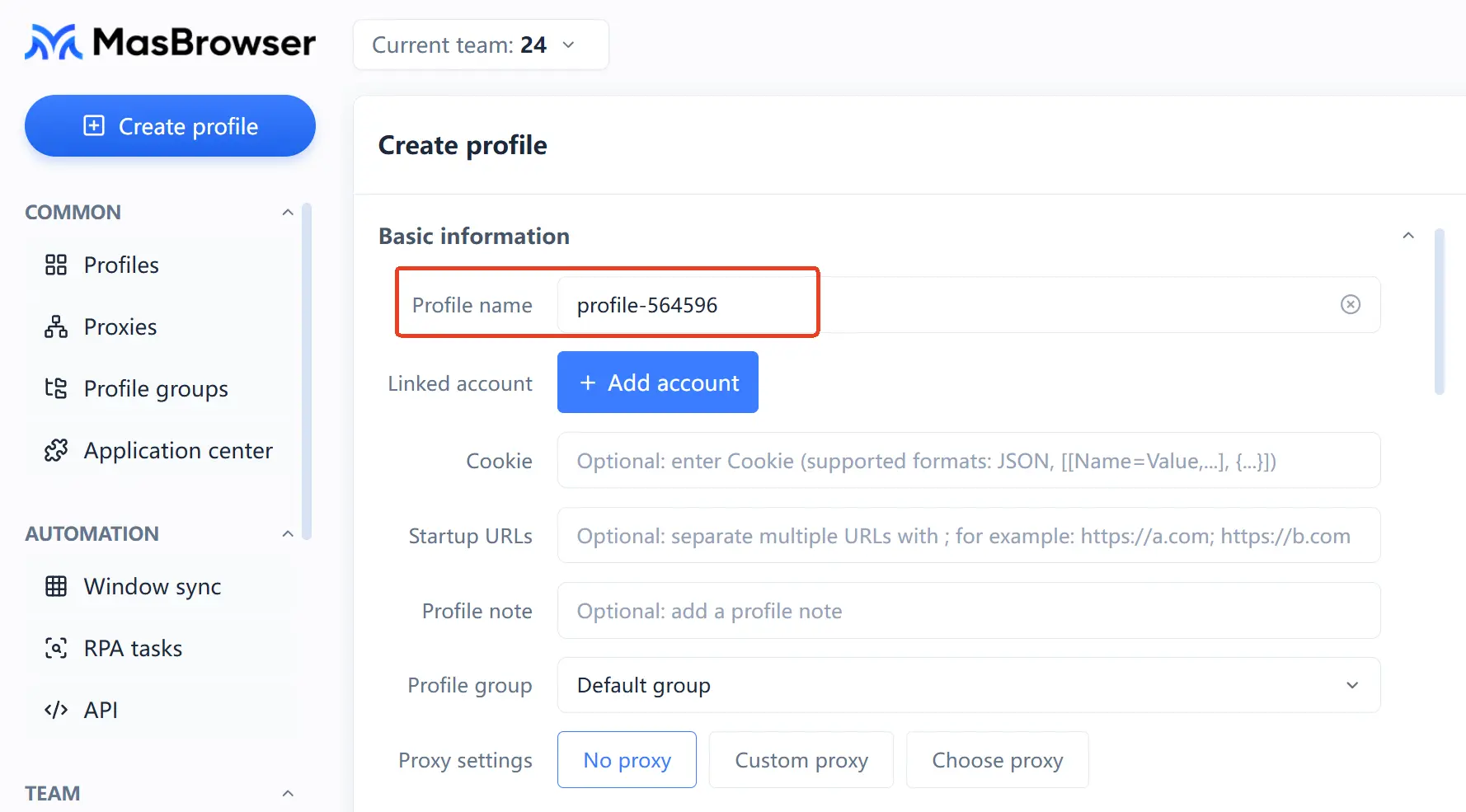
Step 1: Create environments, and name them by business layer. Besides "AF-platform-productline-number" for affiliate environments, we recommend "TR-projectname" prefixes for trackers and "ADS-platform-account" prefixes for traffic sources — the three business types must never be mixed in naming, so troubleshooting starts with a single glance.
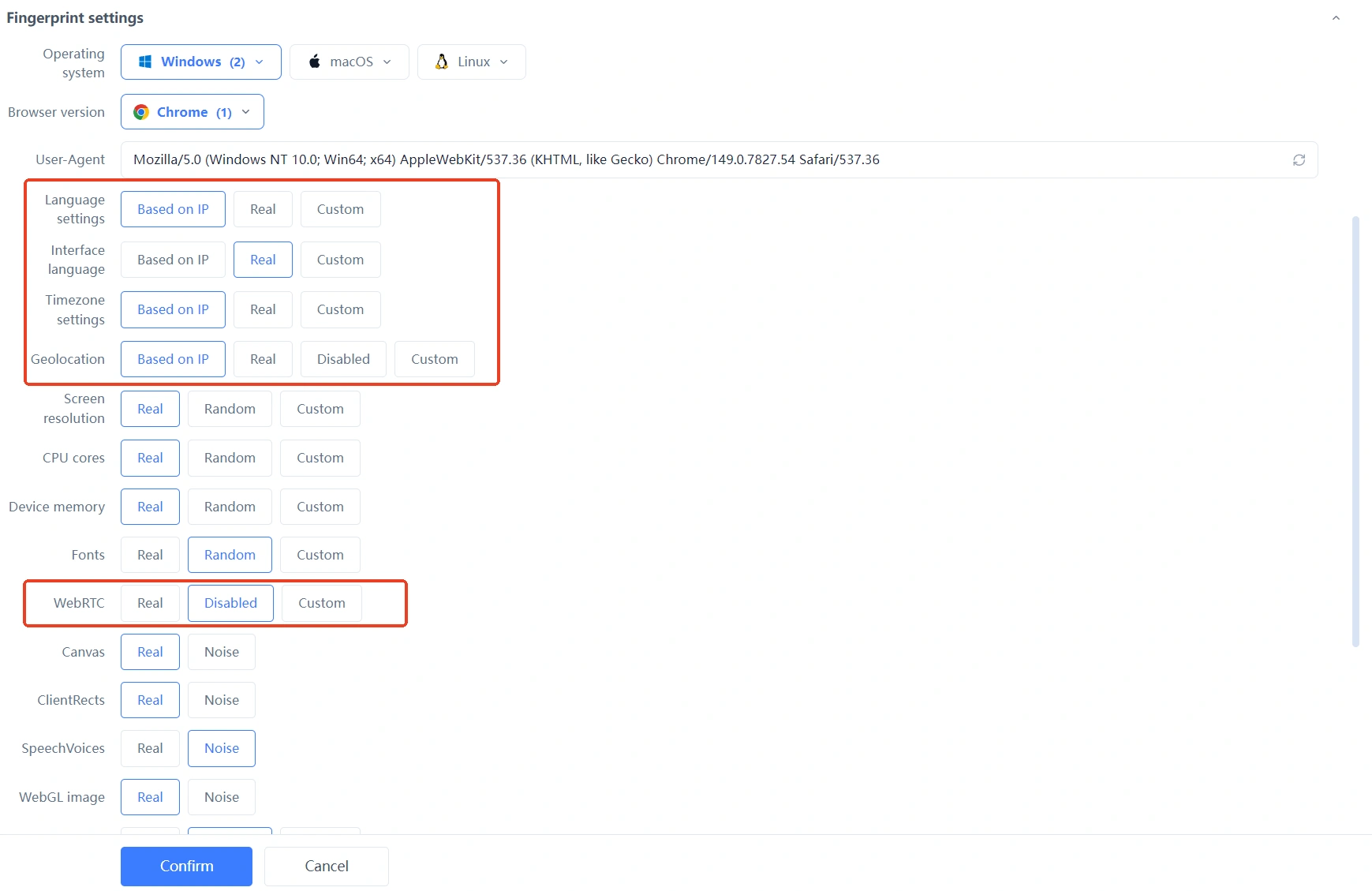
 Step 2: Let the fingerprint follow the IP; don't tweak it by hand. Among the 20+ fingerprint parameters, the easiest and least error-prone approach is setting the fingerprint option to "configure based on IP", so timezone, language, and resolution align automatically with the proxy's region; set WebRTC to disabled so your real local network never leaks through that channel. Manual per-parameter tuning isn't forbidden, but every item then has to be self-consistent on your own watch — beginners should leave it to auto-configuration first.
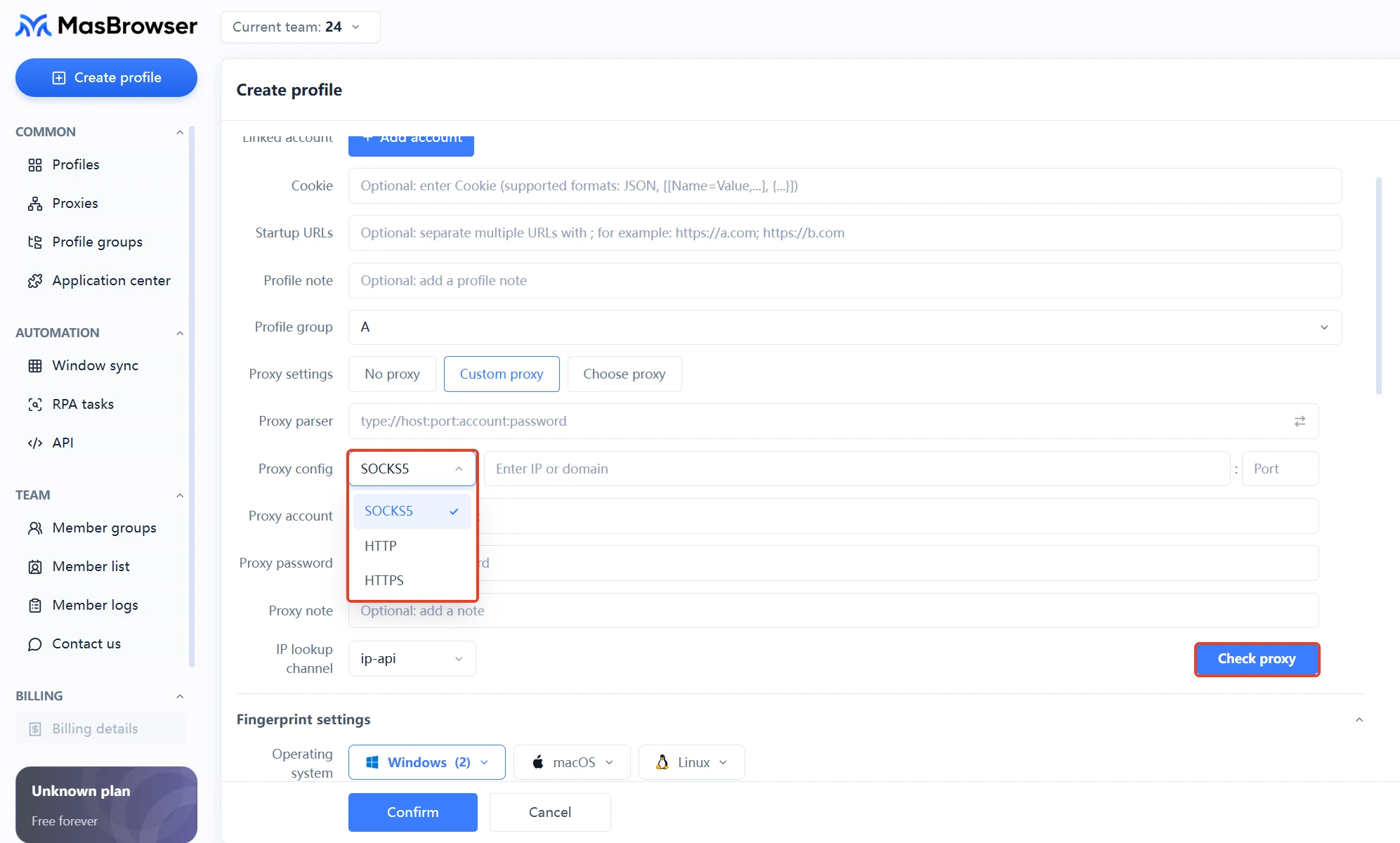
 Step 3: Bind the proxy and test connectivity on the spot. The client supports HTTP, HTTPS, and SOCKS5; after binding, use the built-in test feature to confirm the proxy works before moving on — discovering a dead proxy after the environment is built costs you an extra troubleshooting loop. For how to choose a proxy type and configure login details, the fingerprint browser proxy setup guide has the complete steps.
 Step 4: Complete the first full-chain login inside the same environment. Log in to this project's tracker dashboard and affiliate dashboard in order, open your own tracking link once to confirm the redirect works, then write the payout account, target market, and dashboard checklist into the environment notes — notes are a ledger that travels with the environment; check them first when reconciling accounts or handing over, not your chat history.
Step 5: Run one fingerprint check and freeze the baseline. Before the environment goes live, run a detection tool over UA, Canvas/WebGL, timezone, and IP, and archive a screenshot; whenever you later suspect environment drift, re-test and compare. The full three-step self-check was covered in the FAQ of the strategy piece — just follow it.
A saying circulates in affiliate circles: "Once you're on S2S postback, environment problems stop mattering." That's half true, and worth unpacking. Under S2S (server-to-server) attribution, the advertiser's server reconciles directly with the tracker's server, and conversion records don't depend on the visitor's browser cookies — but that layer protects the accuracy of commission attribution, not your account safety.
What your environment actually affects are three other things: the tracker dashboard's login record (frequent logins from multiple regions are risk control's favorite signal), click testing (whichever environment you click your own link from is the IP and device profile the system records), and report viewing plus payout operations. However clean the attribution, a mess of dashboard logins will still sink the account.
So divide the work correctly: leave visitor-side attribution to S2S, and fold every operational dashboard action into fixed environments — one project, one environment; when the team needs to collaborate, use member grouping and permission control so each person touches only the environments they should, instead of posting the tracker password into a group chat for everyone to log in from wherever.
Many beginners don't know that after the first conversion, a "traceable and reversible" review window sits between the sale and the payout — and during that window, environment stability matters as much as it did during the campaign.
The implication of these two gates for your environments is direct: from conversion to payout, your behavior curve is still being watched. Swapping proxies, changing device characteristics, or logging in from an unfamiliar region during this window puts a break into a smooth curve — the conversion records remain, but the operator has "changed computers and changed countries"; risk control needs no more evidence than that. Hold-period discipline is just three rules: don't change IPs, don't reinstall the client, don't add shared logins; proxies and fingerprint parameters stay fixed inside their own environments — any adjustment waits until the payout cycle completes.
For a handful of offers, the affiliate platform's built-in reports are enough. But once you run multiple offers or multiple traffic sources at the same time, a tracker earns its keep — it solves the reconciliation problem of "which traffic source produced which conversion", which is a different layer from environment isolation; together they form the complete setup.
Not recommended. The three dashboards run different risk-control logic; mixed in one environment, any single risk trigger drags the login records of the other two into the picture. One environment per project, grouped by dashboard within the project, is the sturdier structure.
Yes. Amazon's roughly 60-day payment cycle, ClickBank's CDR and 10% return reserve are all written platform rules, not targeted at your account. Keeping environments stable and campaigns running as usual during the hold works better than repeated appeals.
Enough to start: one production project environment plus one test environment. Once the workflow runs and the first commission lands normally, scale environments by project count — don't pay for quota you can't use on day one.
Affiliate environment setup, in the end, means making "account, environment, IP, payout" correspond one to one, and giving the platform no signal that "this person changed" before the commission lands: pair the environments in five steps, leave them alone during the hold, and route test traffic through a separate environment — get these three right, and multi-account affiliate becomes a revenue line you can run for the long term.
Tool cost is the smallest line in an affiliate's books: the free plan's 2 environments are enough to push your first offer through, the 10-environment tier works out to roughly $0.34 per environment per month on the yearly plan, and about $0.13 at 100 environments — add quota as your project pace demands. Download MasBrowser and set up your first offer's environment along these five steps.


