
MasBrowser
Customer supportLoading messages…
Loading messages…
You are viewing a previous conversation.
Enter to send · Shift + Enter for a new line
Loading messages…
You are viewing a previous conversation.
Enter to send · Shift + Enter for a new line
Core takeaway: price comparison was never about the entry price — it is about the billing model. Managing the same 100 accounts, the yearly bill can differ several times depending on whether you are charged by environment tiers, concurrent sessions, or open counts; and what the pricing page does not show — team-seat thresholds, bundled proxy traffic, renewal reverting to list price — is what decides your real monthly cost. For the head-to-head landscape, see the 2026 fingerprint browser ranking; this article answers one question only: how the money is collected, and how to read it without being misled.
Understand the model before the numbers — the order cannot be reversed. Below we break it down in this order: mainstream model → non-mainstream models → invisible costs → free tiers → how to compute the bill.
Most fingerprint browsers on the market sell "environment counts" — the higher the tier, the lower the per-environment price. This is the industry's default billing model.
Each vendor's specifics within the same model differ quite a bit; here are a few common ones (prices shift with promotions — always check the live page on each official site):
For this model, watch one number only: per-environment monthly cost. Take the tier price, divide by environment count, divide by 12 — no low entry price can fool that figure. Take MasBrowser fingerprint browser as an example: the 100-environment tier is $165/year, which works out to about $0.13 per environment per month — that number says more about whether a tier is worth it than any "from $X" slogan.
Also, the MasBrowser first-anniversary event is live (September 4 to October 5, 2026): a premium plan with 500 environments free, plus a custom RPA script — per-environment cost drops to zero. Details in the anniversary free 500 environments claim guide.
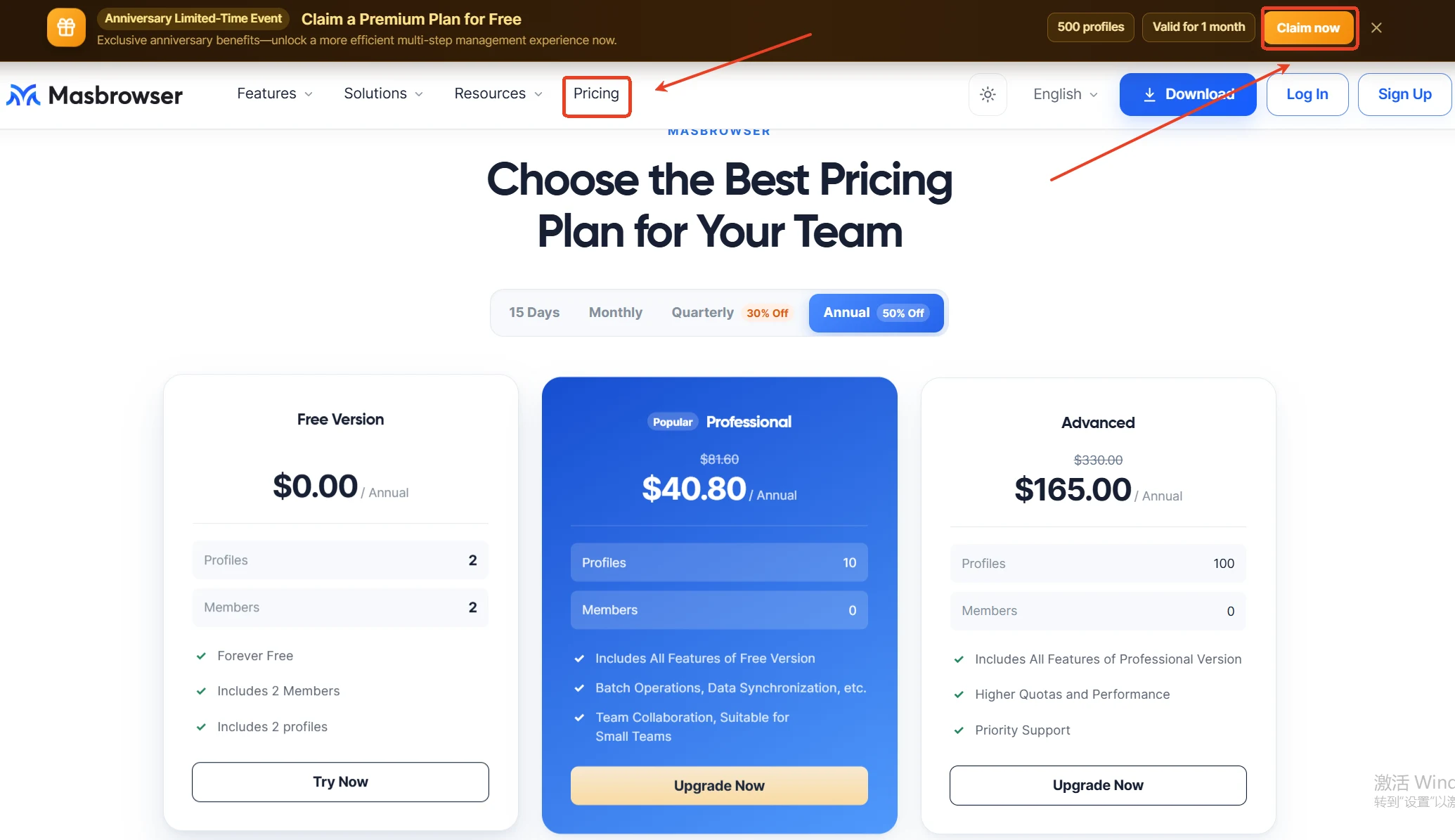
One more variable hides in the tier table of this model: features follow tiers. Team collaboration and automation are often locked to mid-to-high tiers — you are buying not just environment counts but where feature unlocks sit.
Beyond tiered pricing there are three more models, and their existence proves "how many environments you store" is not the cost driver for every business.
Billing by concurrent sessions (pioneered by Kameleo): you are not charged for environments stored but for sessions open at the same time. Storing 200 environments while only 10 are online simultaneously is far cheaper than paying by environment count; for businesses where dozens of accounts must stay online for long hours, concurrency fees overtake tiered pricing. Fits inventory-type accounts, not always-on types.
Billing by usage: Hubstudio charges by daily open counts; Huayang uses a point system — pay per use. Fits low-frequency operators; for matrix operations that stay online all day and toggle environments repeatedly, per-use charging turns out the most expensive.
Perpetual licenses and free-with-purchases: BitBrowser offers a perpetual license — pay once, no monthly fees; ixBrowser goes "features free + daily limits". Perpetual fits teams with long-term stable usage; with free-plus-purchase models, check exactly which features the free part covers and whether the paid part is what you actually need.
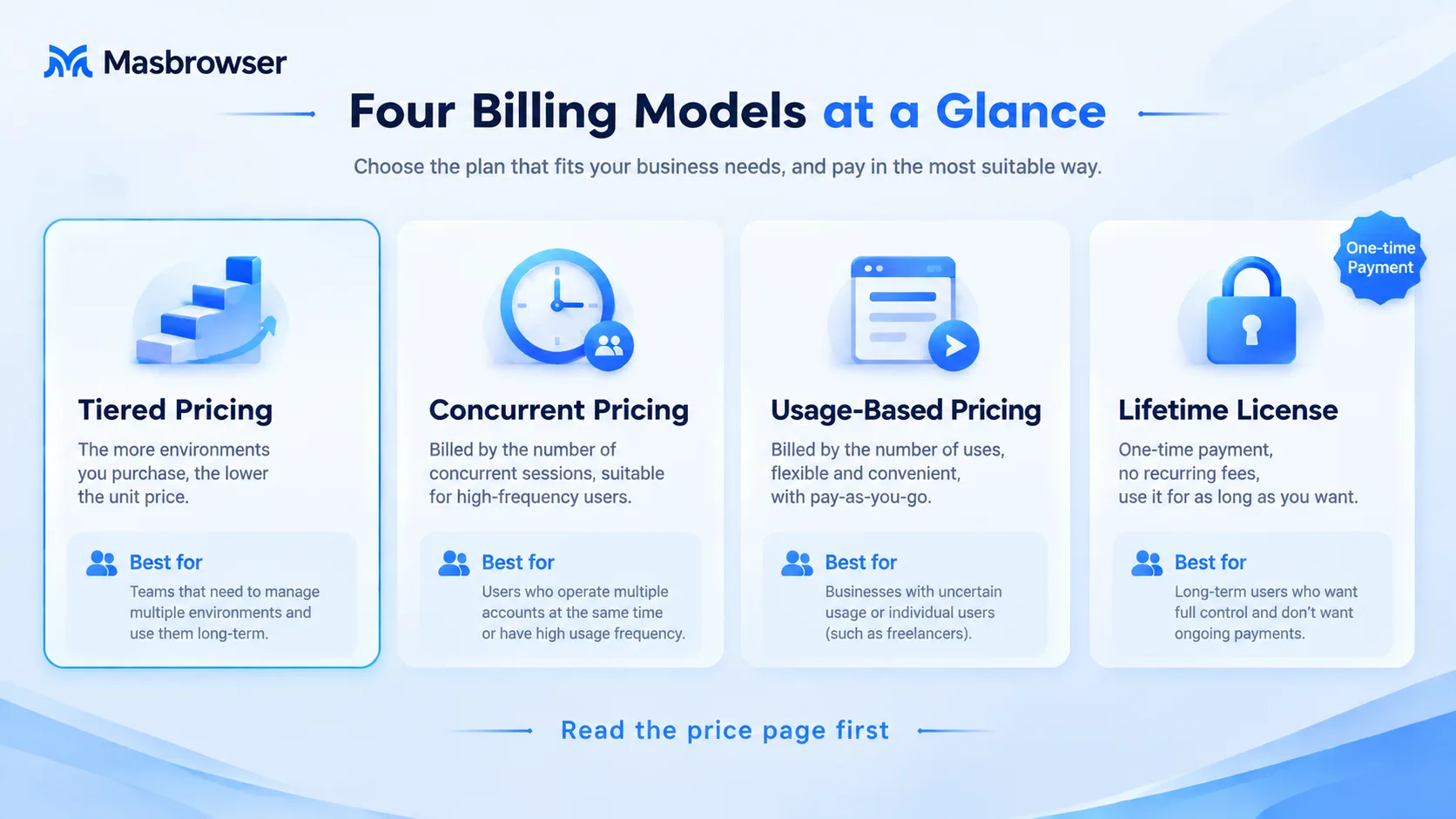 Match the model to your business shape: large stored inventory, few simultaneously online → concurrency billing; low-frequency light operations → per-use billing; stable usage → perpetual; batch matrices always online → back to environment tiers. The details of the low-price playbook from domestic (Chinese) tools are laid out in the BitBrowser vs MasBrowser comparison.
Two plans with "the same environment count" can differ by a factor of two in the real monthly bill — the gap hides in what the pricing page leaves out.
For the plan-level bill (tools, proxies, staffing, suspension losses together), continue with the earlier plan-cost comparison article. These four are small bills, but stacked they are often the answer to "two vendors of the same size, monthly bills apart by a factor of two". Current figures can be checked on the GoLogin pricing page and the AdsPower plans page.
Free tiers are now an industry standard, but the boundaries of "free" differ enormously — it is not a marketing gift but part of the billing model.
Placing several vendors' free tiers side by side reveals the pattern: AdsPower gives 2 environments; GoLogin gives 3 profiles; BitBrowser gives 10 environments but caps daily open counts; Dolphin Anty gives 5-10 profiles; Incogniton gives 10 for the first two months only; ixBrowser has free features but daily limits — all called "free", some giving environments, some giving counts, some giving time.
So read a free tier by three boundaries only: how many environments, how many members, which features are locked. The correct use of a free tier is to run the full pipeline — create environments, set proxies, verify isolation — at zero cost, not to treat it as long-term capacity; once account scale hits an upgrade trigger, the choice logic returns to the model comparison above.
To decide whether to upgrade, ask three questions: has the environment count been pinned at the quota for months? Does a second person need to operate simultaneously? Have repetitive actions piled up enough to deserve automation? Two yeses mean it is time to look at paid tiers; one or none, stay free — do not pay for "peace of mind". The overall inventory of free tools has its own article: free fingerprint browser guide.
The point of computing is not to find the cheapest vendor, but to merge "tool subscription + proxies + seats" into one comparable total.
For example: two tools both running 100 accounts, one at $165/year and one at $288/year-equivalent — the difference usually covers half a year of proxy spending for a small operation. Basis differences matter far more than "which is $3 cheaper". The smaller the tool's share of the bill, the more budget concentrates on the proxies that actually save accounts.
The range is enormous: free tiers are usable long-term, personal tiers mostly run from a few dollars to tens of dollars per month, and enterprise tiers go beyond a hundred. What decides your tier is environment count, member count, and automation needs — not the brand — so fix the scale first, then read the price list; reverse the order and the entry price will mislead you.
Most mainstream tools discount yearly plans to 40-50%, which is genuinely much cheaper per month. But the recommended rhythm is: run a new tool monthly for one month to verify isolation and fit your habits, then switch to yearly — the discount saved cannot offset a whole year wasted on the wrong tool.
Yes, but watch the three boundaries: environment count, member count, feature locks. Free tiers fit running through the pipeline and maintaining two or three low-frequency accounts; when environments sit at quota all year or collaboration is needed, go back to the paid-tier comparison. Using it as formal capacity is the most common misuse.
Basically yes. A fingerprint browser handles environment isolation; the independent IPs your accounts use are bought separately from proxy vendors, and that bill is often higher than the tool subscription. Always merge "tool + proxies" into total cost of ownership before concluding — comparing subscription prices alone systematically understates real spend.
Whether a price comparison is done right depends on comparing the same thing: first recognize the model (environment tiers, concurrency, per-use, perpetual), then align the basis (monthly or yearly, how much per environment), finally add in the seats, traffic, and proxies the pricing page never shows. Run the three steps, and each vendor's true ranking under your business shape surfaces on its own.
To close: the subscription was always meant to be the small head of a multi-account budget — once per-environment monthly cost is pressed to a few dozen cents, tool fees stop being the decision point, and budget belongs to proxy quality and operating rhythm.
To run the pipeline yourself before computing the bill, start from the download MasBrowser free tier — verify at zero cost, then decide your payment rhythm.


