
MasBrowser
Customer supportLoading messages…
Loading messages…
You are viewing a previous conversation.
Enter to send · Shift + Enter for a new line
Loading messages…
You are viewing a previous conversation.
Enter to send · Shift + Enter for a new line
If you work in foreign trade or cross-border e-commerce, you have probably heard this kind of "nightmare": the goods are shipped, the payment has arrived, and you are about to withdraw — then you log into PayPal and see that the account is restricted, the balance is frozen, and it has entered a long review process. Worse, if this PayPal was also bound to other stores, more than one account gets dragged into it.
PayPal's risk control is different from e-commerce platforms: it manages money. When a platform bans you, you lose traffic; when PayPal restricts you, you lose real cash in your balance.
This article explains PayPal multi-account risk control thoroughly: how serious restrictions really are, why the platform targets you, which association landmines multi-account users step on most easily, how to run multiple payout accounts safely, and what to do if you really get restricted.
In one sentence: PayPal restrictions come in two types — "temporary" and "permanent". A temporary restriction can still be saved; a permanent restriction means the account is written off, and the balance may stay frozen in the review process.
The difference between the two is straightforward:
PayPal's risk control logic is "better to wrongly kill": accounts with suspicious activity get restricted first and investigated later. This means prevention is always cheaper than appealing afterward — whether an appeal passes depends on documents and luck, and the cycle is very long.
There are many signals that trigger risk control; the five most common types are:
The first four are "business behavior" issues; the last one, "multi-account association", is a structural problem — it does not look at how well your business is doing, only at the relationships between accounts.
PayPal determines multi-account association through a set of "cross-referencing clues":
Remember: PayPal's association determination is "multi-clue cross-referencing" — one item alone may be fine, but stacked together, risk control compares and locks onto you. This is why the crude trick of "just registering a second account with a different email" is completely insufficient.
The core approach is the same as e-commerce multi-store — one account = one isolated environment + one dedicated IP + one independent set of payout info (payout info: bank card/bank account/phone/email all separate). Practical implementation:
paypal-us-01) and bind a dedicated proxy IP; in fingerprint settings, set language, time zone, and geographic location to "Configure based on IP" and set WebRTC to "Disabled".
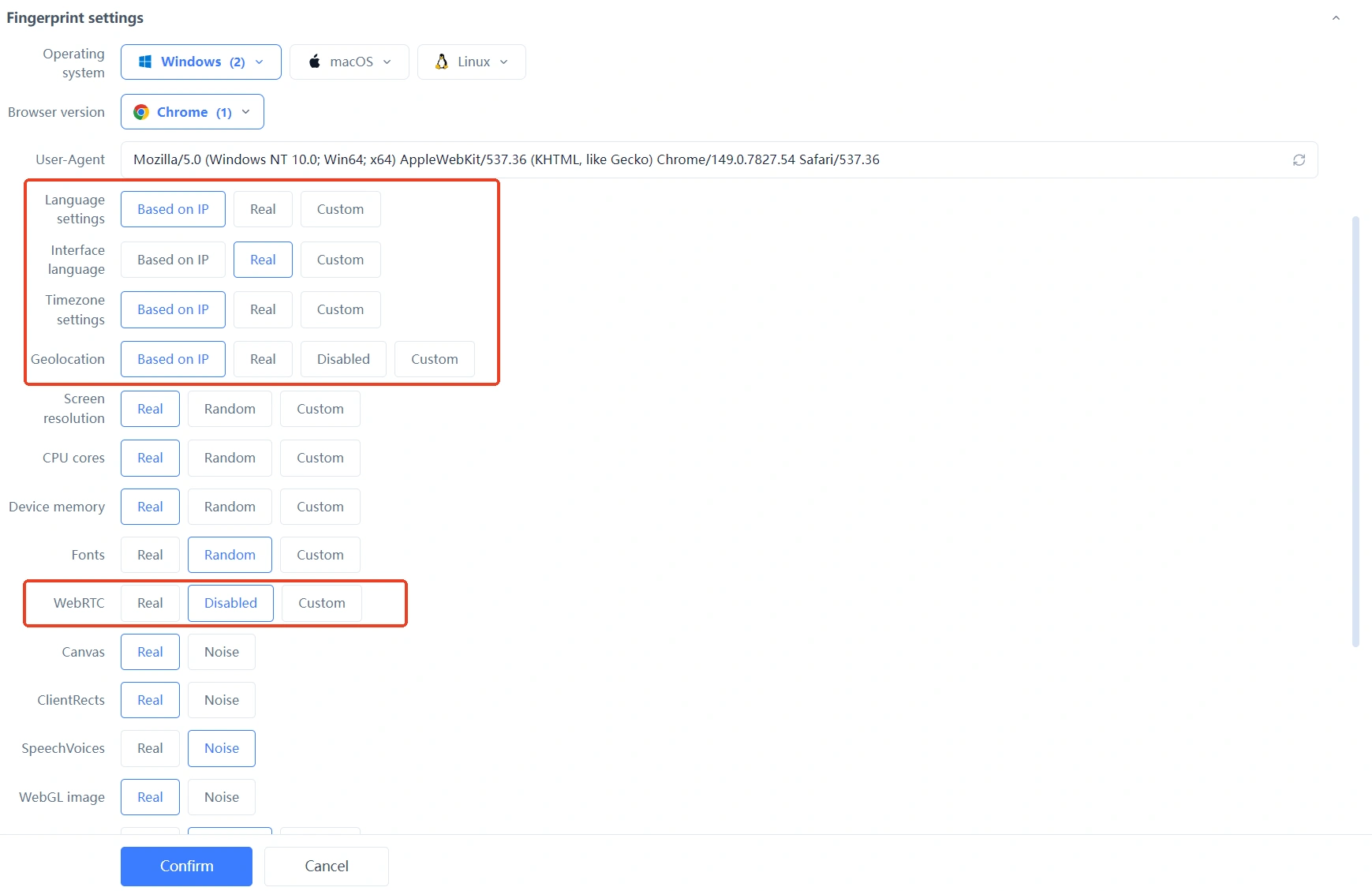 Each account only logs in within its own environment, never mixing. For complete isolated environment and fingerprint configuration, see the MasBrowser multi-account security management page.

Once this combination is complete, the "clues" PayPal can see are all independent of each other — every account looks like "a different person running a different business".
If you are already restricted, handle it in order:
Appealing is a remedy; prevention is the root. Getting payout info isolation, environment isolation, and stable behavior right is far more reassuring than appealing everywhere after being restricted.
Per PayPal policy, the same identity usually can only have one personal account (a business account can be opened separately); multiple accounts must comply with platform rules. Before running multiple accounts, confirm your situation meets platform policy to avoid crossing the red line.
Strongly not recommended. Sharing a bank card/bank account is PayPal's most direct association evidence; once determined, multiple accounts get restricted together. Payout info must be completely independent.
New accounts have no transaction history and low risk-control trust — "aggressive behaviors" like large payments and frequent withdrawals are especially conspicuous on new accounts. Letting a new account start small and grow at a normal rhythm is the most effective way to reduce risk-control probability.
It depends. After a temporary restriction passes review, it can be used normally; under a permanent restriction, the balance enters a frozen review process, and whether it can be withdrawn depends on the appeal result. So "prevention is better than cure" is always more important than handling it afterward.
PayPal manages money, and its risk control logic is "better to wrongly kill" — when an account is restricted, you lose real cash. What multi-account operators need to do is make every account completely independent from payout info to login environment, and then "behave like a normal seller" in business activities.
Payout info isolation, environment isolation, and stable behavior — get these three right, and PayPal will find it hard to find association evidence on you. The free plan already includes 2 environment quotas. Download MasBrowser, create two environments to run through the "one account, one environment" flow, then gradually expand your payout account system.


