SOCKS5 vs HTTP vs HTTPS Proxy: What's the Difference and How to Configure for Multi-Account Ops
When buying proxies, most providers make you pick a type: SOCKS5, HTTP, HTTPS — seeing all three together, first-timers are basically confused: what's the actual difference? Expensive isn't necessarily good, cheap feels risky, so which one should multi-account operations pick? And what differs when configuring?
Here's the bottom line: for web-level multi-account operations (login, browsing, working in backends), HTTP or HTTPS proxies are more than enough; you only need SOCKS5 when forwarding non-web traffic (UDP, games, video, special protocols) or when you want the higher stealth of "a proxy that doesn't parse content". This article explains the differences between the three proxy types, how to choose for multi-account scenarios, and what to watch when configuring.
What's the Real Difference Between SOCKS5, HTTP and HTTPS Proxies?
The essential difference lies in "working layer" and "encryption or not" (the selection logic of proxy and IP types is fully covered in Residential vs. Datacenter IPs; here we focus on the protocols themselves):
- HTTP proxy (application layer, plaintext): only handles plaintext HTTP traffic. It "understands" web requests — it can parse URLs and headers, and do web-layer operations like caching and filtering. Its scope is "plaintext web" — it cannot proxy encrypted web pages (browsing HTTPS sites fails).
- HTTPS proxy (application layer, encrypted connection): also works at the application layer, but can proxy HTTPS encrypted web traffic — technically it uses the HTTP CONNECT method to establish a "tunnel" that lets encrypted data "pass through" the proxy. It "understands" the proxy request itself but does not decrypt the HTTPS content inside.
- SOCKS5 proxy (transport layer): works at a lower level, does not distinguish protocol types — HTTP, HTTPS, FTP, UDP, game traffic, video streams... anything that is TCP/UDP traffic can be forwarded. It doesn't "understand" or care what content you send; it only forwards data packets as-is.
One sentence to remember the three: HTTP proxy is a "plaintext web courier" (only delivers plaintext web packages), HTTPS proxy is an "encrypted web courier" (delivers HTTPS packages without opening them), SOCKS5 is a "delivers-everything courier" (delivers regardless of protocol or encryption).
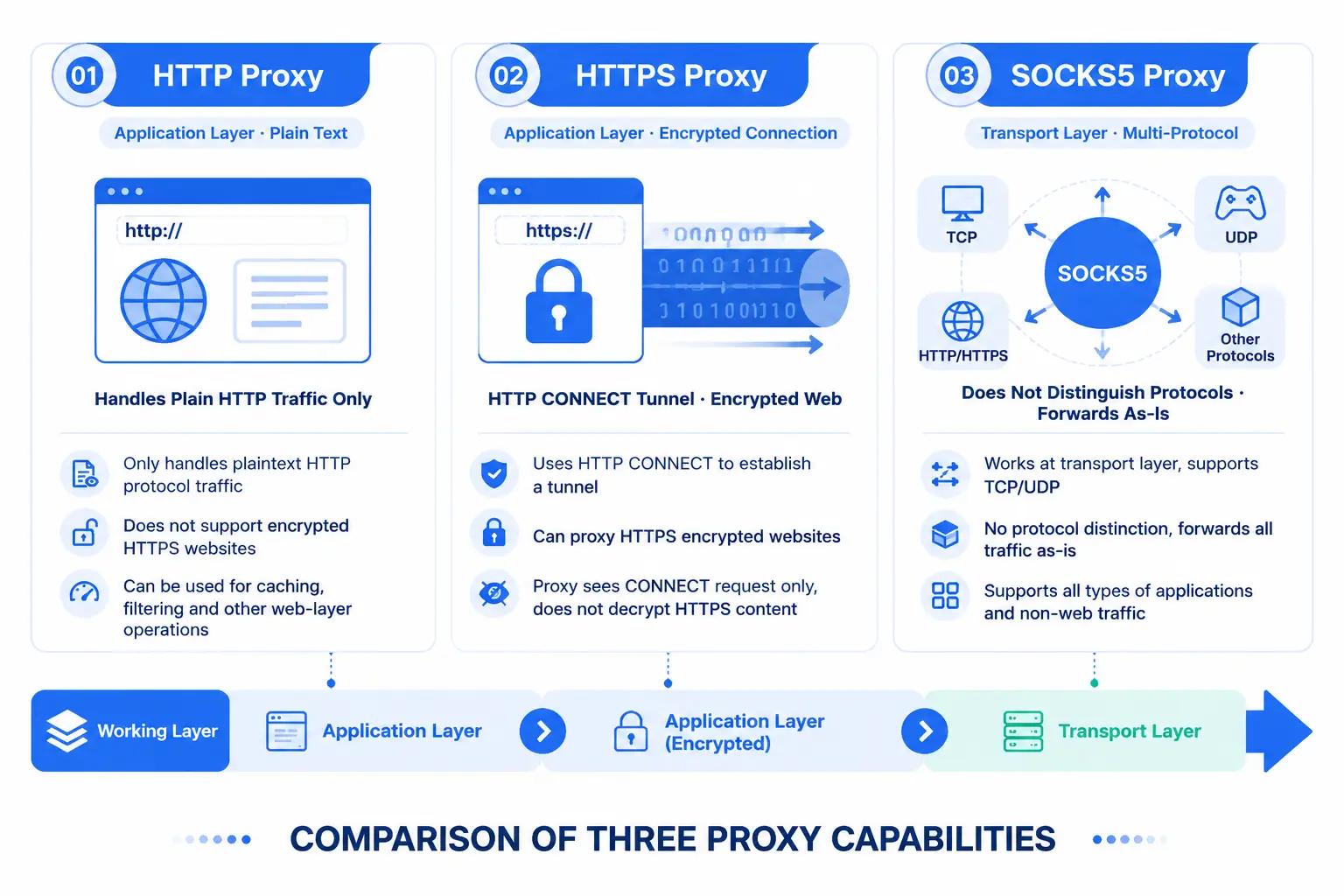
This difference brings three practical effects:
- Supported traffic types: HTTPS proxies can proxy encrypted web pages (modern web is mostly HTTPS, so "web proxies" in practice mostly use HTTPS); HTTP proxies can only proxy plaintext web (old sites, internal tools may use them); SOCKS5 supports UDP (games, video calls, some real-time traffic) which HTTPS/HTTP proxies don't; SOCKS5 can proxy non-web apps (email clients, IM, some software) while HTTP/HTTPS proxies can only proxy web.
- Stealth: SOCKS5 doesn't parse content, so packet-capture tools see "encrypted forwarding"; HTTPS proxies parse the CONNECT request header but not the encrypted content; HTTP proxies are fully plaintext-visible. From "the proxy doesn't snoop on your content" perspective: SOCKS5 > HTTPS > HTTP.
- Speed: no absolute faster/slower. HTTP proxies have caching (repeated requests may be faster); HTTPS proxies add a little handshake overhead for the tunnel; SOCKS5 has low forwarding overhead (no parsing), so pure forwarding may be faster. Actual speed depends on the proxy provider's quality, not the protocol itself.
How to Choose for Multi-Account Ops? Match by Scenario
Most multi-account operations are "web operations" (logging into platforms, browsing backends, publishing content), so the decision is simple:
- E-commerce/social media/ad multi-account operations (pure web) → HTTPS proxy is enough; HTTPS is recommended. Modern web is almost all HTTPS, which HTTPS proxies fully cover; compatibility is also the best, and fingerprint browsers (including MasBrowser) and proxy providers generally recommend HTTPS proxies as the default option.
- Internal tools or legacy platforms (plaintext web) → HTTP proxy. A few internal tools or old sites may still use HTTP; HTTP proxies are sufficient and cheap, but such scenarios are shrinking.
- Need to forward non-web traffic → SOCKS5. For example: logging in via specific software (some IM/clients only accept SOCKS5), UDP traffic (video, voice, some live-platform operations), or your business has traffic needs on non-web protocols.
- Pursuing the higher stealth of "a proxy that doesn't parse content" → SOCKS5. If you're concerned about "whether the proxy can see the content you transmit" (e.g., highly sensitive business data), SOCKS5's "no parsing, forward as-is" trait fits best.
One-sentence decision: for web operations stick with HTTPS (HTTP only for plaintext web); only go SOCKS5 for non-web traffic or higher stealth — for the vast majority of multi-account operators, an HTTPS proxy is enough; don't pick SOCKS5 just because it "sounds more advanced".
How to Configure in a Fingerprint Browser? Type Selection + Four-Step Flow
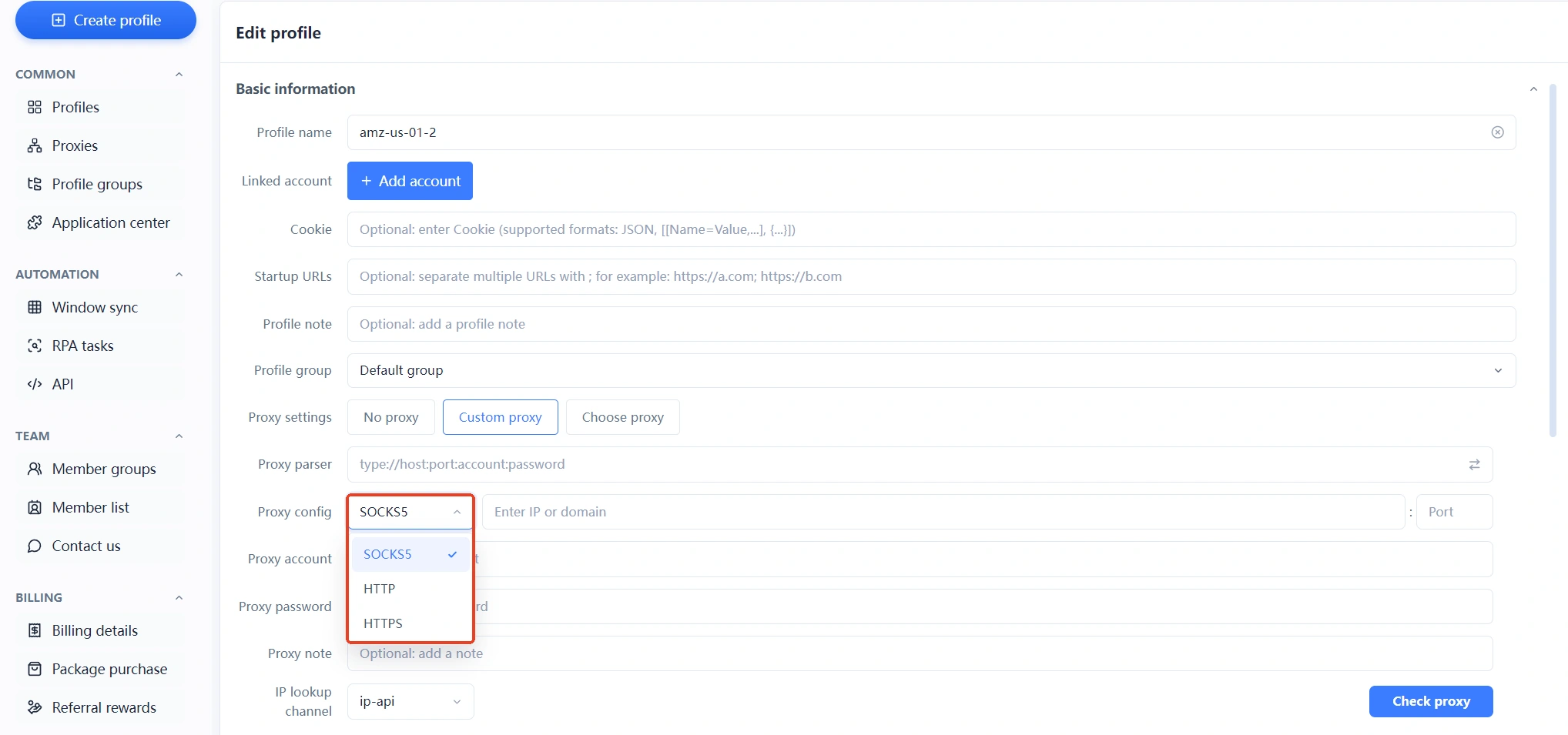
Configuring the three proxy types in a fingerprint browser (using MasBrowser as an example) is almost identical; the only difference is which option you pick in the "proxy type" dropdown — MasBrowser's proxy settings offer SOCKS5 / HTTP / HTTPS type options (the full configuration flow is broken down step by step in Fingerprint Browser Proxy Setup Guide; here we focus on type-related parts):
- Check the proxy info and confirm the type. When buying, the provider gives you a piece of info, usually formatted as
type://host:port:account:password(e.g.,https://1.2.3.4:8080:user:passorsocks5://1.2.3.4:1080:user:pass), pick whatever the prefix says (the type field is SOCKS5/HTTP/HTTPS) — choosing the wrong type means the proxy won't connect or behaves abnormally. - Create/edit the environment and enter proxy settings. In the environment's basic info or proxy settings, select "Custom proxy" and find the "proxy type" dropdown — MasBrowser offers SOCKS5 / HTTP / HTTPS, choose per the provider's prefix.
- Fill in address, port, account, password. Enter the provider's info (IP/host, port, username, password) — one wrong character and it won't connect — double-check carefully. MasBrowser also provides a Proxy parser hint: filling per the
type://host:port:account:passwordformat is the least error-prone. - Save then test connectivity. Click the "Check proxy" button in the lower right to test connectivity and IP region in one click — confirm the test passes before launching the environment and logging into accounts (if the test fails, check type/port/account/password first; don't rush to launch).
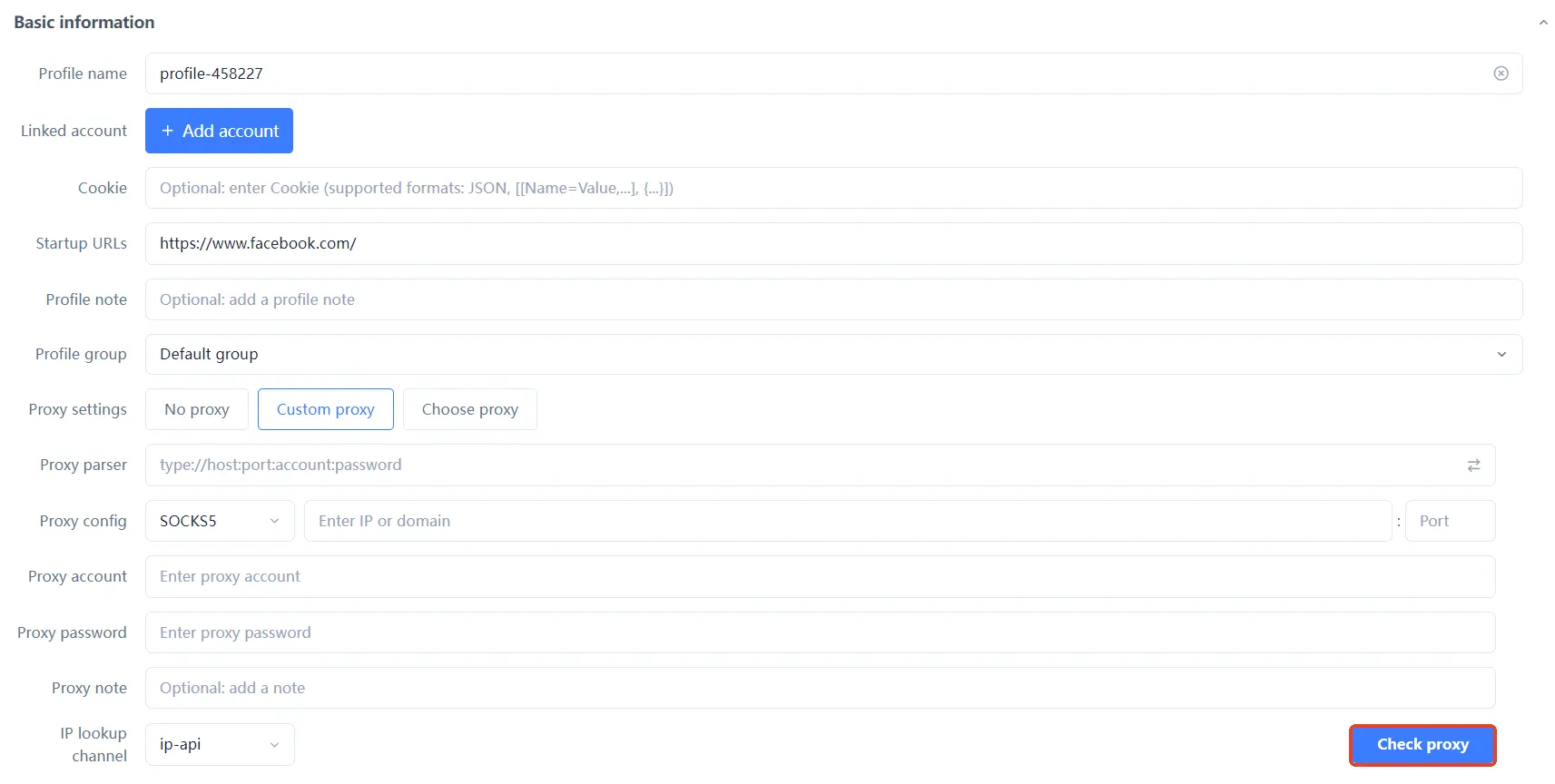 The core of configuration is one sentence: pick the "type" per the provider's label, fill everything else as-is — the three proxies differ only in one dropdown in config; the real difference is in protocol capability.
The 4 Common Misconceptions About SOCKS5 vs HTTPS vs HTTP
- Myth 1: SOCKS5 is always faster than HTTP/HTTPS. Not necessarily. Speed mainly depends on the proxy provider's line quality, not the protocol. HTTP has caching (may be faster for repeats), HTTPS has a little handshake overhead, SOCKS5 has low forwarding overhead — don't be fooled by "SOCKS5 is faster" claims; test and see.
- Myth 2: SOCKS5 is always more secure than HTTP/HTTPS. Partially true. SOCKS5's "doesn't parse content" is indeed more stealthy, HTTPS proxies don't decrypt HTTPS content (but can see the CONNECT header), HTTP proxies are fully plaintext — but the core of security is "whether the proxy provider is trustworthy" (do they log, are they compromised); the protocol itself doesn't determine the security level. Provider reputation matters more than protocol type.
- Myth 3: HTTP proxies leak your browsing data. Not necessarily. HTTP proxies handle plaintext traffic — when you visit an HTTPS site through an HTTP proxy, the HTTP proxy sees the "connection request" rather than encrypted content (TLS encryption happens after the HTTP proxy); but when visiting a pure HTTP site, the HTTP proxy indeed "sees" the content. What you really need to guard against is "proxy providers logging" and "local WebRTC leaking your real IP" (protection against WebRTC leaks is fully covered in WebRTC IP Leak).
- Myth 4: any of the three works, pick whatever. Wrong. The most typical consequence of picking the wrong type: filling SOCKS5 info into the HTTP type → won't connect or times out; using an HTTP proxy as HTTPS → fails to visit HTTPS sites. Pick per the provider's labeled type; don't mix them up.
Behind the four myths is one logic: SOCKS5/HTTPS/HTTP are "different capabilities", not "better or worse" — with the right scenario, even cheap HTTP is right; with the wrong scenario, even expensive SOCKS5 is useless.
FAQ
Which is faster: SOCKS5, HTTP or HTTPS?
No absolute answer. Speed depends on the provider's line quality, node distance, and bandwidth. HTTP has caching (repeats may be faster), HTTPS has handshake overhead, SOCKS5 has low forwarding overhead — don't pick speed by protocol; test by provider.
Do multi-account operations have to use SOCKS5?
No. The vast majority of multi-account operations are web operations (logging into platforms, working in backends, publishing content), where HTTPS proxies are fully sufficient and most compatible. Only when forwarding non-web traffic (UDP, games, special clients) or pursuing "a proxy that doesn't parse content" do you need SOCKS5.
Are the configuration steps for SOCKS5 / HTTP / HTTPS the same?
Basically yes: the only difference is choosing SOCKS5, HTTP, or HTTPS in the "proxy type" dropdown; everything else (filling IP/port/account/password, testing connectivity) is identical. Pick the right type, fill the rest as-is.
How do I know whether my proxy is SOCKS5, HTTP or HTTPS?
Look at the proxy info from the provider: the format is usually type://host:port:account:password — the prefix type field is the type: socks5:// is SOCKS5, http:// is HTTP, https:// is HTTPS. If unsure, ask the provider's support, or look at the port (SOCKS5 commonly uses 1080/1081; HTTP/HTTPS commonly 8080/3128, though not absolute).
How many proxy types do fingerprint browsers support?
Mainstream fingerprint browsers generally support HTTP, HTTPS, and SOCKS5 — MasBrowser's proxy settings offer all three type options plus one-click connectivity testing (Check proxy), which is industry-standard. The exact supported types follow the product UI; when configuring, first see what's in the dropdown, then pick per the provider's prefix.
Conclusion
SOCKS5, HTTP, and HTTPS proxies are essentially three tools with "different capabilities": HTTP proxy understands plaintext web, HTTPS proxy can proxy encrypted web, SOCKS5 forwards all traffic without parsing content — each has its scenario; there's no absolute good or bad.
For the vast majority of multi-account operators: stick with HTTPS for web operations (HTTP only for plaintext web), go SOCKS5 only for special traffic needs or higher stealth — don't pay more for "sounding advanced", and don't pick the wrong type to save money. When configuring, remember "pick the type per the provider's prefix, fill the rest as-is, test before launching" and none of the three proxies will give you trouble. The free plan includes 2 environments; first use one to run through the proxy configuration (pick type → fill info → Check proxy), confirm the proxy is stable before rolling out all accounts — Download MasBrowser and configure the proxy for your first environment.