Static IP vs Rotating IP: How to Choose for Cross-Border E-commerce Environments
When buying a proxy, the provider usually asks: "Do you want a static IP or a rotating IP?" Many beginners freeze on the spot — they have heard both terms but don't know which to pick, let alone what happens if they pick wrong.
Static and rotating are two completely different "temperaments": one stays on a single address, the other changes addresses every so often. For people in cross-border e-commerce, this directly determines whether the platform flags the account as "abnormal login".
This article explains static IP and rotating IP thoroughly: the essential difference, how risk control views variability, how to combine with "residential vs datacenter", how to choose by business, and common misconceptions.
What Is the Real Difference Between Static IP and Rotating IP?
In one sentence: a static IP "lives at the same address long-term"; a rotating IP "moves house every so often" — when an account logs in, the platform sees either "the address hasn't changed" or "the address keeps changing".
- Static IP (fixed IP): one IP is assigned to you long-term, the address does not change. Proxy providers usually sell it "per IP", suitable for scenarios that need a long-term stable address.
- Rotating IP (dynamic IP): the IP changes periodically — some change per request, some every few minutes, some every 24 hours. Providers sell it by "traffic" or "duration", usually cheaper per unit.
| Comparison | Static IP | Rotating IP |
|---|---|---|
| Address change | Does not change | Changes periodically (minutes to days) |
| Billing | Per IP | By traffic / duration |
| Unit price | Relatively higher | Relatively lower |
| Best for | Account login, long-term operations | Scraping, browsing, bulk operations |
Static IP vs rotating IP comparison
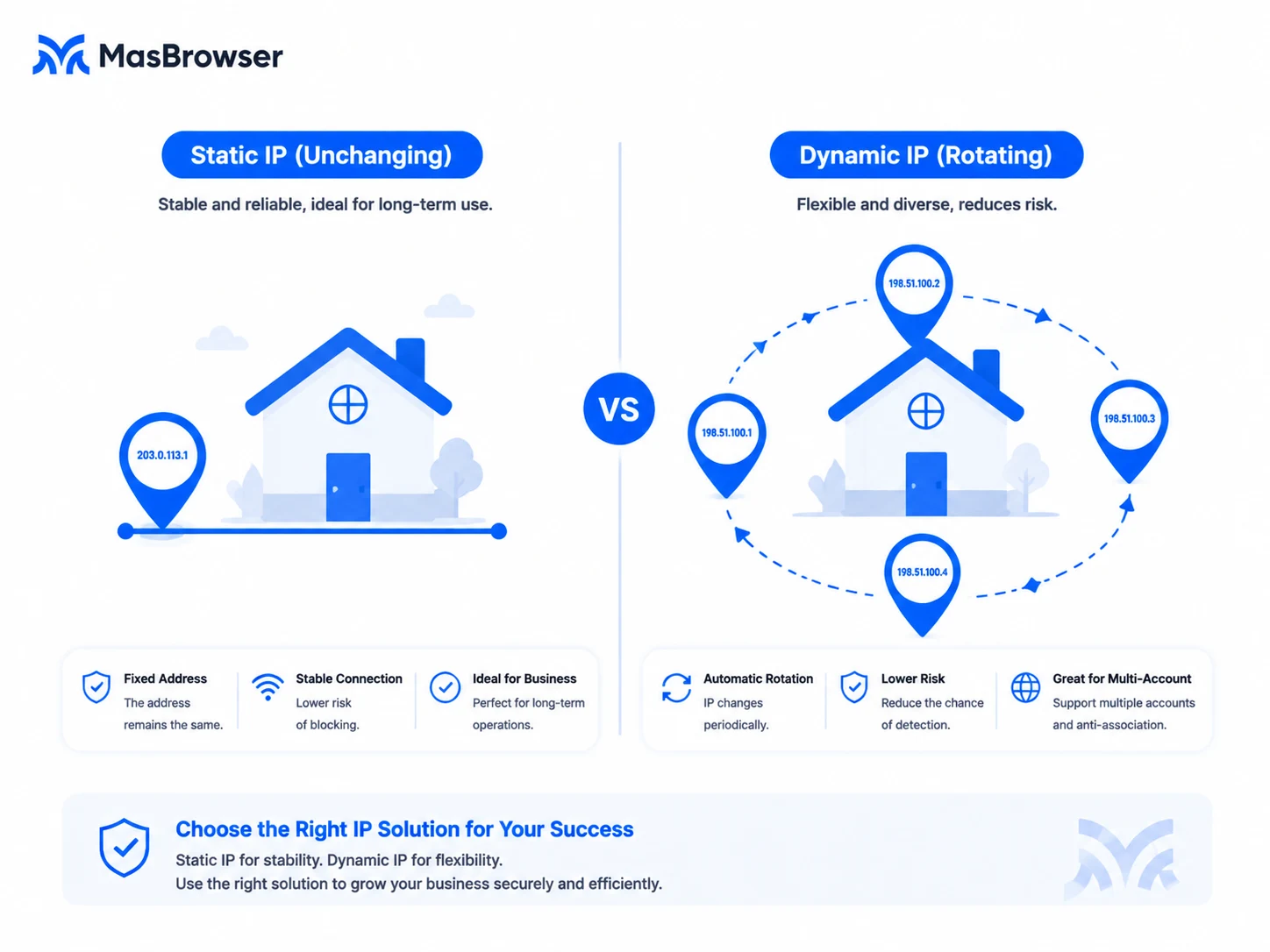
There is no absolute good or bad between static and rotating — the key is whether your accounts need a "stable address" — that is the core point below.
How Does Platform Risk Control View "Variability"?
Risk control systems are very sensitive to "login address changes": normal users have long-term stable IPs, and frequent IP changes are themselves an anomaly signal.
Think about real user behavior: going to work, coming home — you use relatively fixed networks. Your IP may change a little, but it won't be "a different place on every login". In platform risk models, "frequently changing login addresses" is a typical suspicious feature:
- An account logs in from a US IP today, a Hong Kong IP tomorrow, and switches again the day after — the platform judges "the account may be stolen" or "shared by multiple people", triggering verification or even bans.
- Multiple accounts rotating inside the same dynamic IP pool — when the platform compares, it finds "these accounts' IPs keep crossing each other", and association risk goes through the roof.
So accounts that need stable logins (stores, ad accounts) should prioritize static IPs; only businesses that "don't need a stable address" (scraping, bulk browsing) fit rotating IPs. This principle matters far more than "which is cheaper".
Combined with "Residential vs Datacenter": How to Pick Among Four Combinations?
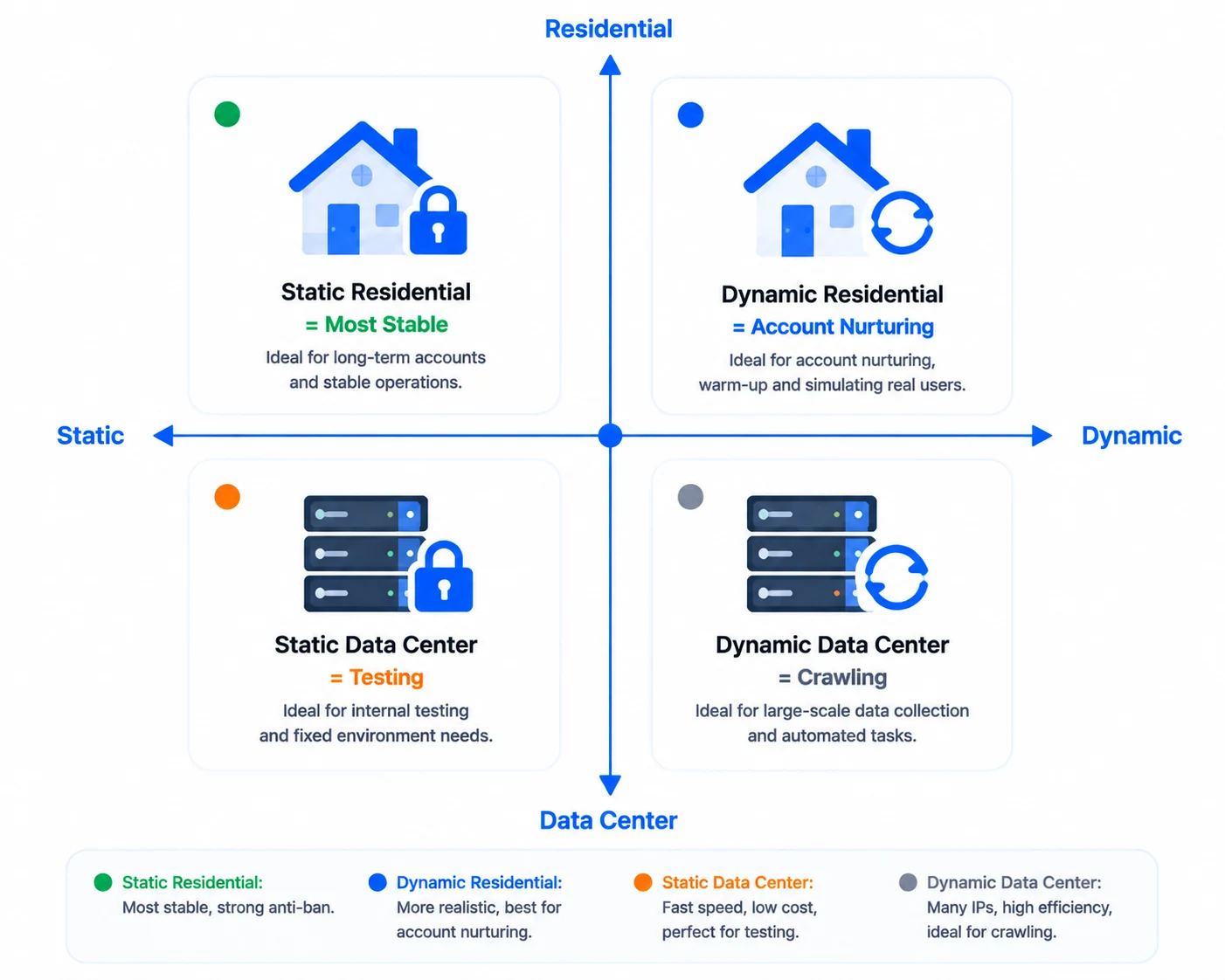
Static/rotating is one dimension, residential/datacenter is another — two orthogonal dimensions combine into exactly four combinations:
| Combination | Stability | Trust | Best for |
|---|---|---|---|
| Static + Residential | High | High | Store accounts, ad accounts (first choice) |
| Rotating + Residential | Medium | High | Social media nurturing, operations needing some variability |
| Static + Datacenter | High | Low | Internal tools, test environments (don't log into high-value accounts) |
| Rotating + Datacenter | Low | Low | Scraping, bulk collection (high volume, low value) |
The mainstream combination for cross-border e-commerce is "static + residential" — stores and ad accounts need "long-term stable real-user IPs". The selection logic for residential/datacenter is fully broken down in Residential vs Datacenter IP; no need to repeat it here — just remember the combination conclusion.
Choosing by Business Scenario
A relatively universal decision checklist:
- E-commerce / platform stores: static + residential. Store accounts need long-term stability; the address absolutely must not keep changing.
- Ad account campaigns: static + residential. Ad accounts have high requirements for both IP reputation and stability.
- Social media matrix nurturing: mainly static + residential; if you nurture "browsing-type" accounts, rotating + residential is acceptable, but don't switch frequently at login.
- Scraping, bulk collection: rotating + datacenter. High volume, low per-unit value — rotating + cheap datacenter IPs give the best cost-effectiveness.
- Testing, temporary use: static + datacenter is enough; no need for expensive residential.
Remember: the more "valuable" the account, the more static it should be; the more "high-volume, low-value" the business, the more rotating is fine. Don't risk store accounts just to save money on rotating IPs.
Common Misconceptions
- "Rotating IPs save money, accounts can use them too": the savings belong to businesses that "don't need a stable address"; a store account on a rotating IP saves less than the cost of one ban.
- "Static IPs are definitely safe": static only solves "address stability"; you still need to check the IP type (residential vs datacenter) and whether it has a bad history — static + datacenter IP is still high risk.
- "A rotating IP changes on every request": rotation has granularity too — some change every minute, some every 24 hours. For account scenarios, at least pick "daily-level"; don't pick "request-level".
- "I bought a rotating IP and the account won't log in": rotation can cause "address mutation" at login, intercepted by risk control — accounts already running stably should avoid switching to rotating mid-way.
The complete logic chain for choosing an IP: decide the type first (residential/datacenter) → then the variability (static/rotating) → finally verify quality. With both dimensions right, the IP hurdle is cleared.
FAQ
Is a static IP always better than a rotating IP?
No. A static IP is better in "stability" but costs more; a rotating IP is cheap and flexible, but "addresses keep changing" doesn't fit accounts that need stable logins. The key is the business: account-type use static, collection-type use rotating.
What rotation frequency should I choose for a rotating IP?
Depends on the scenario: if you need a relatively stable address (e.g. nurturing), choose slow rotation (daily-level); for pure collection, choose fast rotation (minute-level or even request-level). Don't use request-level rotation for account logins.
The account is already on a rotating IP, can I switch to static?
Yes, but transition smoothly: first pick one static IP, switch during the account's low-activity hours, stay stable after switching, and don't log in frequently during the transition. A sudden big change in the login environment is itself a risk.
How do I configure static/rotating IPs in MasBrowser?
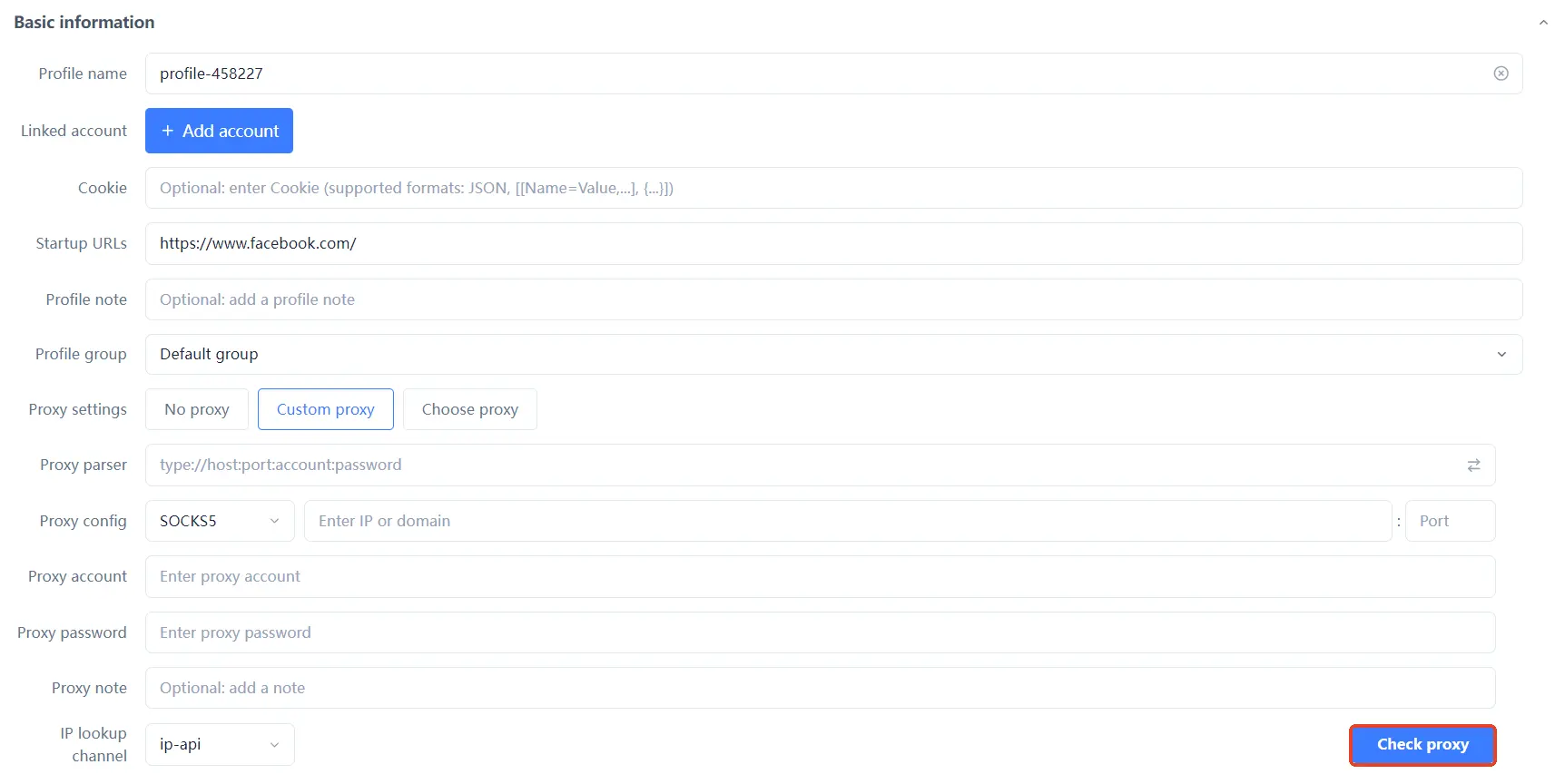
The configuration is the same as a normal proxy — in MasBrowser environment settings, fill in the IP/port/username/password in proxy settings, click "detect proxy" to confirm, then save (detailed steps are in the proxy setup guide). Keep a configured static IP long-term; with rotating IPs, watch whether they drop frequently. For complete independent environments and fingerprint isolation configuration, see the MasBrowser multi-account security management page.
Conclusion
The difference between static IP and rotating IP is essentially a difference of "address stability" — platform risk control is very sensitive to "frequently changing login addresses"; choose the wrong type and your account is "moving house" every day — who else would risk control watch but you?
The principle of choosing an IP is one sentence: the more valuable the account, the more static; the higher-volume, lower-value the business, the more rotating; then stack the "residential vs datacenter" type judgment — only when both dimensions are right is it stable. The free plan already includes 2 environment slots; download MasBrowser, configure one "static + residential" environment to get the flow working, then scale by business size.