
MasBrowser
Customer supportLoading messages…
Loading messages…
You are viewing a previous conversation.
Enter to send · Shift + Enter for a new line
Loading messages…
You are viewing a previous conversation.
Enter to send · Shift + Enter for a new line
If you manage multiple accounts, you have probably been told that "GPU info is one of the key fingerprints," but few people tell you exactly how it gets exposed and why it is so hard to defend against.
Here is a real scenario: you log into store A with Chrome and store B with Edge on the same computer, thinking "I changed browsers, so it must be fine." Yet the platform still determines the two accounts are associated — because Chrome and Edge use the same GPU and report the exact same GPU model.
That "GPU model" is the WebGL fingerprint.
A WebGL fingerprint is a hardware identifier collected by the browser through GPU rendering capabilities — unlike Canvas, which "draws a picture and measures pixel differences," WebGL directly asks your GPU for its name and parameters. Browser fingerprinting is made up of dozens of parameters (the overall principle is covered in thisexplainer), and WebGL is the most "honest" one: it gives you almost no room to disguise.
The Canvas fingerprint is "indirect measurement" — it makes you draw a picture and compares pixel details; the WebGL fingerprint is "directly announcing yourself" — the browser simply asks the GPU for its vendor and model. The former relies on guessing, the latter on asking.
So if a platform wants to pick the "easiest evidence of association," WebGL has always ranked near the top.
The entire collection process only needs one line of JavaScript, done in two steps:
WEBGL_debug_renderer_info extension and reads two fields: UNMASKED_VENDOR_WEBGL (GPU vendor, e.g., "NVIDIA Corporation") and UNMASKED_RENDERER_WEBGL (GPU model, e.g., "NVIDIA GeForce GTX 1650 / PCIe / SSE2"). These two fields are the "unmasked" raw values, and Chrome, Firefox, and Edge all allow reading them by default.There is a detail many people do not know:changing browsers does not help. Chrome, Edge, and Firefox have different cores, but underneath they all call the same GPU driver. The first time I tested the same computer's WebGL info with Chrome and Edge separately, the GPU model was identical character for character — I changed every browser, but the hardware was still the same hardware.

Many people only know that "the GPU model gets collected," but they do not know exactly which fields are collected. I have put together a list of parameters that detection websites read:
| Field | Example value | Description |
|---|---|---|
| GPU vendor | NVIDIA Corporation | From UNMASKED_VENDOR_WEBGL |
| GPU model | NVIDIA GeForce GTX 1650 / PCIe / SSE2 | From UNMASKED_RENDERER_WEBGL; even the interface and instruction set come along |
| GLSL version | OpenGL ES GLSL 3.00 | Shader language version; reflects the capability combination of browser and driver |
| Shader precision | Highp / Mediump / Lowp | Different GPUs support different precision ranges |
| Max texture size | 16384 | GPU texture capability limit; the higher, the more powerful the GPU |
| Extension list | ANGLE_instanced_arrays etc. | The list of supported WebGL extensions |
| ANGLE layer | ANGLE (NVIDIA, ...) | Chrome translates WebGL requests to the underlying graphics API through ANGLE; the translator version is also exposed |
Once you understand this table, you will see why conventional methods like "changing UA" are completely useless against WebGL — it reads real hardware parameters, not browser declarations. The ANGLE layer is the easiest to overlook: it acts as the "translator" between the browser and the GPU, and the translator's version and implementation are themselves an independent piece of fingerprint info.
Because it is too useful in association detection:
This is also why, when risk control systems determine association, WebGL is often used together with Canvas and font lists as the "core evidence group."
The damage of this evidence chain also varies by industry: for cross-border e-commerce sellers logging into multiple stores from the same device, identical GPU info is the hard proof of association; for social media matrix account farming, dozens of accounts reporting the same GPU means actively exposing "there is one team behind all of this"; for ad account testing with multiple accounts, once the accounts are linked, budgets and scaling rhythm are all disrupted. No matter the industry, once the account count goes up, WebGL is an unavoidable hurdle.
If you want to see what your GPU looks like in the browser's eyes, two steps are enough:
MasBrowser runtime info after launching an environment, showing the Fingerprint protection: Enabled status
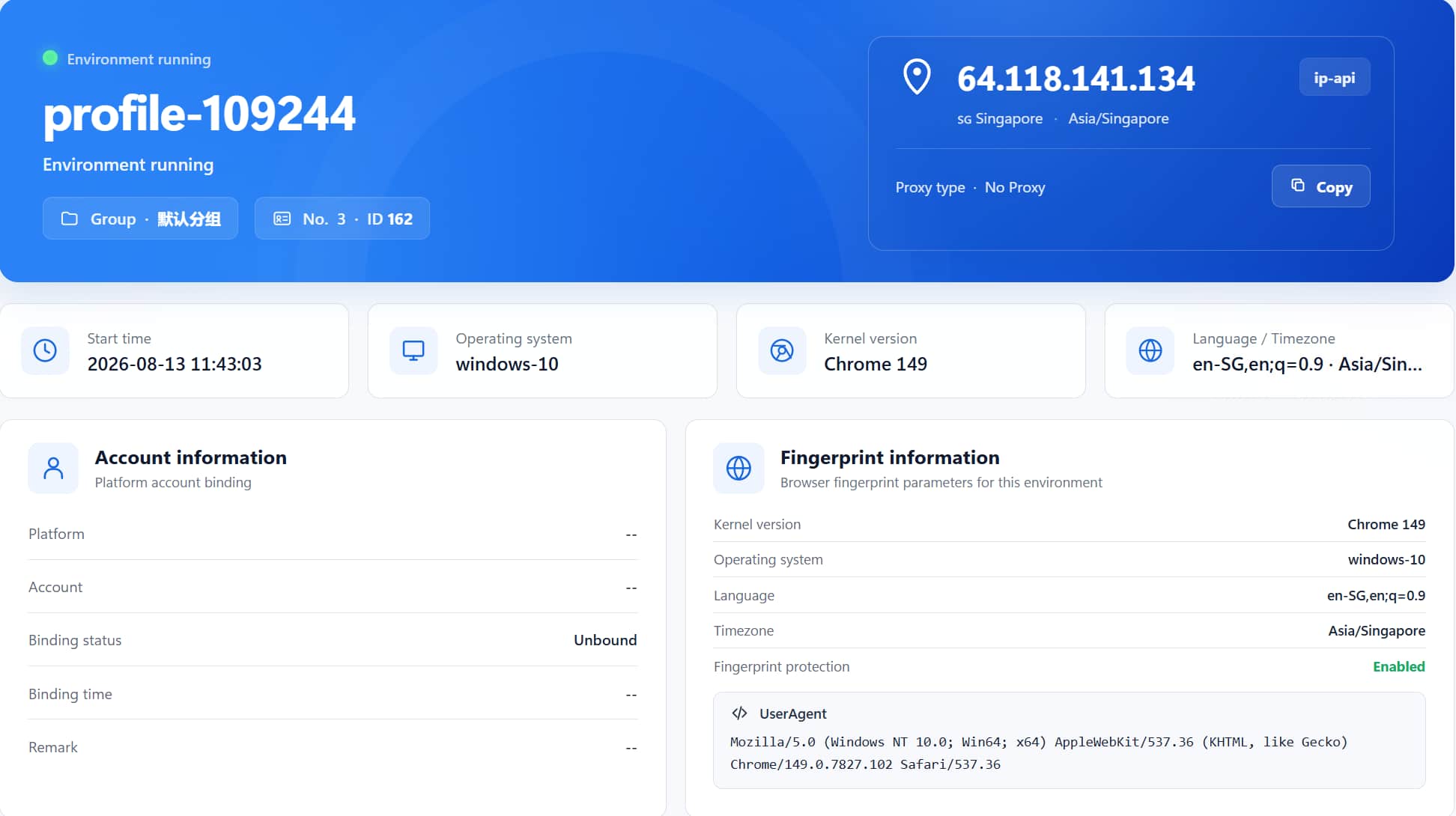
The point of detection is this: if you log into multiple accounts with a regular browser, the WebGL info of all accounts is completely identical — that is one of the most powerful pieces of evidence platforms use for association determination.
No proxy, no extra tools needed — you can verify whether WebGL isolation is working purely locally:
This verification has nothing to do with IP or proxy — even if the two environments share the same network exit, the GPU info is isolated, and that is exactly what WebGL protection means.
First, look at a few methods that "look useful but actually are not":
The direction that really works is toapply a "mask" at the WebGL layer: let the browser return an identifier different from the real GPU, or randomize the rendering parameters. Fingerprint browsers have turned this into a switch — takeMasBrowser as an example: when creating an environment, find the WebGL-related options in the fingerprint settings, and choose "Random" to generate a reasonable GPU configuration, or customize it according to GPU models common in the target region.
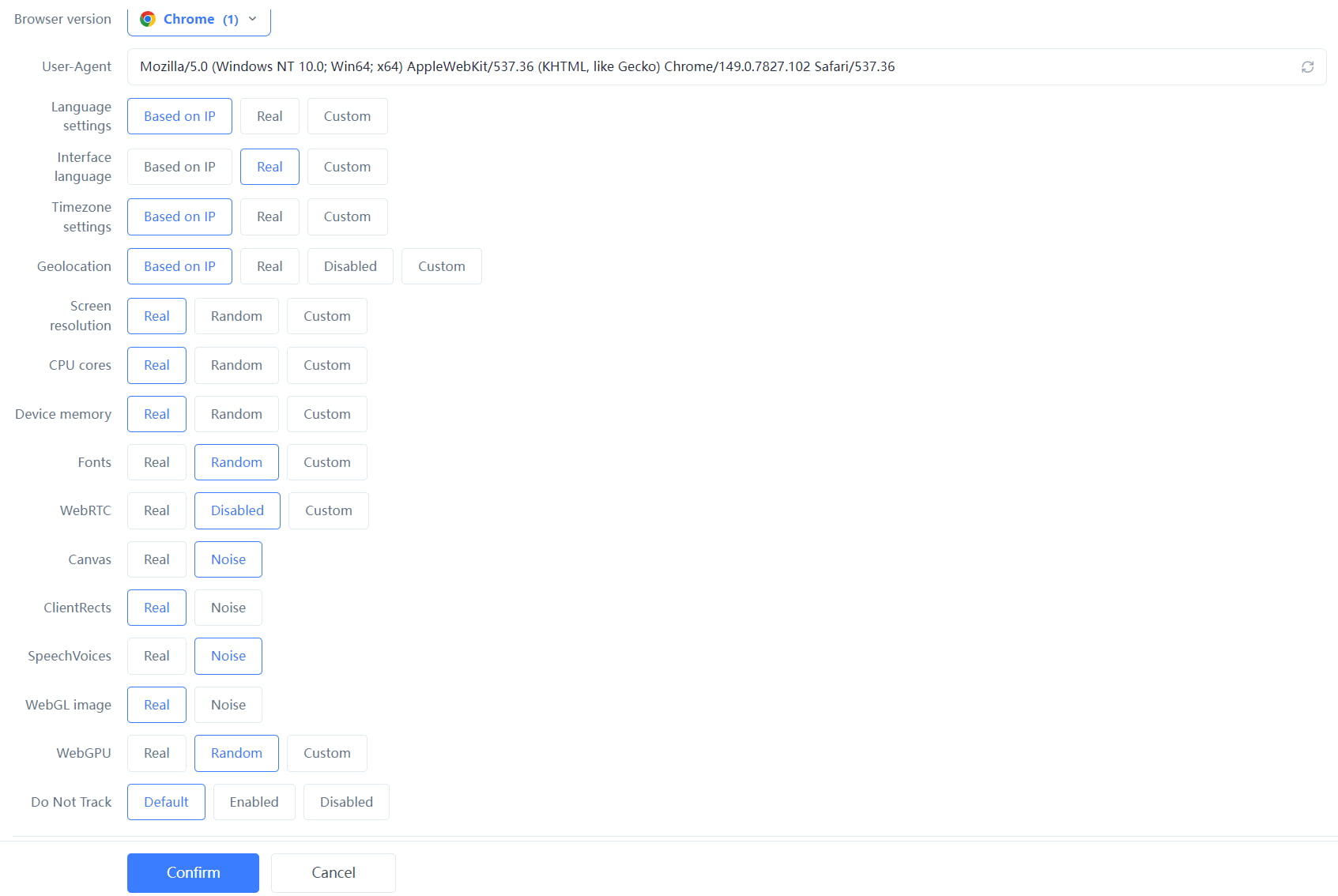 Once enabled, the WebGL vendor and model of each environment are generated independently, and platforms can no longer link multiple accounts through "the same GPU." The complete independent environment and fingerprint isolation configuration can be found on theMasBrowser multi-account security management page.
In actual operation, there is an easily overlooked point:the randomly generated GPU configuration should be "reasonable." For example, if the proxy IP shows the target region is the US, randomly generating a China-exclusive GPU model instead looks deliberate. The safe approach is to eyeball it once after choosing "Random," or directly customize according to mainstream GPU models in the target market.
Two more details are worth noting: first, laptops often have both integrated and discrete GPUs, and the detection result may change with driver policy and power state, so try not to frequently switch performance modes after creating an environment, keeping the fingerprint stable; second, after Windows updates the GPU driver, the WebGL fingerprint may change, so if accounts have been running stably for a while, try not to touch the driver during operations to avoid an "environment change" that triggers risk control.
Yes, but very rarely. WebGL info only changes when you replace the GPU or reinstall the GPU driver (major version update); it stays stable in daily use. This is also why platforms dare to track it long-term.
Yes, but at a big cost — many websites (maps, 3D displays, some ad verification) rely on WebGL rendering, and disabling it limits page functionality or even prevents loading. By comparison, using a fingerprint browser to "mask" it is a more elegant solution.
In a fingerprint browser, what changes is the "GPU identifier reported to websites," not the actual GPU driver, so 3D rendering on web pages continues normally and functionality is unaffected.
WebGPU is the next-generation GPU compute API that can expose even more detailed hardware info than WebGL and will become a new fingerprint dimension in the future. Most websites still rely on WebGL today, but paying attention to WebGPU protection early is worthwhile.
The WebGL fingerprint is the item in browser fingerprinting that "lies the least" — it does not rely on what you declare, but directly reads the true identity of your GPU. For ordinary users, it is a privacy risk; for multi-account operators, it is the "primary evidence" of association determination, and if not handled well, all accounts get taken down at once.
Fortunately, this capability can be masked with a fingerprint browser. The free plan already includes 2 environment slots.Download MasBrowser, create an environment and configure WebGL randomization, then go to a detection page and compare — you will intuitively see how the GPU info gets isolated.


