WebGPU Fingerprinting: The Next-Generation Browser Fingerprint Dimension
You may not have noticed: after the recent Chrome update, the rendering engine underneath web games has quietly switched from WebGL to WebGPU.
For ordinary users, this just means "pages load faster"; but for people who run multiple accounts, this change is worth pausing over — the new interface can expose far more hardware information than the WebGL era, and it is much harder to defend against.
This article does not pile on jargon. In plain language, it covers three things: what a WebGPU fingerprint is, what it exposes beyond WebGL, and what you can do right now.
What Is WebGPU? Why Is It Called "Next-Generation"?
In short: WebGPU is the browser's next-generation GPU interface, gradually replacing WebGL — with stronger capabilities and more exposed hardware information. Browser fingerprinting has always had dozens of parameters (the overall principle is covered in thisbrowser fingerprinting explainer), and GPU-related parameters have always been the most "hardcore" part.
The two names look similar, but the approaches are completely different:
- WebGL takes the "compatibility route." Under the hood it is based on OpenGL ES, like putting an adapter jacket on old GPUs. The jacket can only hide so much detail, so the hardware info websites can get is limited.
- WebGPU takes the "native route." It is designed directly for modern GPUs, calling compute units and rendering pipelines with the precision of writing native programs. The hardware detail a browser can "see" is naturally much richer than in the WebGL era.
| Comparison | WebGL | WebGPU |
|---|---|---|
| Design approach | Compatible with old GPUs (OpenGL ES) | Native design for modern GPUs |
| Hardware info available | Vendor and model (via extension API) | Capability parameters, feature set, shader features, etc. |
| Adoption | Mainstay of existing sites | Enabled by default in Chrome 113+, gradually replacing WebGL |
WebGPU vs WebGL architecture comparison diagram
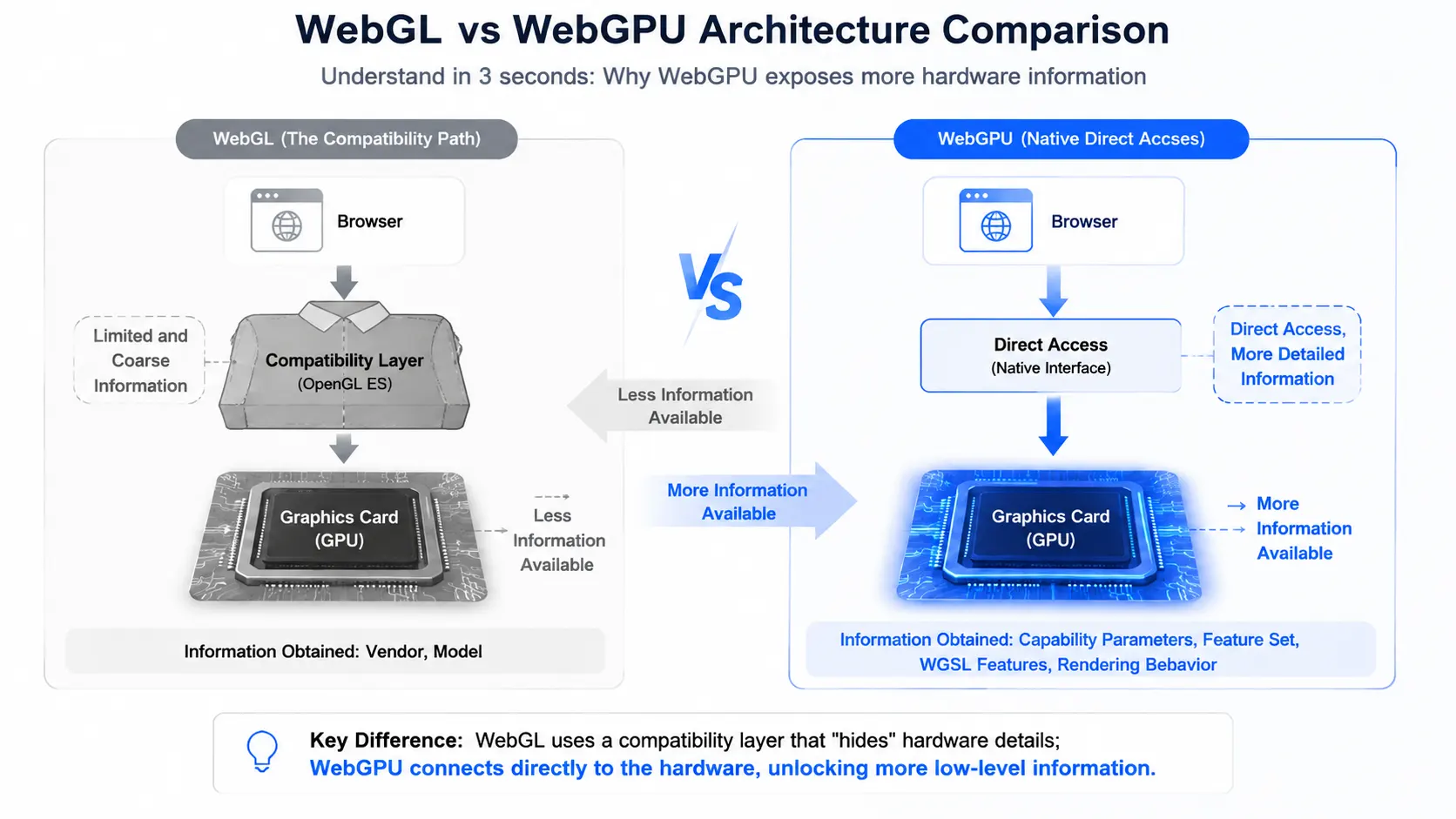
One-sentence summary:websites can read more GPU information, so the fingerprint space grows too.
What Exactly Does a WebGPU Fingerprint Expose?
What it exposes beyond WebGL is not just "a name," but a whole "hardware capability portrait." A WebGL fingerprint mainly relies on one extension API to read the vendor and model (explained in thisWebGL fingerprint explainer); WebGPU's collection surface is much wider, mainly coming from four dimensions:
- Device capability parameters (limits): a set of values such as maximum texture size, maximum buffer size, and maximum compute workgroup dimensions. This set is jointly determined by GPU model, driver version, and VRAM size — like a string of "hardware capability passwords."
- Feature set (features): which advanced features your GPU supports (texture compression, depth-stencil formats, etc.). What is supported and what is not is a "capability checklist."
- WGSL language features: WebGPU has its own shader language, WGSL, and different browsers and drivers support different subsets — another independent piece of information.
- Rendering behavior: after actually running a shader or texture sampling, different GPUs produce subtle differences in numeric precision and output — similar in concept to Canvas fingerprinting, but deeper in dimension.
WebGPU four-dimension collection diagram
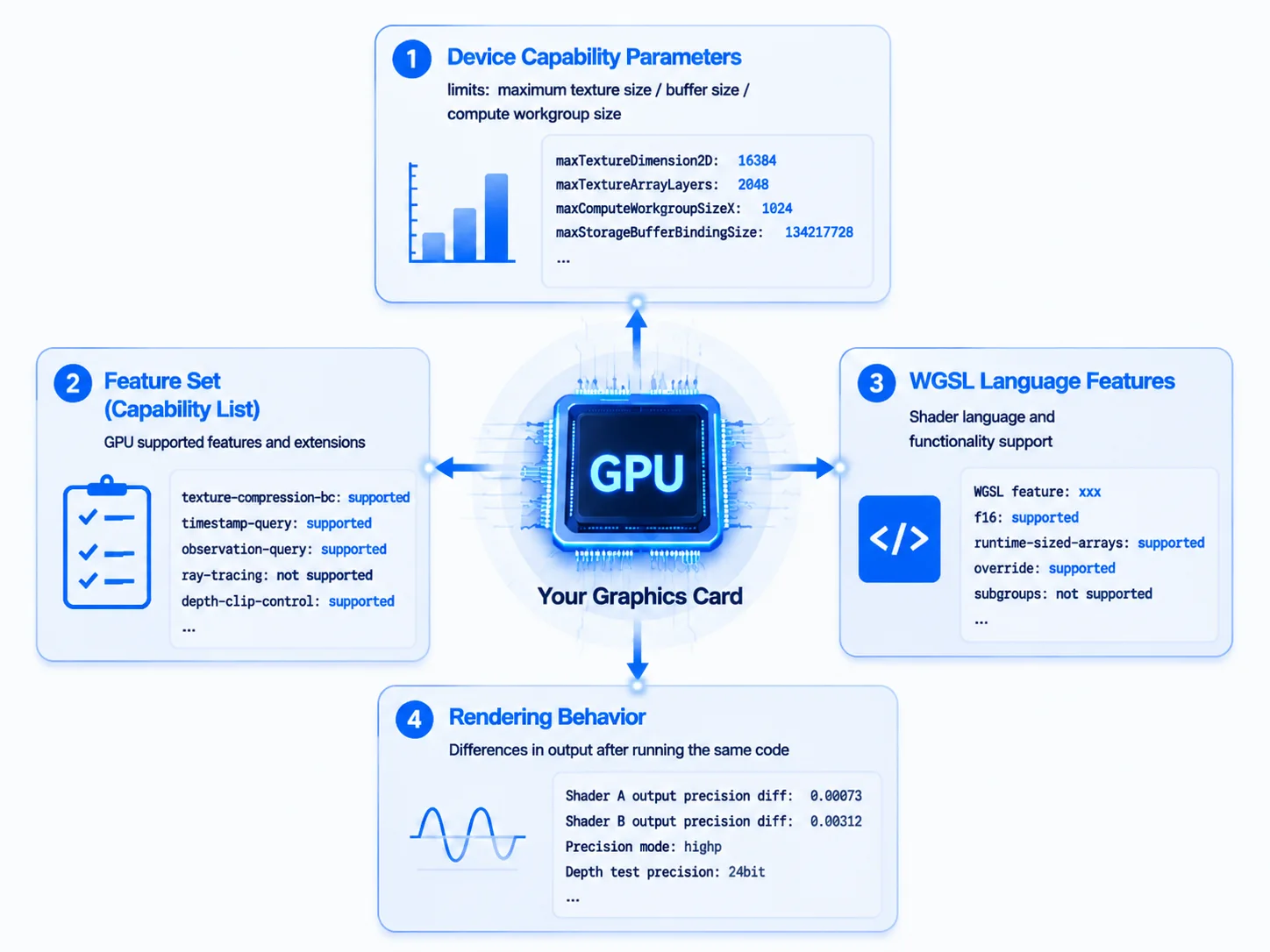
There is a counterintuitive point here:for privacy reasons, Chrome anonymizes the GPU vendor and model, blocking the "directly naming" route. But this actually makes the fingerprint more covert — websites do not even need to know what your GPU is called; with the four sets of capability parameters above, they can already distinguish you from other devices.
Why Is It Called a "High-Entropy" Fingerprint?
An analogy: a WebGL fingerprint is like "reporting your ID number" — direct, but single-dimensional; a WebGPU fingerprint is like "measuring height, weight, shoe size, stride, and handwriting, then combining them" — none of them is distinctive alone, but combined, there is almost no second you.
This is what "high entropy" means: lots of information, many combinations, and an extremely low chance of collision.
Academic research on WebGPU fingerprints has grown noticeably since 2023, with multiple papers confirming that it can generate stable, highly distinctive device identifiers, and some experiments even exceed the distinctiveness of the Canvas plus WebGL combination.
Are platforms using it at scale for risk control yet? Not yet — most websites still rely mainly on WebGL. But fingerprints have a characteristic:once collected into a risk control system, they are hard to "wash clean." Bringing GPU parameters under management early costs little and pays off long-term — if you wait until platforms deploy it at scale, you may have to rebuild the entire environment system.
How to Check Your Own WebGPU Fingerprint?
Two steps are enough to see how much your browser exposes:
- Open a WebGPU fingerprint detection page. In Chrome or Edge, visit a WebGPU-related detection website (such as the webgpufingerprint open-source project); the page runs a piece of WebGPU code and lists complete information such as capability parameters, feature set, and WGSL features.
- Compare two environments. Create two environments in MasBrowser, launch them, and open the same detection page inside each environment. If the capability parameters of the two environments are exactly the same, the GPU configuration has not been differentiated and you need to check the fingerprint settings.
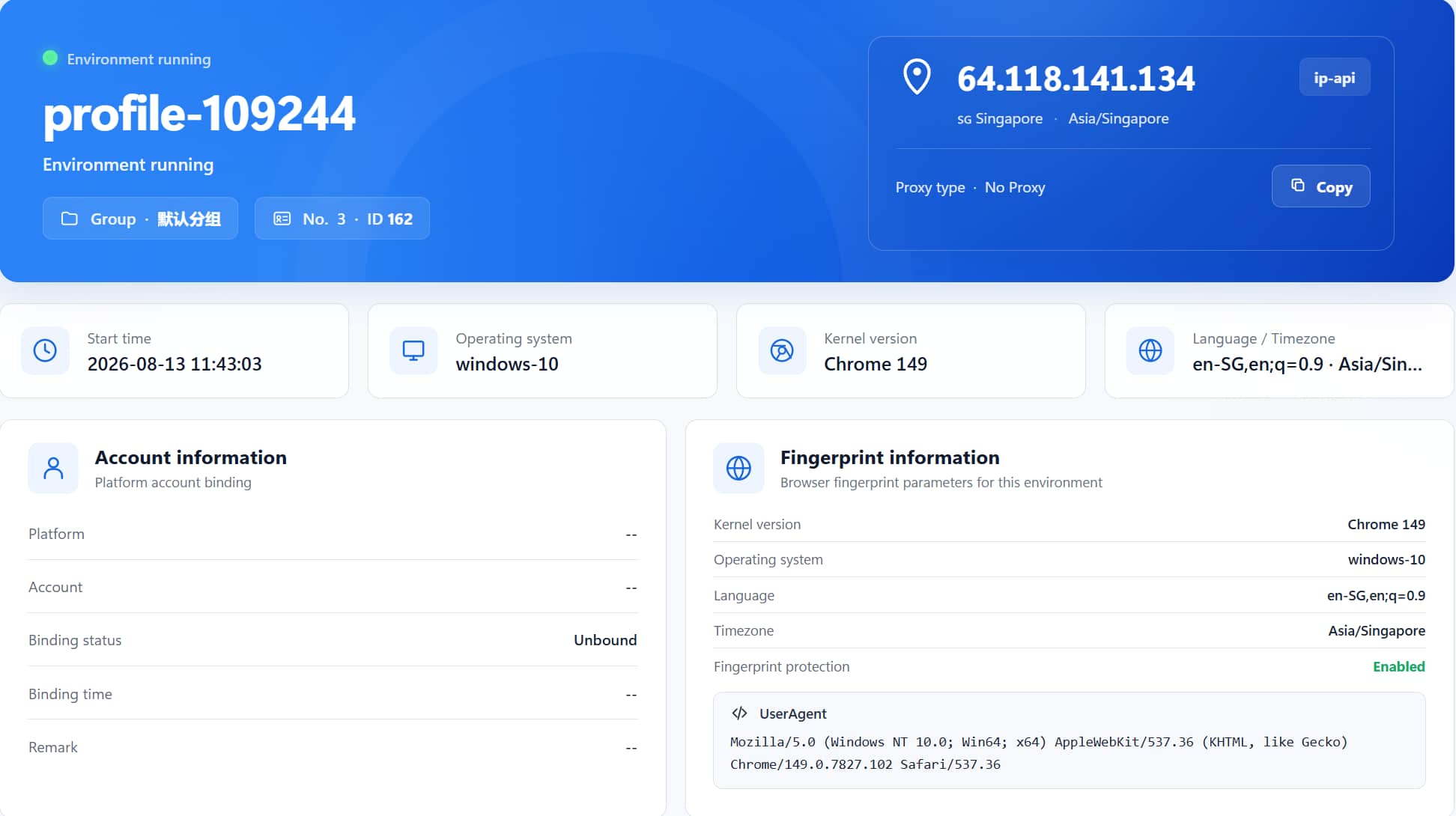
The point of detection is the same as WebGL: if you log into multiple accounts with a regular browser, the GPU capability parameters of all accounts are completely identical — this is the new evidence platforms will use for association determination in the future.
What Can You Do Now?
First, rule out two "wishful" approaches:
- Disable WebGPU: that is cutting off your nose to spite your face; mainstream browsers enable it by default, and disabling it slows down all web pages.
- Change browsers: reading capability parameters is browser-layer behavior, and changing the engine does not solve hardware exposure — same as "changing browsers does not help" in the WebGL era.
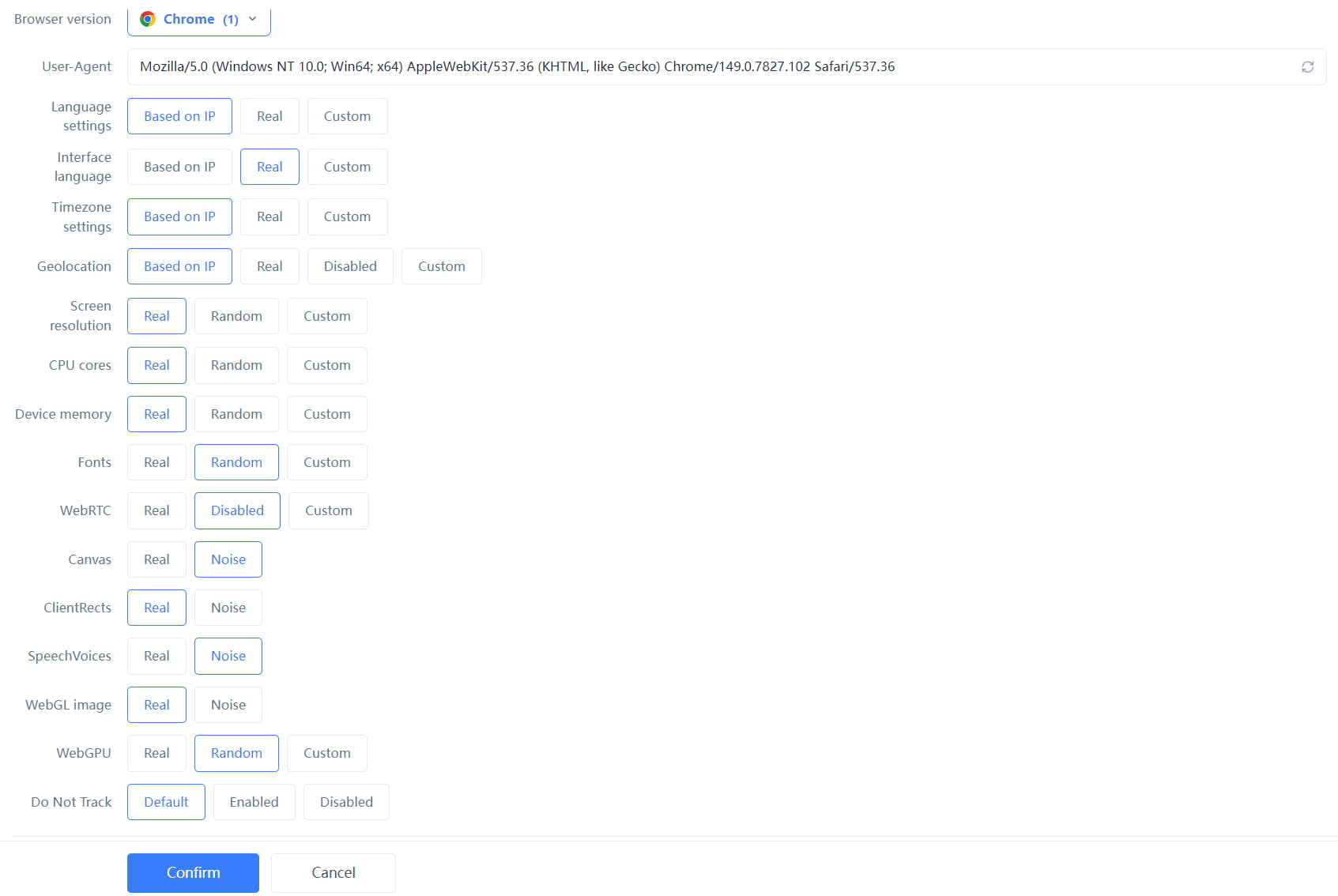
The more practical approach at this stage is to bring GPU-class fingerprints into overall environment management:
- Keep the fingerprint browser kernel up to date. WebGPU is a new standard, and protection relies on continuous kernel adaptation; using an old version is like running naked.
- Bring GPU parameters into consistency management. After the environment is created, try to keep GPU-related options fixed and avoid frequent changes — consistency matters more than single-point protection. TakeMasBrowser as an example: after the environment is saved, fingerprint parameters are solidified and do not drift on restart. The complete independent environment and fingerprint isolation configuration can be found on theMasBrowser multi-account security management page.
- Watch platform detection dynamics. If accounts frequently show anomalies, promptly check whether there is a new detection dimension, and rebuild the environment when necessary.
One sentence:WebGPU protection is still in the "follow and adapt" stage, but bringing GPU parameters into consistency management is a no-brainer now and a rework later.
FAQ
Will WebGPU replace WebGL?
In direction, yes, but it takes time. Chrome and Edge already support it by default, Safari and Firefox are catching up gradually; a large number of existing sites still rely on WebGL, and the two will coexist in the short term. For protection, both need coverage.
Do I need to worry about WebGPU fingerprints now?
No need to panic, but worth managing early. Not many platforms use it for risk control yet, but Chrome has already popularized the capability, and research has confirmed its fingerprint value — waiting until platforms adopt it at scale will be too late.
Do fingerprint browsers support WebGPU protection?
Mainstream fingerprint browsers are all following up. WebGPU is a relatively new standard, and protection capabilities improve gradually with kernel version iterations; choosing a product with timely kernel updates is more reliable.
Can Chrome's anonymization protect my WebGPU fingerprint?
Not completely. Chrome does anonymize the GPU vendor and model, but capability parameters, feature sets, WGSL features, and rendering behavior remain readable, and combined they are enough to form a high-entropy fingerprint — anonymization only blocks the "directly naming" approach.
Conclusion
WebGPU is the direction of browser technology evolution and the new battleground of fingerprint identification. It exposes more than WebGL, is harder to disguise, and is quietly seeping into every user's environment as Chrome spreads.
For multi-account operators, the best strategy is not to wait until risk control goes live, but to bring GPU parameters into environment consistency management now. The free plan already includes 2 environment slots.Download MasBrowser, create an environment and check the GPU-related configuration — get ready for the next-generation fingerprint in advance.