New AliExpress Store No Traffic? A 90-Day Store Weight Building Timeline
Day 25 after opening, and your AliExpress store's backend exposure is still stuck at three digits while the order column sits at zero — the most common opening for new AliExpress sellers. What makes it more unnerving: the backend shows no violation warnings, your listings are all live, yet the traffic just won't move.
Key takeaway: A new store with no traffic usually isn't a mystery — it's a weakness in one of the four assessment areas of "products, fulfillment, service, and account security," combined with a misread of the 90-day support period. This guide first gives you a 10-minute self-check sequence, then a month-by-month weight-building timeline; if you're launching 2-3 new stores at the same time, there's a multi-store scheduling playbook at the end — multi-store is where anti-detect browsers truly shine.
New store no traffic? Check these four things in this order
AliExpress weighs store search ranking as a combined score across four dimensions — product quality, fulfillment, service, and account security. Self-check in the order of "products first, account second," and fix the shortest plank first.
- Check 1: Product information completeness. Missing attributes, low-resolution main images, and titles stuffed with invalid keywords all drag down a listing's initial weight. Completing the information on 30 listings beats publishing 200 poor ones — bulk listing at scale is precisely where product information quality violations concentrate.
- Check 2: Category placement and duplicate listings. A wrong category means exposure to the wrong audience, and changing categories re-ranks your product; repeatedly posting links of the same product for exposure is explicitly banned search manipulation.
- Check 3: Fulfillment and service metrics. Shipping timeliness, logistics posting rate (how quickly parcels go online after pickup), the three DSR scores, and dispute initiation rate — in some categories' seller recruitment and campaign assessments, the "5-day posting rate over the last 30 days" is a hard threshold written into the rules. Roughly 70% of AliExpress buyers place orders without contacting the seller and open disputes directly when problems arise, so your response speed in seller messages is the valve on your dispute rate.
- Check 4: Account security. Whether your login devices and IP are stable, and whether there's any suspicion of "registering or controlling other accounts at the same time." AliExpress platform rules explicitly state that sellers suspected of controlling multiple accounts can have accounts frozen or even removed — multi-store sellers should take this check especially seriously (separating payment and identity information is another topic; this section focuses on the device and network layer).
If none of the four checks turns up hard flaws, it's most likely just a matter of time: the industry consensus is that new stores get roughly a three-month traffic support period, with "new store" style search weighting early on that tapers off in the middle and later stages, when your own data has to take over. Your baseline score at the end of the support period largely decides whether you "transition smoothly" or "fall off a cliff" (for support-period tactics, see operational advice for the AliExpress new store traffic support period; for rule details, defer to the official explanations in AliExpress Seller Center).
The 90-day weight-building timeline: three stages, three jobs
Split the 90 days into three stages, each focused on one big task — that grows a store far faster than "trying to do everything at once."
| Stage | Main task | Key actions | What not to do in this period |
|---|---|---|---|
| Days 1-30 Settling in | Lay a solid foundation | Finish store decoration and category approval; list 30-50 products with complete information; fix your login environment and IP to form a stable login profile | Frequently changing categories, titles, or main images; switching networks — home broadband today, hotspot tomorrow |
| Days 31-60 First sales | Get the first orders through | Tightly control shipping times and make sure tracking numbers are genuinely trackable; handle every seller message from your first 50 orders; sign up for campaigns new stores can join | Fake shipping or fake orders to inflate volume; cutting prices below cost for conversion |
| Days 61-90 Service push | Let service scores take over from support traffic | Watch the three DSR scores and the posting rate; compensate dispute orders immediately; keep stock cycles buffered ahead of big campaigns | Changing IP or devices right before a campaign; mass-delisting slow movers and creating data swings |
The three stages depend on each other: if your environment isn't fixed during settling in, a risk-control review in the first-sales stage wipes your accumulation to zero; if fulfillment falls short in the first-sales stage, you won't even qualify to register for campaigns in the service-push stage. The order can't be scrambled — "fix the environment" belongs on Day 1.
The most common demotion traps — most sellers fall into the third one
Looking back at cases of new-store traffic collapses, the causes are highly concentrated, and most can be avoided in advance:
- Fake or late shipping: a tracking number filled in without any real logistics trace is an explicitly banned transaction violation, and the first month of a new store is when sellers most often take the risk for the "on-time shipping rate" — never take that road.
- Duplicate listings: repeatedly posting links for the same product; getting caught means direct point deductions.
- Frequent product information edits: a traffic collapse right after changing the main image is a recurring complaint in seller communities — getting it right once before listing beats repeated fiddling afterward.
- Slow dispute responses: once the dispute rate ticks up, search weighting drops with it, and the vicious cycle starts right there.
- A drifting login environment: home broadband at home, office network at the company, mobile hotspot on the go — the backend IP changes every day; or one computer has logged into several stores one after another. Each action looks normal on its own, but stacked together they signal "questionable account ownership."
The first four traps are solved with operational discipline; the fifth is solved with a tool — which is exactly where an anti-detect browser comes in.
Pin down your login environment with MasBrowser: a 5-step setup
"Fixing the environment" means the platform sees the same "computer" and the same network exit every time. MasBrowser (official site) turns that environment into a saveable, copyable profile. Five steps:
Step 1: Create a dedicated environment. After installing MasBrowser, create a new environment and name it in a "platform-site-number" format, e.g. ali-ru-store01, so you can tell which store it is at a glance.
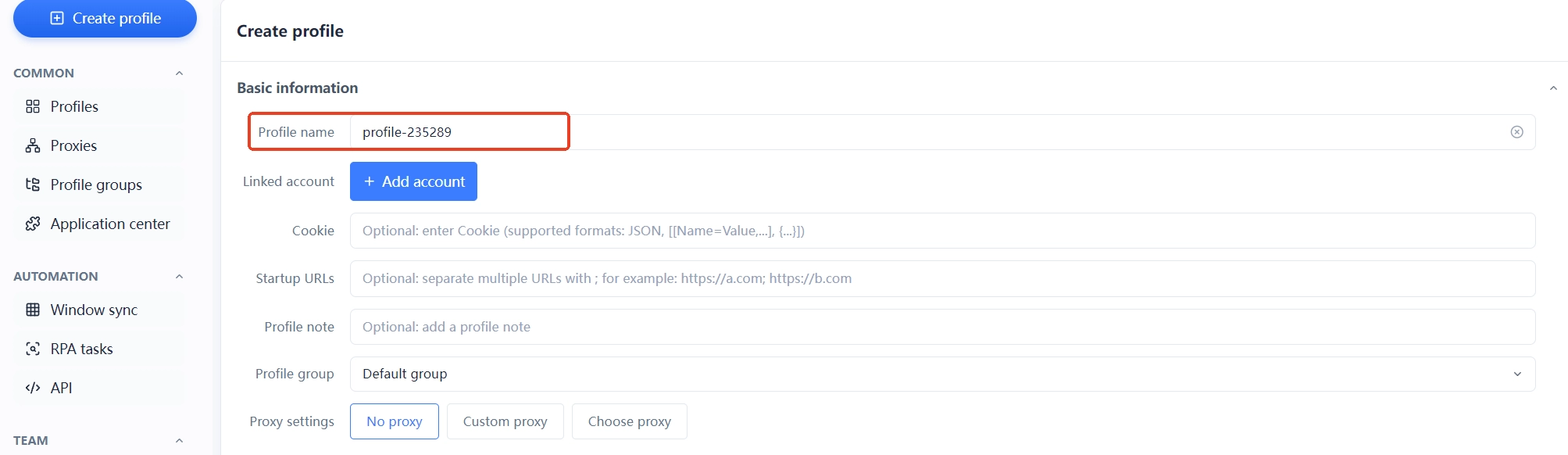
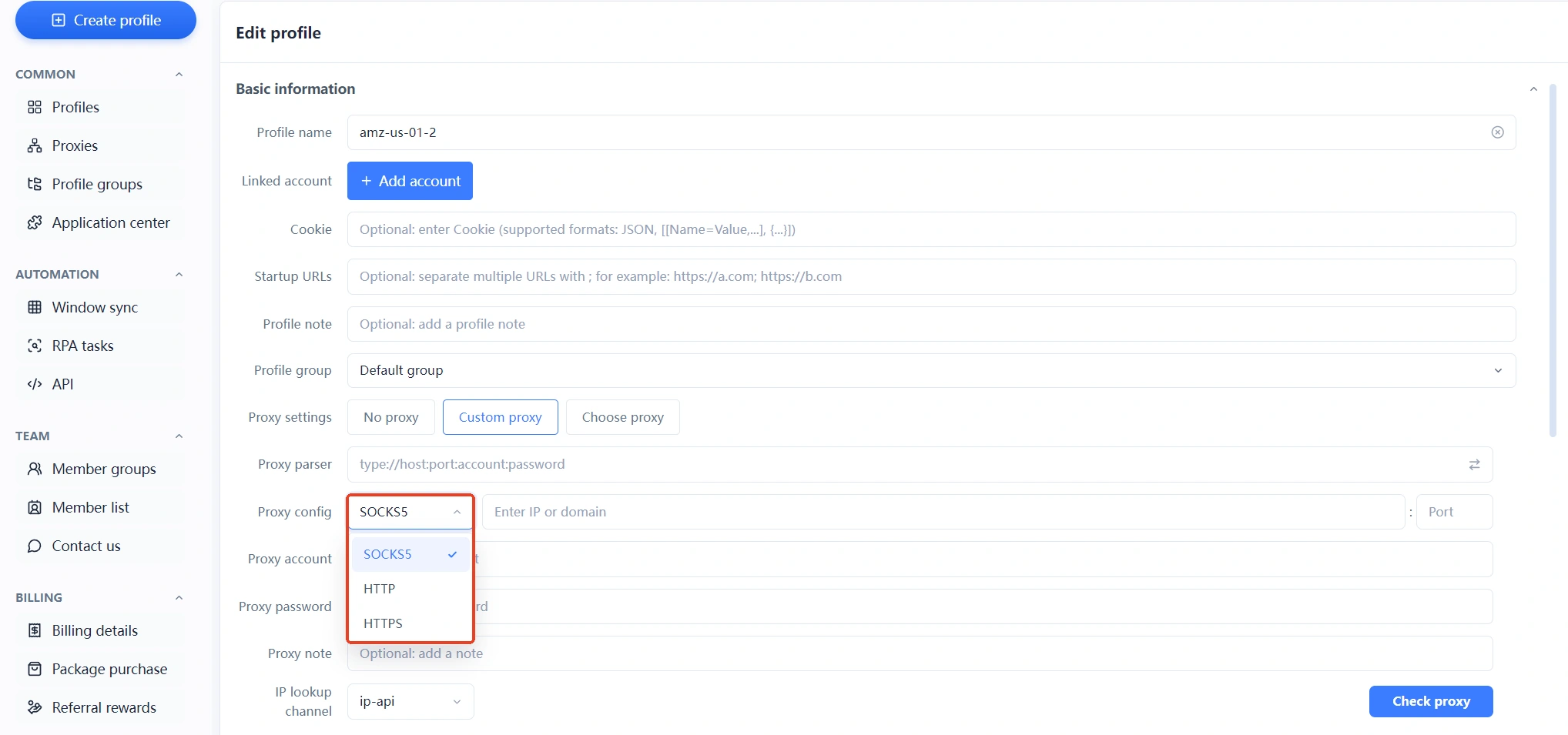
Step 2: Bind a dedicated proxy IP. In proxy settings, enter an IP matching your target market (bind a local IP if you're doing the Russian market); protocols support SOCKS5, HTTP, and HTTPS, and click "Test" after entering to confirm connectivity. For how to choose an IP type, see the difference between residential and datacenter IPs; for filling in proxy parameters, the anti-detect browser proxy setup guide walks through it step by step.
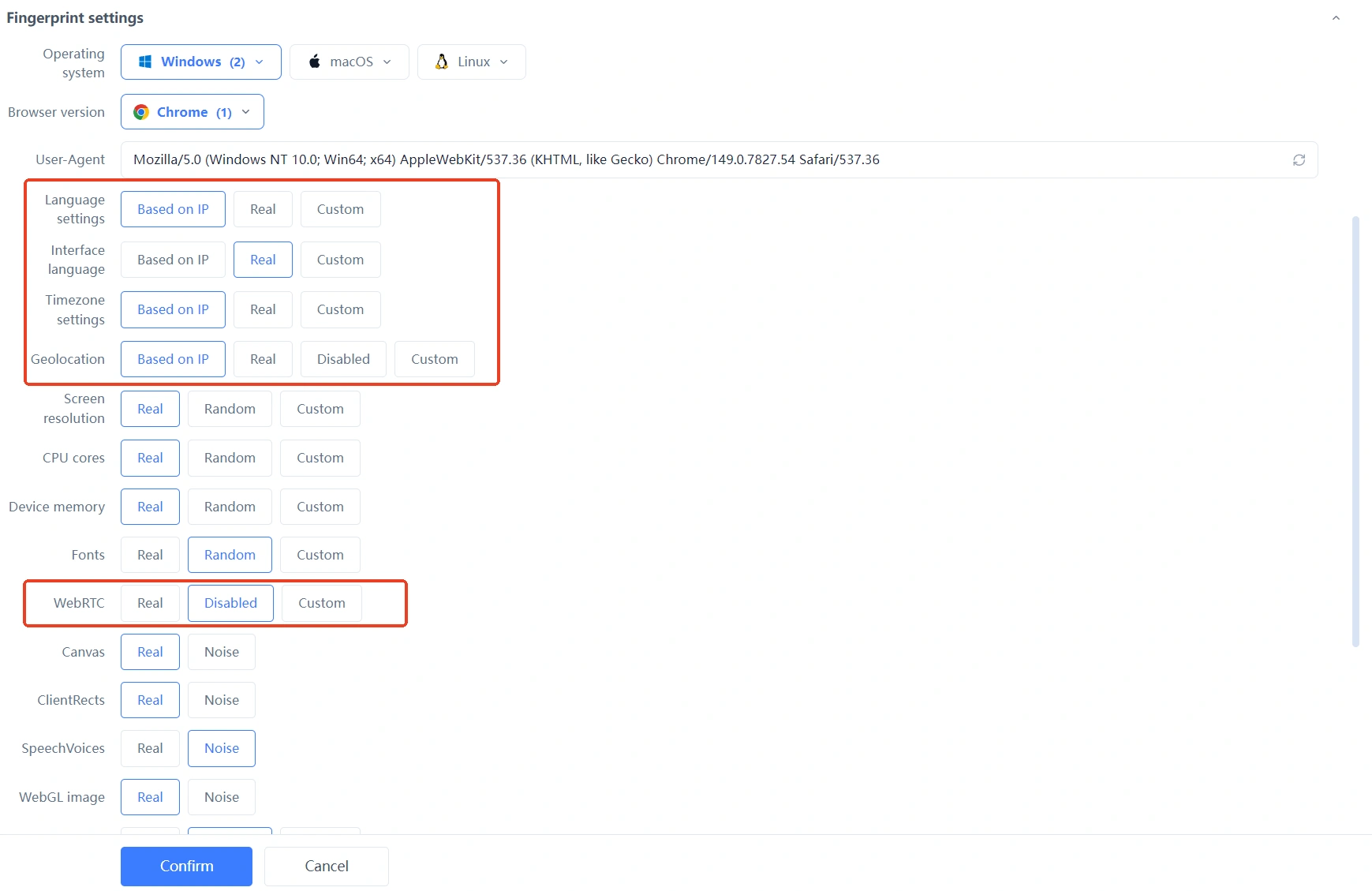
Step 3: Align fingerprint parameters with the IP. In fingerprint settings, set timezone, language, and geolocation to "Based on IP" and WebRTC to "Disabled," so the whole parameter set is self-consistent with the IP exit and you avoid self-contradictions like "IP in Moscow, timezone showing Beijing time."
Step 4: Fix your login habits. From now on, enter the store backend only from this environment — no bare browsers, no mobile hotspots. If an older store was logged in from other devices before, observe the data for a few days after switching before drawing conclusions.
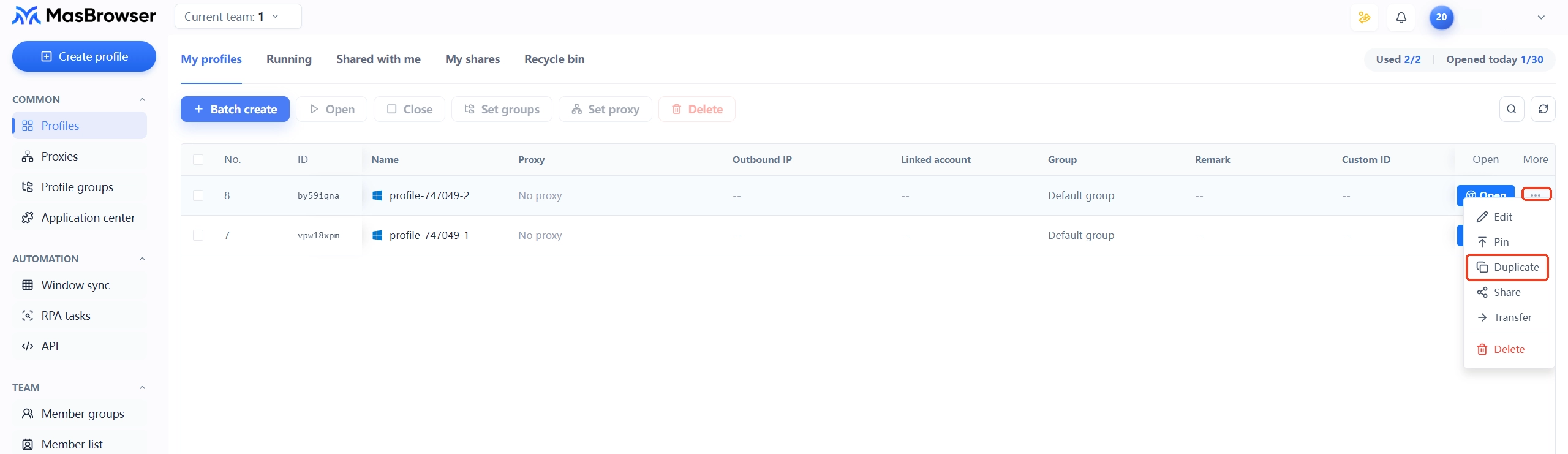
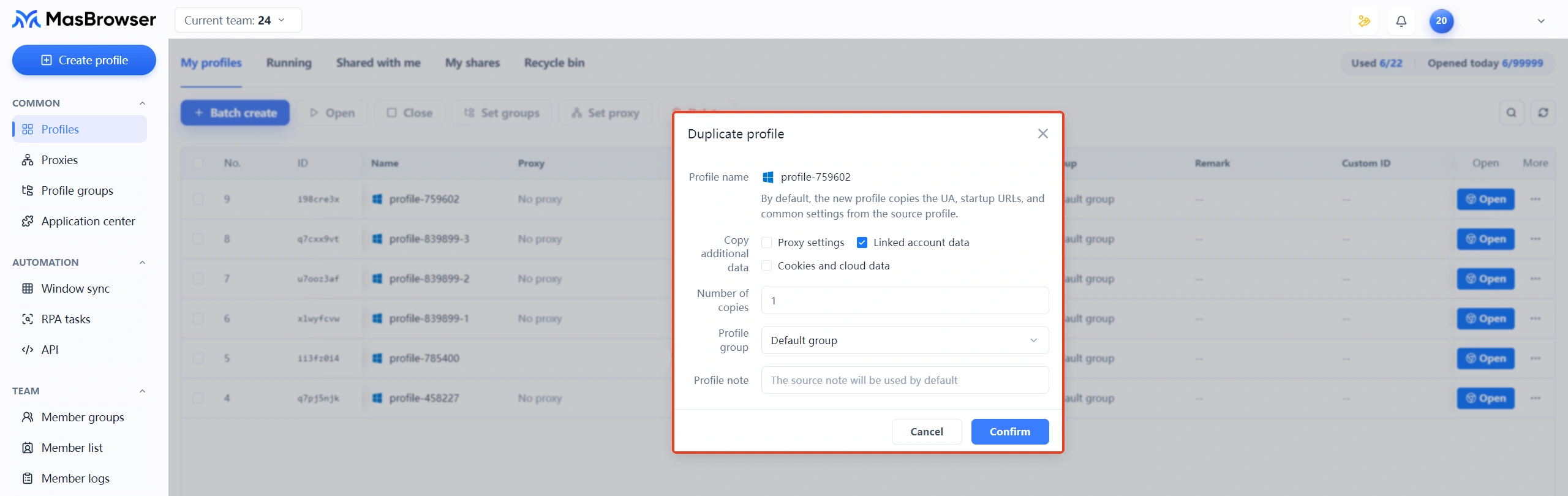
Step 5: Duplicate for more stores. For the second store, duplicate a set of "new environment + new IP" — one store, one environment, one IP; never switch between two stores inside one environment.
Running 3 new stores at once: how to schedule the support period
Multi-store runs the same 90-day timeline; the difficulty shifts from "how to grow" to "how to schedule" — aligned pacing is leverage, while staggering means triple the workload and triple the risk.
A schedule can look like this:
- Days 1-30, settle all three stores in sync. Build the three environments and list the first products in the same week; aligned pacing makes review easy; any store that "opens before its environment is fixed" becomes the weakest link for the whole operation.
- Days 31-60, get one store through first, then duplicate to the other two. Let the first store smooth out its first-order fulfillment and seller-message response workflow, then port the proven SOP directly to the other two — half the effort of three stores each fumbling in the dark.
- Days 61-90, stagger the service-score push. Spread the three stores' campaign stocking and dispute handling across different weeks, so no single week turns frantic with everything slipping through.
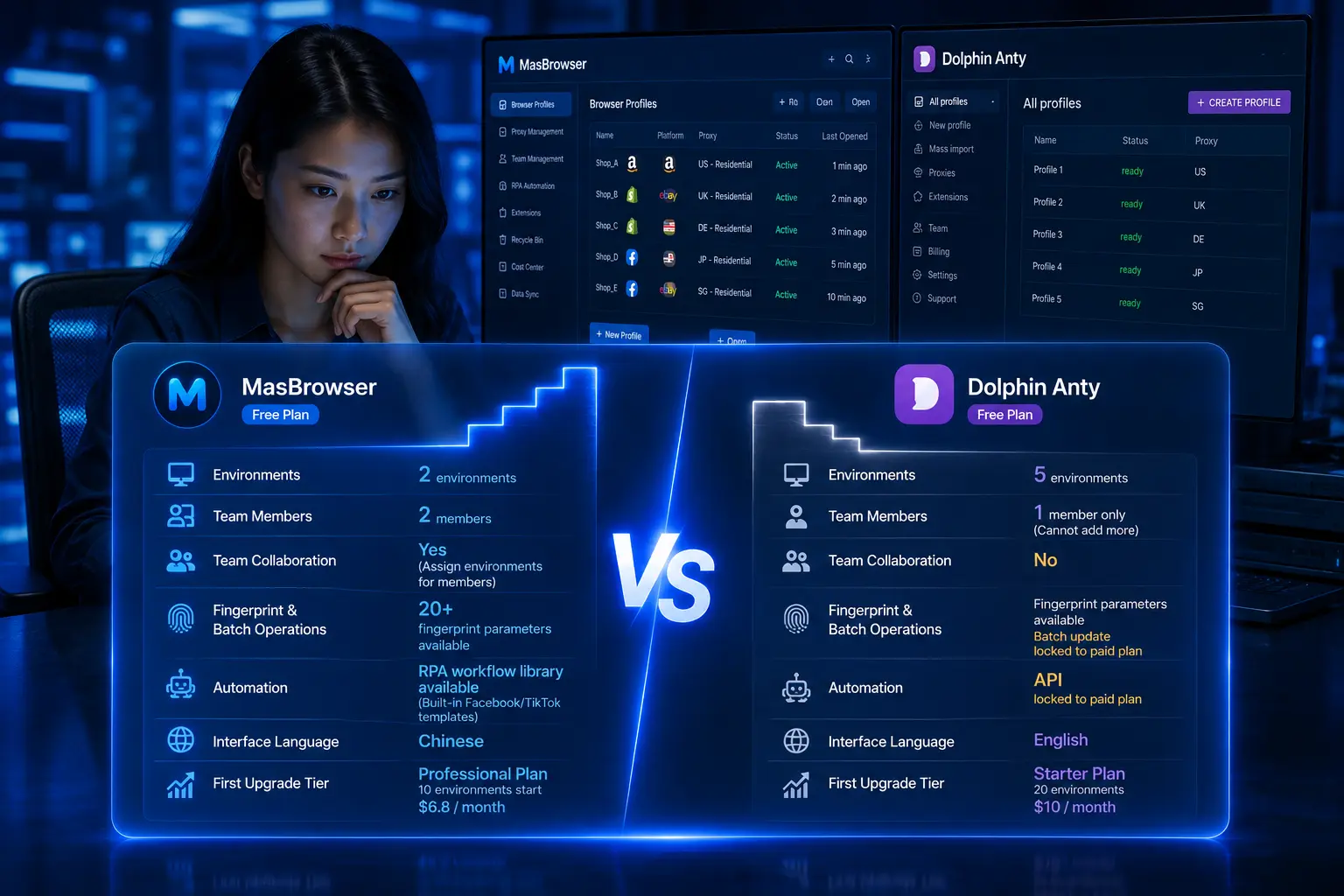
Beyond scheduling, multi-store faces a problem single stores don't: association. That rule — "controlling multiple accounts can lead to freezing and removal" — boils down to one line for multi-store sellers: every store must have a fully independent login environment and IP. This isn't "nice to have"; it's mandatory. In MasBrowser, name the environment list in the "platform-site-number" format and it becomes a store ledger; team scenarios support assigning environments to members with managed permissions, so operators only touch the stores they're responsible for (the free plan includes 2 members and 2 environment slots; after scaling up, the Professional plan is US$6.8/month or US$40.8/year, which works out to as low as about US$0.13 per environment per month); during big campaigns, window sync spreads several store backends across one screen for simultaneous monitoring (full capabilities on the MasBrowser multi-account security management page).
The nurturing mindset isn't only for e-commerce: cold-starting social media accounts is a whole system of its own, and the TikTok new account nurturing guide breaks it down in full — reading the two side by side helps you grasp the universal principle of "stabilize whatever the platform assesses."
FAQ
An AliExpress new store has no exposure — what to check first?
Run the four-step self-check from this guide: first look at product information completeness and main image quality, then check category placement and duplicate listings, then verify shipping timeliness and the logistics posting rate, and finally check whether the login environment is stable. Most "no traffic" cases stall at the first two steps; multi-store sellers should focus on the fourth step.
How long until an AliExpress new store gets stable traffic?
The common industry experience is 1-3 months: days 1-30 lay the foundation, days 30-60 get fulfillment running, and days 60-90 let service scores take over from support traffic. The platform is sensitive to violations, and a new store with abnormal data can be throttled as early as day 15-30 — so pacing matters more than speed.
Can I switch computers or locations while nurturing an account?
Avoid switching on bare devices whenever possible. If you really must, carry the environment configuration over with an anti-detect browser — the environment file stores the fingerprint parameters and proxy settings, so launching the same environment on a new device still shows the platform "the original computer." Switching devices and logging in bare is like reporting an environment anomaly to the platform yourself.
Does AliExpress multi-store require one IP per person?
The core is "one store, one independent IP," not "one person, one IP." Multiple people can manage different stores from their own environments, as long as each store environment's IP, fingerprint, and registration information are mutually independent. Separating payment accounts and identity information matters just as much — sharing any single item can confirm the association.
Can a new store join platform campaigns during the support period?
Yes, but usually with thresholds: some campaigns have hard requirements on posting rate, DSR scores, and positive-review rate — exactly why days 61-90 are about pushing service scores. Qualifying and signing up in the middle-to-late support period beats forcing eligibility early.
Conclusion
An AliExpress new store's traffic never comes from waiting — when there's no traffic, run the four-step self-check first; once the foundation is there, advance through the 90-day three-stage plan; and multi-store players add "scheduling" plus "one store, one environment, one IP." Your baseline score when the support period ends is the gap between you and your peers. The timeline isn't hard — what's hard is not burying account-security mines from Day 1.
If you're about to open a new store, or already have several stores logging in from drifting environments, start from environment isolation. The free plan includes 2 environment slots — download MasBrowser, pin down the login environment for your first store, then advance along the timeline.