How to Do Cross-Border Product Selection and Testing? Lower Trial-and-Error Costs with Multi-Store Environments
Anyone in cross-border e-commerce has probably paid this "tuition": you follow a trend and pick a product someone else sold well, stock it, run ads — two weeks later, zero conversions, inventory stuck in the warehouse, ad money down the drain. Worse, the review reveals — this product was never tested at all, it was purely "shooting from the hip".
Failing at product selection isn't scary; what's scary is failing at the highest possible cost. This article won't tell you "which product will go viral" — it explains how to use a systematic method to push trial-and-error costs to the minimum — plus something many sellers haven't realized: a failed test is sometimes not a product problem, but a test environment management problem.
Where Do the Costs of Product Testing Actually Come From?
First, calculate what "trial-and-error cost" consists of. Based on the author team's review of seller testing practices on Amazon, TikTok Shop, Shopee and other platforms, a failed product test usually loses four things:
- Capital cost: inventory cost, ad spend, logistics fees — the most direct bill.
- Store cost: new stores need nurturing; registration, operations and environment setup all cost; more critically, store weight is a consumable — a store repeatedly listing and delisting junk products loses weight the more you do it.
- Time cost: from listing to getting data, a product takes as little as two weeks or as long as a month. Betting on the wrong product means the team is standing still.
- Opportunity cost: the most invisible and the most expensive — the time spent testing this product could have tested another product with more potential.
Of the four, capital and time are easy to calculate; store and opportunity costs are the most overlooked. The "test everything in one store" approach gambles both store weight and opportunity: the store gets "dirtier" with each test, data becomes less accurate, and eventually you either abandon the store or spend longer rebuilding its weight.
So the essence of product testing isn't "testing luck" but "running experiments" — use the smallest sample and shortest time to verify "does this product have a chance in this market"; if it does, invest; if not, cut losses immediately.
From Selection to Testing: Turn "Shooting from the Hip" into Hypothesis Validation
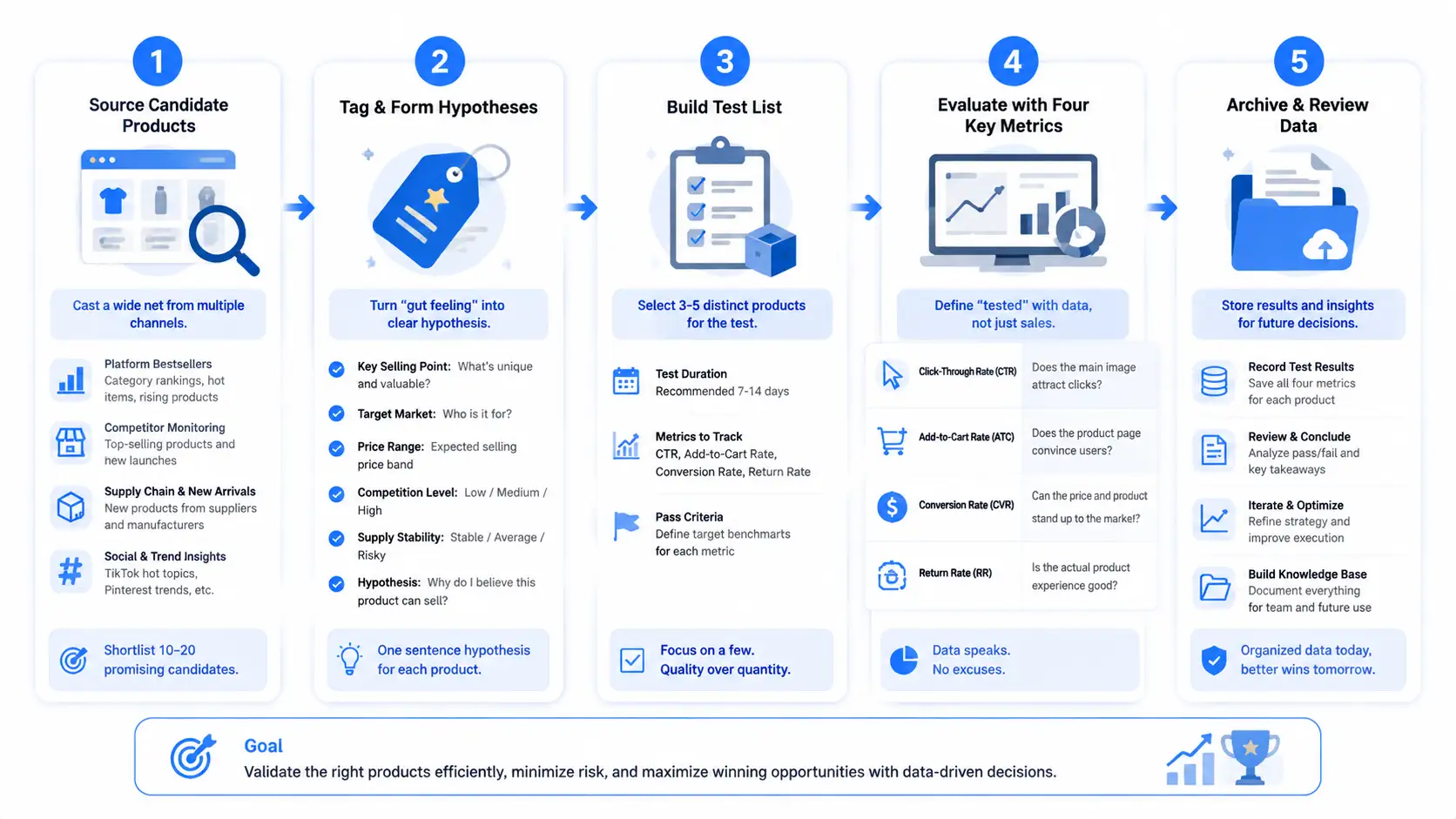
The first step of product selection isn't opening a selection tool — it's turning "feelings" into "hypotheses":
- More selection input sources, never too many: platform category rankings, competitor store monitoring, new supply-chain products, social media trend topics — cross four channels to shortlist 10-20 candidate products.
- Tag each candidate: label every product with "selling point, target market, average order value, competition intensity, supply stability", and state in one sentence "why I think it can sell" — that's your hypothesis.
- Build a testing list: pick 3-5 clearly differentiated products from the candidates to enter the testing period, and write down for each: how long to test, which metrics to watch, what standard counts as "passed".
The key to testing is defining "what counts as tested": it's not "someone bought after shipping" — watch the hard metrics — click-through rate (does the main image attract), add-to-cart rate (can the detail page convince), conversion rate (can price and product strength hold up), return rate (actual product experience). When the testing period ends, fill these four numbers into a comparison table — let the data speak, don't smooth things over with feelings.
How to Arrange Multi-Store Testing? Three Setups and 4 Pitfalls
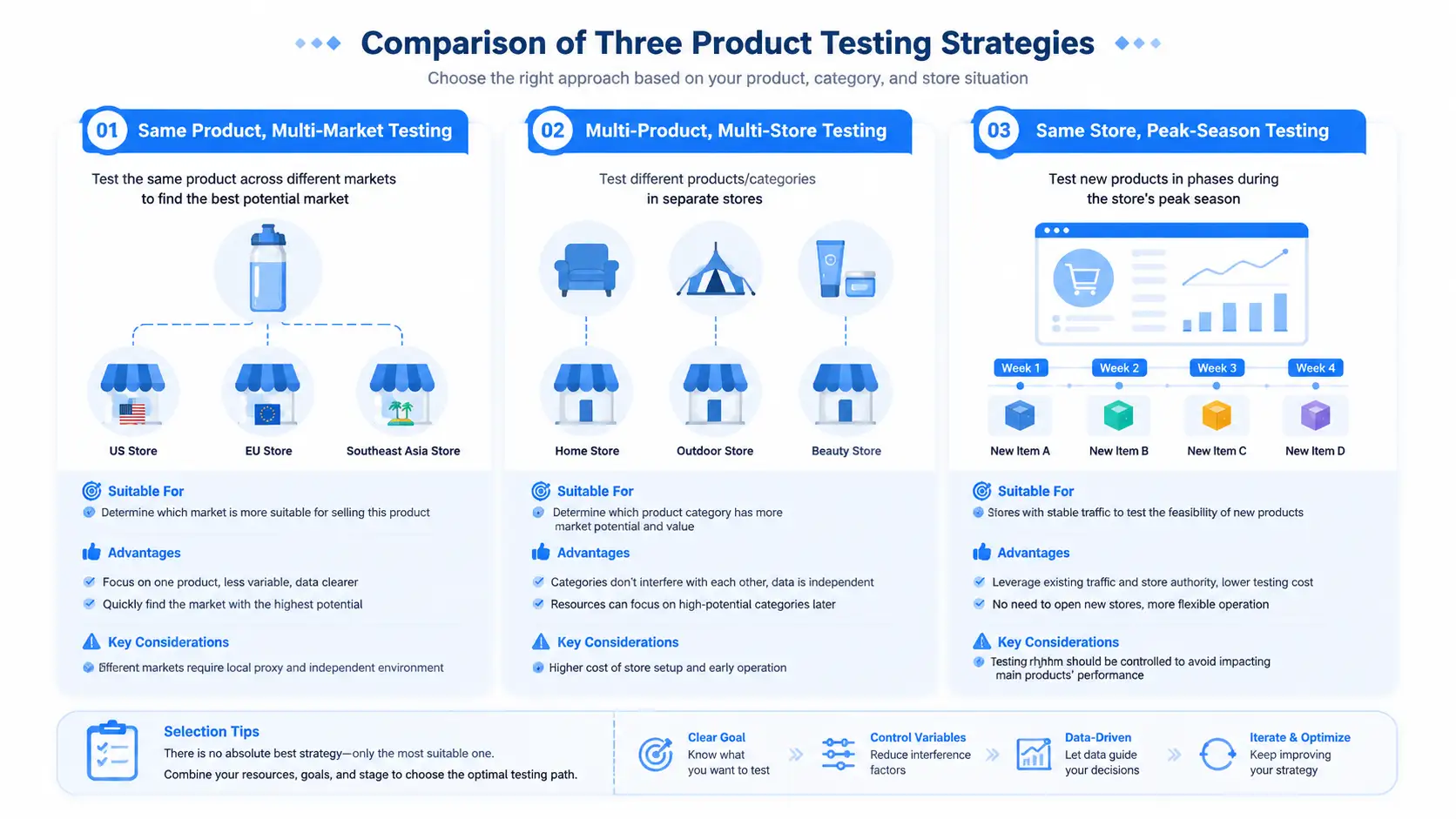
With the selection list ready, next is "which store to test in". Single-store testing is gambling; multi-store testing is experimentation — every store environment is an independent experiment unit. Three common setups:
- Same product, multi-store, test markets: list the same product simultaneously on US, European and Southeast Asian stores to see which market responds best — judges "who this product should be sold to".
- Different products, separate stores, test categories: open one store for each of three different-category products — no interference — good for cold-start phases when you're not sure which category to enter.
- Same store, staggered testing: a mature store rotates new products weekly while the store itself stays put — good for established stores with steady orders, using spare traffic to carry new products.
The premise of multi-store testing is complete isolation between stores: environments, IPs and fingerprints must not be linked, so the data stays clean — if one store tests a winner while another gets flagged by risk control, the results contaminate each other and the experiment data is void (details in Amazon multi-account anti-association; not expanding here). Keep a comparison sheet for every test: product, store, market, listing date, CTR, add-to-cart rate, conversion rate, return rate, ad spend, conclusion — three months later, flip it open and see at a glance which products can fight in which markets.
With the arrangement right, avoid the 4 most common pitfalls of the testing period — high-frequency problems in actual operations; avoiding them in advance reduces invalid tests and wasted resources:
- Pitfall 1: testing every product in one store. Weight gets consumed repeatedly and data becomes less accurate; winners also can't scale alone. Testing should use "sacrificable" stores — don't use the main store as a test bed.
- Pitfall 2: batch-opening stores that share environments. Several test stores log in under the same IP and environment set; when the platform checks associations, the test data of all stores is voided together. Isolation for test stores matters even more than for main stores.
- Pitfall 3: recording only results, not the process. Only recording "this product lost money" without "how it was tested, what data was seen, what adjustments were made" — you'll step into the same pitfall again next month.
- Pitfall 4: finding the winner but losing the environment. When scaling, the original environment, proxy config and ad structure were never archived; you have to rebuild and miss the window.
The first two pitfalls burn money, the last two burn time — testing isn't just "testing", it's "keeping evidence".
Why Can't Ordinary Browsers Manage Multiple Stores During Testing?
Many sellers start testing with the simplest approach: one Chrome logs into multiple stores, multiple accounts share one computer, Excel keeps account info, close it after testing. Short-term it saves trouble, but as the number of tests grows, problems surface one by one:
- Test environments get messy. Testing is experimentation; each test unit should map to one product, one market, one independent environment. Multiple stores mixing in one browser environment — login states interfere, environment info is indistinguishable, and when something goes wrong you can't tell whether the product failed or the environment dragged it down — the test result is directly invalid.
- Test data can't be reused. After a product succeeds, you want to expand markets, add budget, scale up — if the previous browser config, network config, login state and operation records were never saved, rebuilding wastes time — and the window for a winner is often very short, you can't wait.
- Team collaboration efficiency drops. Testing products grow from 5 to 10 to 20; relying only on spreadsheets to manage accounts gets harder: can't find the matching environment, forget which account tests which product, multiple people conflicting.
So testing doesn't need simple "opening more browsers" — it needs a manageable, reusable test environment system — that's exactly the value of environment management tools.
Build a Standardized Product-Testing Lab with MasBrowser
The principle of environment isolation is broken down in What Is a Fingerprint Browser; here we go straight to using it as a product-testing tool. Take MasBrowser as an example, here's how it lands around the testing flow:
- Environment naming = test project code. Name each environment by "product-market-batch", e.g. testing the US market with Portable Blender, batch 2026-08-A, the environment is named
portable-blender-us-a. With unified naming, environments stop being account containers and become experiment codes for every test — quick to locate, easy to distinguish markets, simple for team collaboration.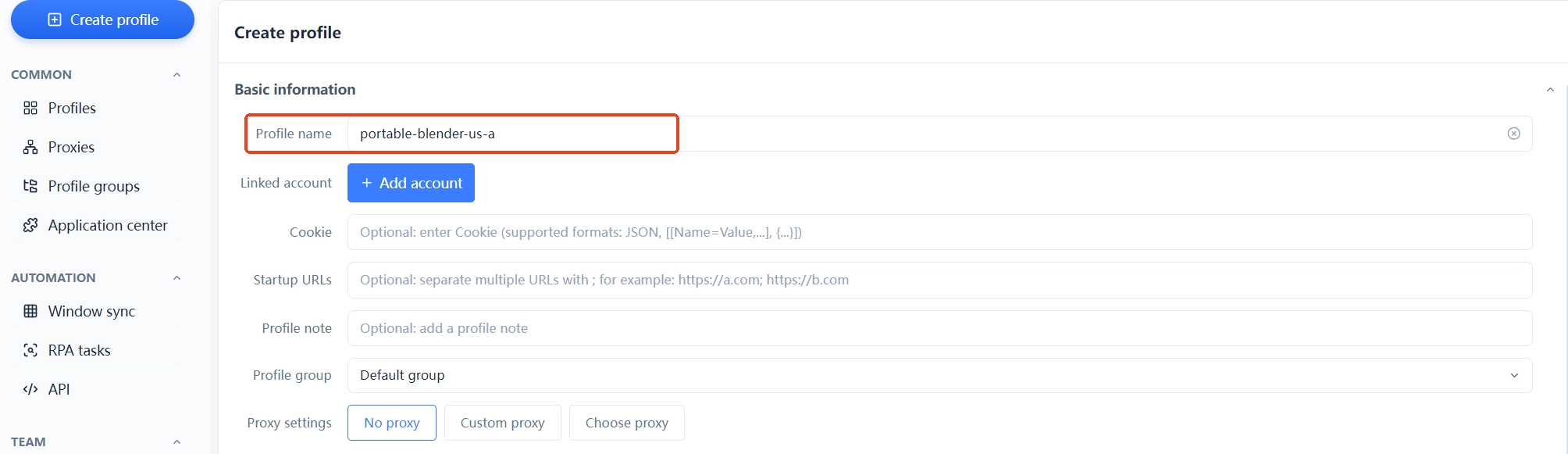
- Independent environment = valid test data. Testing fears fake data most: every test account has an independent browser environment, independent proxy config and independent account management; environment factors don't interfere with results, and results across products and markets can be compared horizontally.
- Archive after testing = failure is also a data asset. Most sellers' habit is to "delete account, delete environment, start over" for failures; the more sensible way is to keep the environment, mark the failure reason, record test data, add it to the product database; winners quickly restore the original environment and keep scaling. Every test becomes the basis for the next decision.
- Unified multi-market management. Testing US, European and Southeast Asian markets simultaneously, with different accounts, networks and strategies — view everything centrally through environment management: which market is being tested, which product performs best, which environment needs continued operations — no more flipping through Excel.
For the complete management logic from store opening to scaling, see complete cross-border multi-account anti-association guide; this article's key takeaway: treat the environment as an experiment tool during testing, not as "ban insurance".
Which Sellers Need Test Environment Management More?
Environment management isn't necessary for every seller, but these situations clearly benefit:
- Cross-border sellers testing multiple products simultaneously;
- Multi-market operations teams (US + Europe + Southeast Asia in parallel);
- Sellers who need to validate product opportunities in batch and iterate fast;
- Teams with multi-person collaboration needs and account/environment handovers;
- Operations teams that want to accumulate test data long-term and reuse failure experience.
For a single store, single product, long-term stable operation, an ordinary browser may be enough. But when you enter scaled product testing, environment management becomes the efficiency bottleneck — the time to find environments, rebuild environments and the loss of invalidated data all grow exponentially with test count.
FAQ
How long does one product need to be tested before concluding?
Depends on data accumulation speed: low-AOV, fast-ordering categories (like home gadgets) show trends in 2-4 weeks; high-AOV, long decision-cycle categories (like electronics) need 4-8 weeks. Prerequisite: enough sample size — until total exposure reaches a certain scale, data fluctuates and conclusions aren't reliable.
How many products should I test at once?
3-5 recommended, with clear differentiation (different categories, markets, price bands). Testing a dozen at once splits focus and data interferes; testing just 1-2 is too slow and wastes the window.
What do I do with the store and environment of a failed test?
Keep the environment disabled but retained (config and data saved for review); handle the store per platform rules — if usable, downgrade to a backup store; don't rush to deregister, store weight builds slowly and the next testing round may need it.
What metrics should test data mainly look at?
Four core ones: CTR (main image), add-to-cart rate (detail page), conversion rate (price and product strength), return rate (actual experience). Plus a supporting metric — the ratio of ad spend to sales (ACOS), to judge whether traffic costs are worth it.
Should I run ads during the testing period?
Yes, but small budget for trials: the purpose of ads during testing is "buying data", not "making money"; small budgets test clicks and conversions and are much faster than waiting for organic traffic. Scale up budget only after data meets targets.
Conclusion
What testing really wastes isn't one failure — it's starting over after every failure. Leave behind environment configs, product data, market feedback and failure reasons from each test — they become important assets for the next round of selection.
There's no universal formula for product selection, but there is a methodology: turn "shooting from the hip" into hypothesis validation, turn single-store betting into multi-store experiments, turn every test into archived data. MasBrowser provides independent environment management to help cross-border sellers manage multiple testing accounts, markets and testing cycles — it's not an "anti-association tool", it's your product-testing experiment environment management platform.
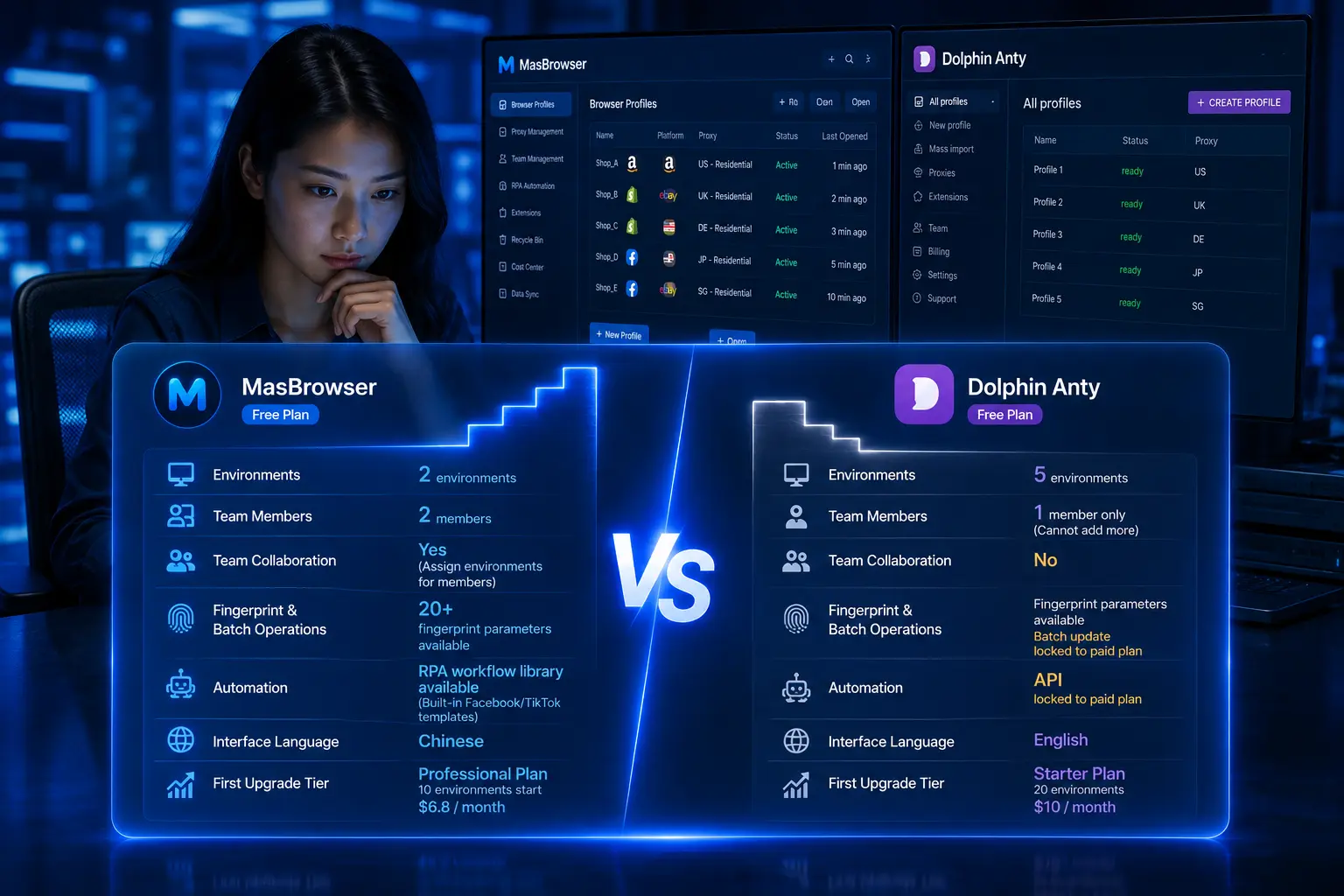
Start with your first test product and build your own testing lab. The free plan includes 2 environment slots: download MasBrowser, try the environment management flow first, and archive your first batch of test data.