How to Read Your Whoer Anonymity Score: Why 90%+ Is the Safety Line
Let's start with a real scenario.
Xiao Wang runs cross-border e-commerce with three stores in three environments. Proxies and fingerprints are all configured, and he feels good about himself. Until one day, he opens Whoer and casually tests — a big 67%. He freezes: what does this number mean? Did I configure something wrong? Will my accounts disappear someday?
He later learns this number is called the anonymity score (shown as "anonymity level" in Whoer's UI; in English it's the leaks score). It's like an "environment credit score": the higher it is, the more your IP, network, and browser look like an ordinary user to websites; the lower it is, the more you look like "machine operation".
This article explains it thoroughly: what the anonymity score actually is, how it's calculated, why 90% is the safety line, and what to fix when the score won't go up.
What Exactly Is the Whoer Anonymity Score?
In one sentence: the anonymity score is a "safety score" Whoer gives your environment — 0 to 100%, measuring "whether your environment looks like a normal user to websites".
Open whoer.net and the score is usually right in a prominent spot on the homepage. Its official positioning is the "leaks score": it detects whether you leak DNS, WebRTC, or IP when using a proxy or VPN — leaks that expose your real location and identity. Fewer leaks, higher score; more leaks, lower score.
You can think of it as the "overall health index" on a check-up report:
- High score = all indicators normal; the doctor (platform) takes one look and lets you go.
- Low score = some indicator lights a red flag; the doctor (platform) asks you to "stay for a re-check".
For people running multiple accounts, this score has an even more direct meaning: it's roughly "how platform risk control will view this environment". An account with a low anonymity score is "suspicious network environment" in the platform's eyes — at best it triggers identity verification, at worst a direct ban. So it's not a reference indicator; it's an early-warning indicator.
How Is the Anonymity Score Calculated?
The anonymity score isn't made up on the fly — it's a weighted result of multiple detection items — mainly four groups: leak detection, proxy detection, timezone/language, and fingerprint consistency.
Let's break down what each group tests:
- Leak detection (highest weight): DNS leak, WebRTC leak, IP leak. If your real IP or DNS requests slip outside the proxy tunnel, points drop significantly. This is the "shortest board of the barrel" — leave one leak unplugged and no matter how good everything else is, the score won't rise.
- Proxy detection: Whoer checks whether you're using a proxy/VPN — inspecting request headers, scanning common proxy ports (8080, 3128, 1080), identifying fingerprintable patterns, and distinguishing residential IPs from datacenter IPs. If it identifies "this is a proxy", the score gets stuck.
- Timezone and language match: compares the IP's country with the system timezone and browser language. A US IP with Beijing time and a Chinese interface is spotted instantly and penalized.
- Fingerprint consistency: compares browser request headers (Headers) with values read by JavaScript — UA, language, timezone, screen info. If the two sides don't match, there are "disguise traces" and points are deducted.
A vivid example: say the base score is 100; a WebRTC leak exposing your real IP may directly deduct 30-40 points, a timezone mismatch another 10, and the IP being recognized as datacenter another 15 — stack a few items and that's how 67% comes about. What you see as "one score" is actually several detection points losing points at the same time.
Why Is 90% the Safety Line?
Because 90% is the "platform risk-control trust line" — above 90% means the environment has no obvious anomaly signals and the platform will most likely treat you as a normal user; below 90%, each point corresponds to a suspicion risk control can catch.
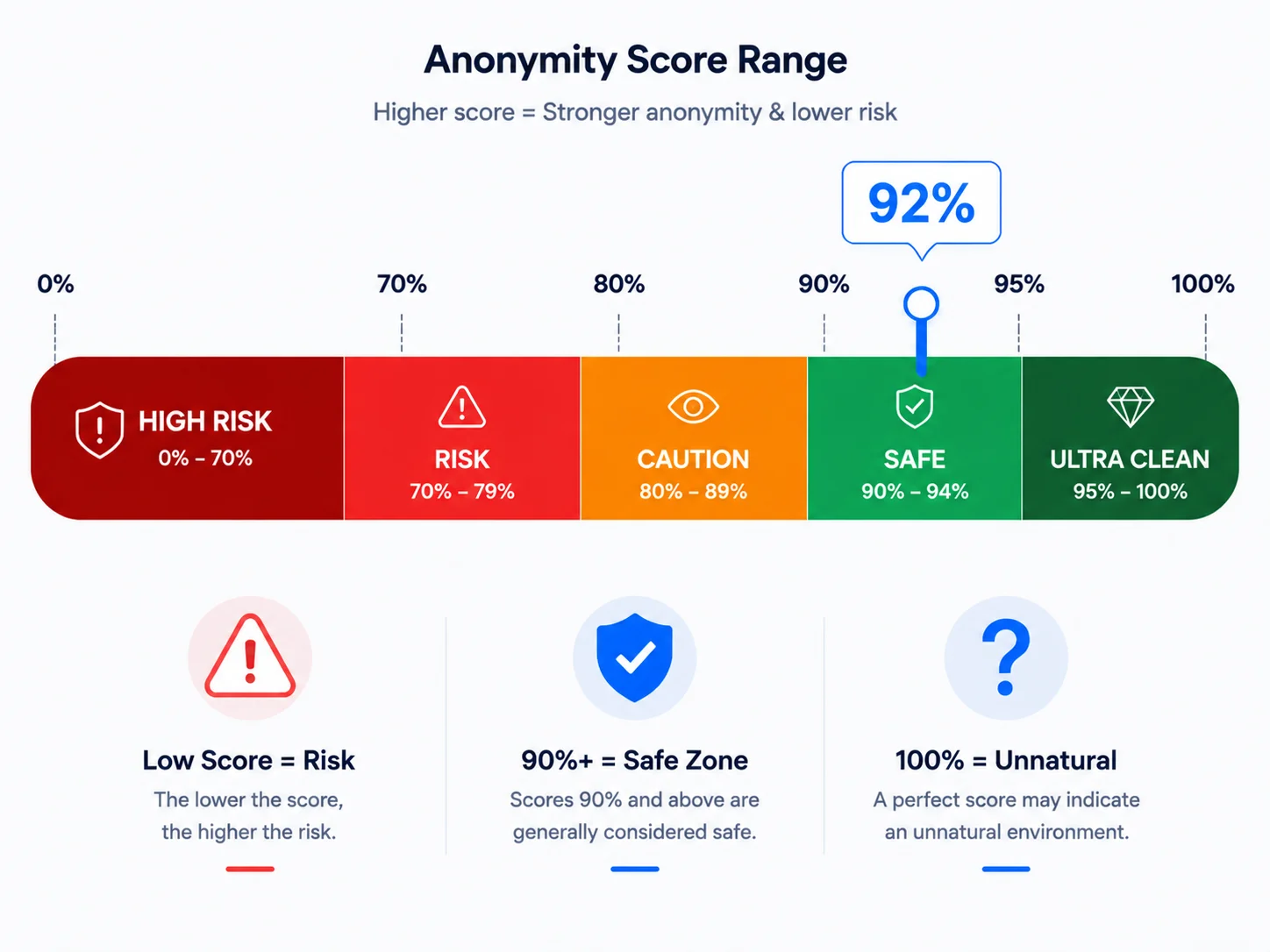
A common way to band the ranges:
| Range | Meaning | The platform's "attitude" |
|---|---|---|
| 95%-100% | Ultra-clean zone, almost flawless | Treated as a normal user (though long-term 100% is itself rare) |
| 90%-94% | Safe zone, the passing line for multi-account operations | Basically no intervention |
| 80%-89% | Observation zone, 1-2 identifiable issues | May "look twice" |
| 70%-79% | Risk zone, obvious leaks or contradictions | Probability of triggering verification rises noticeably |
| Below 70% | High-risk zone, environment basically "naked" | Must fix before logging into important accounts |
Platform risk control logic is simple: low-score account = abnormal environment = high risk, verify first. New accounts are especially sensitive to this score — new accounts have no trust built up yet, and a low environment score means double "suspicion", multiplying the odds of a ban. Older accounts have some "historical credit" as a cushion, but a persistently low environment score will get them watched too.
So for multi-account operations, 90%+ is the floor, not the goal — you can float between 92% and 96%, but don't let it stay below 80% for long.
Anonymity score range banding diagram
Score Won't Go Up? Check These 6 Things
If the score won't rise, 90% of the time it's one of these 6 points. Check in order:
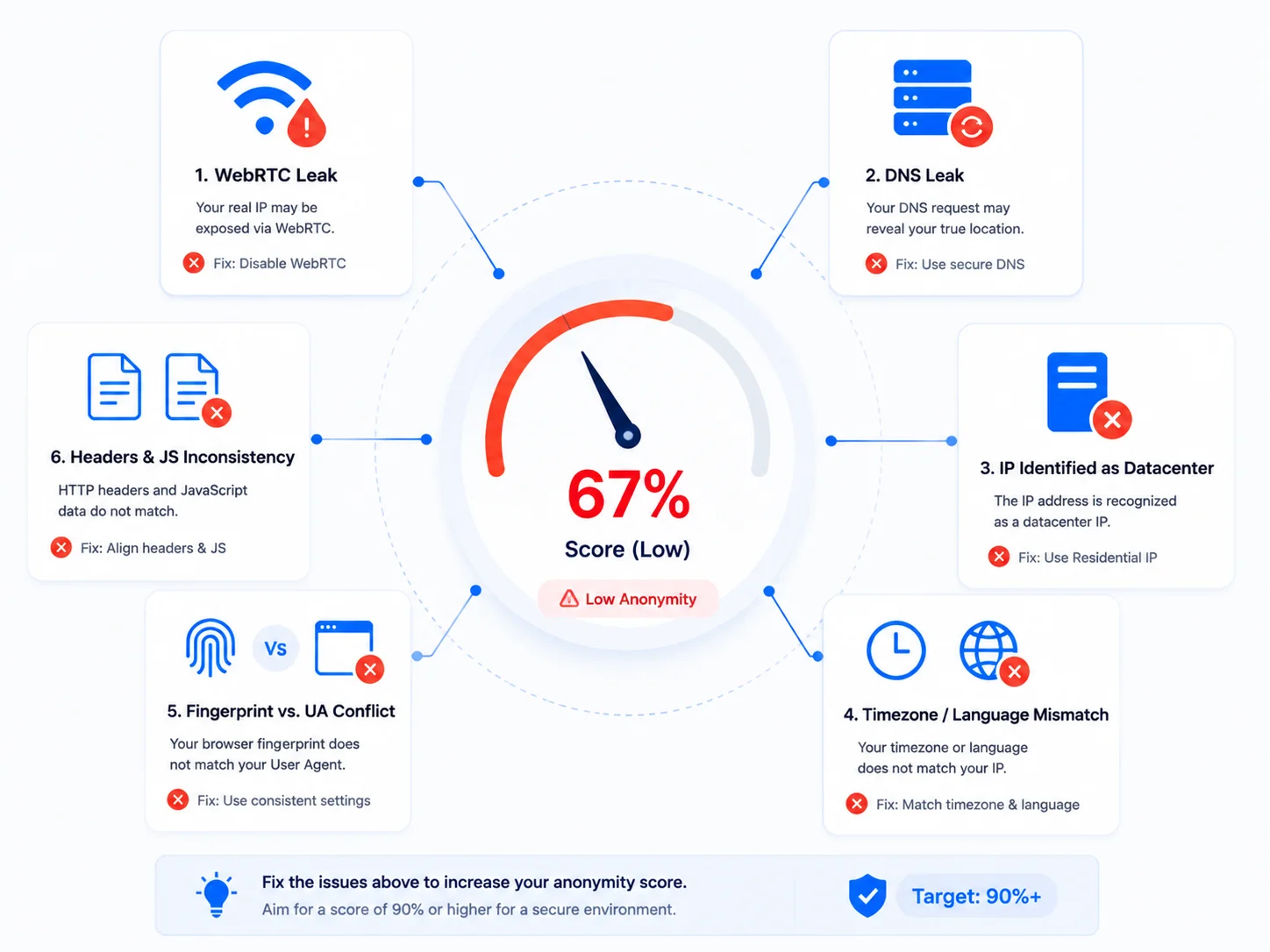
- WebRTC leak (public enemy #1): the browser's WebRTC feature bypasses the proxy and reports your real IP directly, dropping the anonymity score in one big chunk. How to self-check: if Whoer's WebRTC section shows your real IP, that's it. Fix: set WebRTC to "disabled" in fingerprint settings.
- DNS leak: the proxy doesn't fully handle DNS queries, and DNS requests go through your local ISP. How to self-check: Whoer's DNS leak detection section. Fix: switch to a proxy with complete DNS handling.
- IP recognized as proxy/datacenter: datacenter IPs are inherently "suspicious-looking". How to self-check: Whoer marks the IP type. Fix: switch high-value accounts to residential IPs; don't tough it out on datacenter IPs.
- Timezone/language mismatch with IP: US IP with Beijing time and Chinese language. How to self-check: look at Whoer's timezone and language section. Fix: set timezone, language, and geolocation to "configure based on IP" and follow the proxy (the consistency logic is detailed in Timezone and Language Fingerprint).
- Fingerprint contradicts UA: the UA says Windows + Chrome, but Canvas, WebGL, and fonts don't look like Windows + Chrome. How to self-check: compare Whoer's browser fingerprint section. Fix: keep fingerprint parameters as one "same device" profile overall; don't mix and match.
- Headers vs JS inconsistency: Whoer specifically shows these two columns side by side; if they don't match, there are "disguise traces". How to self-check: see whether UA, language, and timezone agree across both columns. Fix: check whether plugins or scripts modified some parameters in the browser.
Suggested check order: plug leaks first (WebRTC/DNS) → then switch to a clean IP → finally calibrate timezone/language and fingerprint, starting with the highest weight for the fastest results.
Six point-deduction causes diagram
How to Get the Score to 90%+?
Using MasBrowser as an example, the core steps to configure a "90%+" environment:
- Bind the right proxy: when creating an environment, bind a proxy IP consistent with the target market, prioritizing residential IPs (the proxy selection logic can be referenced in Residential vs Datacenter).
- Plug the leaks: in fingerprint settings, set WebRTC to "disabled" and set language, timezone, and geolocation to "configure based on IP" for automatic alignment — this step directly fixes the two groups that lose the most points: WebRTC and timezone/language.
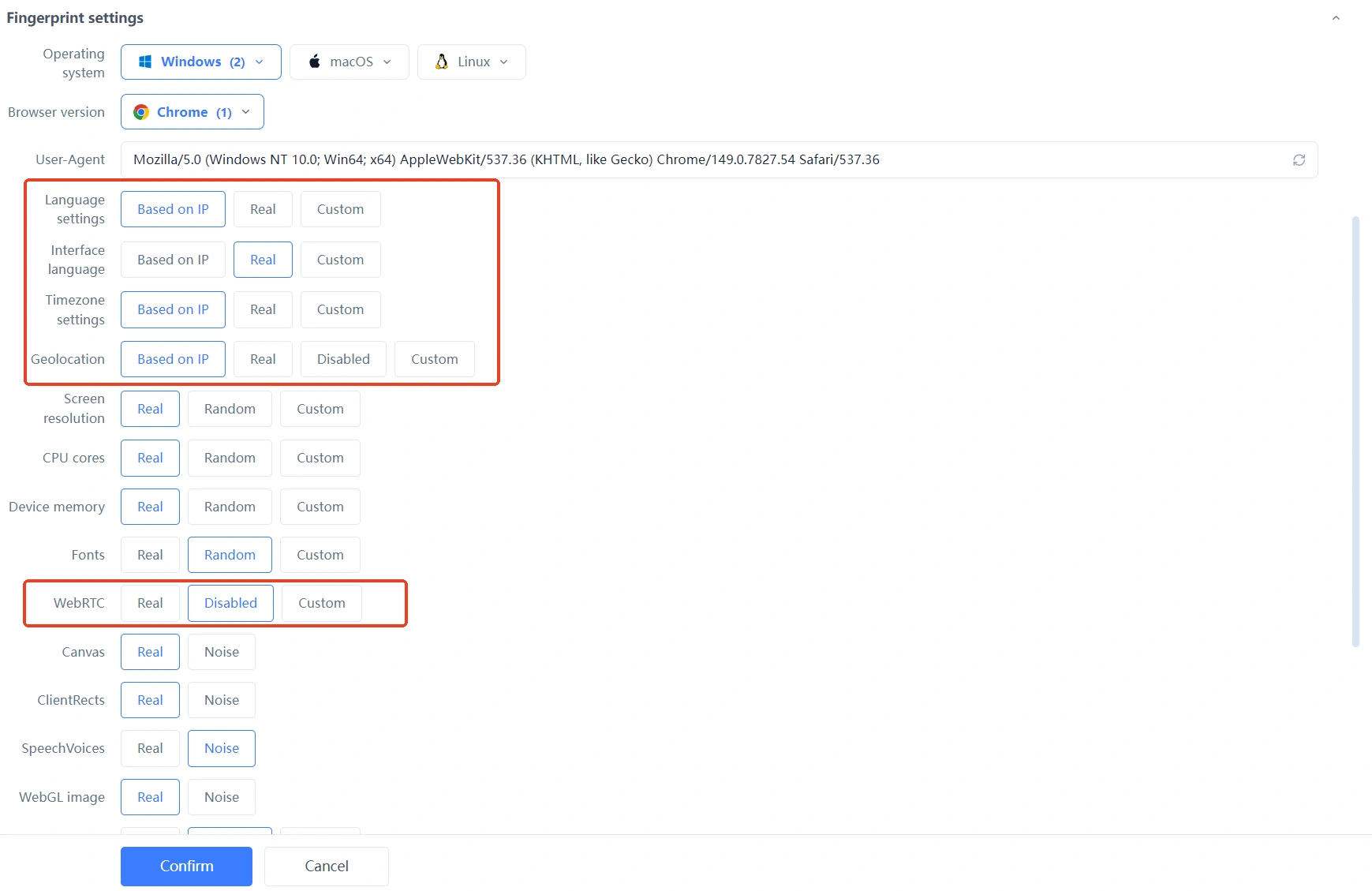
- Launch and re-test: launch the environment, open Whoer, and test the anonymity score once. 90%+ means the environment qualifies; below 90%, go through the 6 points above one by one — fix one, test once.
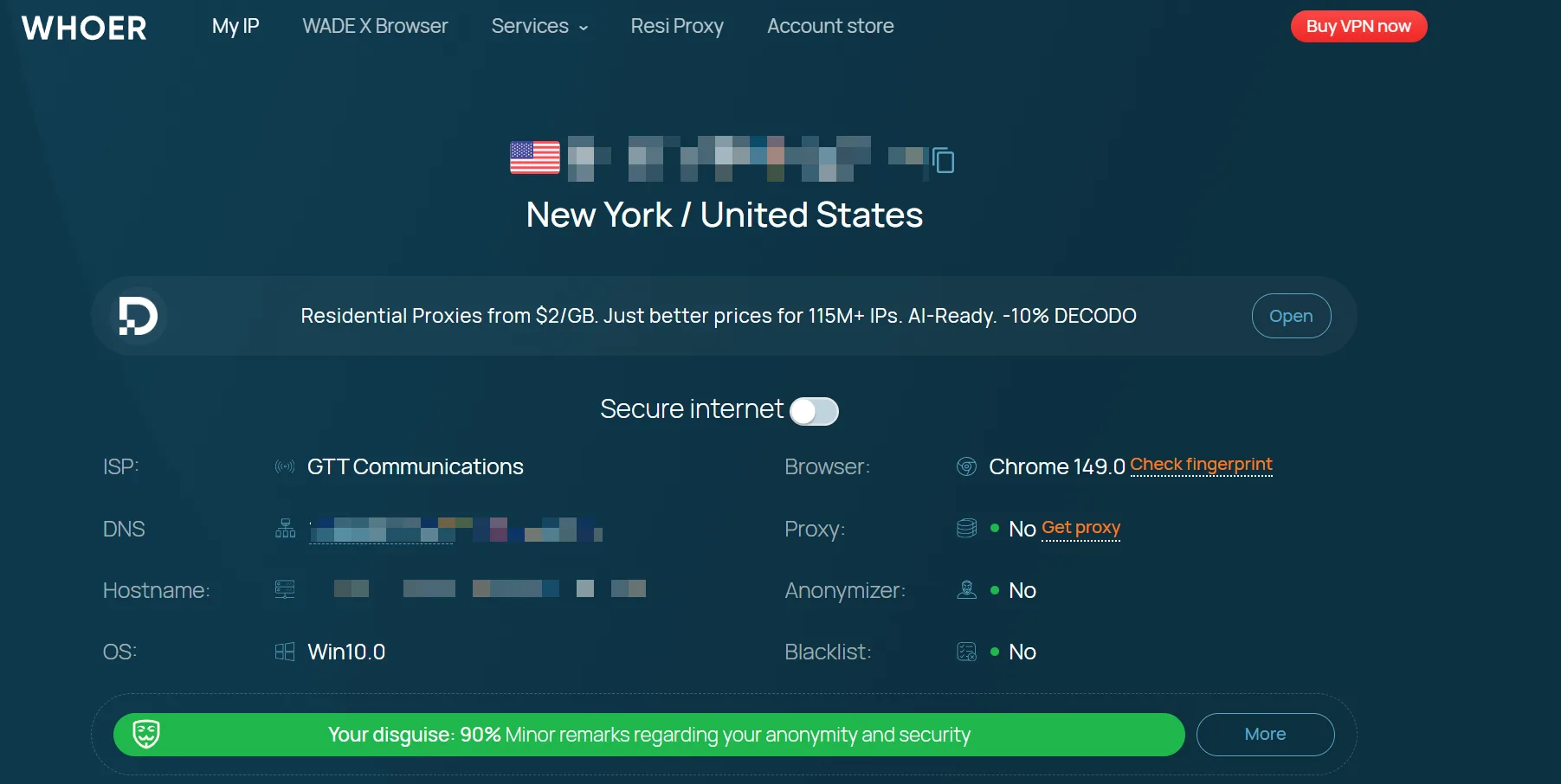 Configuring once and testing once beats testing ten times without changing the configuration. How the three detection tools work together (Whoer for network, BrowserScan for fingerprints, Pixelscan for overall checks) is fully covered in Fingerprint Detection Tools Guide; here we focus only on Whoer's anonymity score.
Can the Anonymity Score "Lie"?
A high score doesn't guarantee safety, and a low score doesn't guarantee a ban — treat the anonymity score as a "reference frame", not a "verdict".
- High score ≠ definitely safe: the anonymity score measures "environment dimensions"; platform risk control also layers "behavior dimensions" — login times, operation rhythm, content behavior. Environment at 98, but a new account adding 50 friends a day will still get watched.
- Low score ≠ definitely banned: a single low reading may be momentary fluctuation (a dynamic proxy mid-rotation). If it stays low for several days across different tools, then the environment really has a problem.
- Different tools giving different scores is normal: Whoer focuses on network leaks, BrowserScan on fingerprint authenticity — different dimensions, naturally different scores. When both tools flag the same problem, that's when it deserves attention.
The right usage: treat the anonymity score as a "check-up report" — when it drops, investigate; when it's stable, keep going; don't stress over single fluctuations.
FAQ
Is an anonymity score of 100% a good thing?
It looks like it, but a long-term stable 100% is itself suspicious — real users' environments always have "noise" (occasional timezone deviations, plugin changes, etc.). A "clean but with details" 90%-99% is more realistic than a perfect 100%.
Will a 70% anonymity score definitely get banned?
Not necessarily, but the risk rises significantly. A low score means the environment has obvious anomaly signals, and platform risk control has very low tolerance for such environments — not "definitely banned", but "much higher odds of being banned". Before logging into important accounts, raise the score first.
Can the anonymity score stay at 90%+ forever?
Yes, but it requires maintenance. Dynamic proxies cause IP changes, and system updates affect fingerprints — re-test weekly, investigate the corresponding dimension (leaks, IP, timezone/language) when the score drops, and adjust promptly.
Will the anonymity score change after switching proxies?
Yes, and it can change dramatically. The new proxy's IP type (residential/datacenter), whether the IP has a bad history, and how well it handles DNS all directly affect the score. Always re-test after switching proxies; don't assume.
Why is my score still low after following the tutorial?
The most common causes: the proxy itself is bad (datacenter IP, flagged IP), or there are parameters left unmodified in the environment (e.g. only the UI language was changed but the system language was missed). Go through the 6 point-losing items one by one, paying special attention to WebRTC and IP type.
Conclusion
The Whoer anonymity score is the "health score" of your account environment — it doesn't guarantee you won't be banned, but it lets you know before logging in whether you look "suspicious" in the platform's eyes. 90%+ is the operational floor; when the score won't rise, investigate in the order "plug leaks → switch IP → calibrate timezone/language".
Making "test the anonymity score" a fixed step after every configuration saves far more hassle than finding out the reason after a ban. The free plan already includes 2 environment slots; download MasBrowser, configure the first environment, open Whoer and test once — the moment you see 90%+, you'll have an intuitive feel for what "a clean environment" means. For complete independent environments and fingerprint isolation configuration, see the MasBrowser multi-account security management page.