How to Build a Cross-Border Seller Tool Stack? Six Layers
Ask anyone selling cross-border: your bookmarks are probably stuffed with a dozen "must-have tools" — product research, keyword mining, ERP, shipment tracking... You save whatever bloggers recommend and subscribe whenever there's a promotion. A year later the tool bills add up, yet two old problems remain: tools each cover one segment with disconnected data and constant switching; worse, all those tool logins sit on one computer with one IP, and your store gets banned anyway.
Here's the conclusion up front: the right way to build a seller tool stack isn't "impulse buying" but "layered construction" — first clarify how many layers your business has and what each layer must solve, then place tools into each layer. And beneath all layers sits the most overlooked one: the account layer. Get it wrong and everything above it is wasted. This article breaks the cross-border seller tool stack into six layers: what goes in each, how many tools each stage needs, and the three most common gaps.
The Seller Tool Stack at a Glance: Six Layers, One Job Each
Break down a cross-border seller's daily work and the tool stack falls into six layers (tools listed are examples only; features are subject to each official site):
- Product research layer — solves "what to sell": all-in-one research tools like Helium 10 cover product research (Black Box), keyword mining (Cerebro), and listing optimization — usually the first tool marketplace sellers install on Amazon or Walmart.
- Listing and order layer — solves "publishing and shipping": cross-border ERPs like DianXiaoMi connect to major platforms for bulk listing, label printing, and profit accounting — multi-store sellers can hardly avoid them (a free tier is available).
- Logistics tracking layer — solves "where is my parcel": tracking platforms like 17TRACK aggregate thousands of carriers worldwide with automatic status updates, cutting logistics-related complaints.
- Keywords and ads layer — solves "where traffic comes from": the platform's own ads backend is the foundation; add dedicated keyword and automation tools only for heavy campaigns — tool choice here is tightly bound to the platform, so master the backend before buying more.
- Finance and profit layer — solves "are we actually making money": costs, exchange rates, and commissions across platforms and stores turn manual spreadsheets into chaos fast — use the ERP's built-in module or a dedicated tool.
- Account environment layer — solves "how accounts survive": multi-store, multi-platform account isolation relies on fingerprint browsers giving each account an independent environment (independent fingerprint + proxy + cookies); the isolation mechanics are fully explained in what is a fingerprint browser.
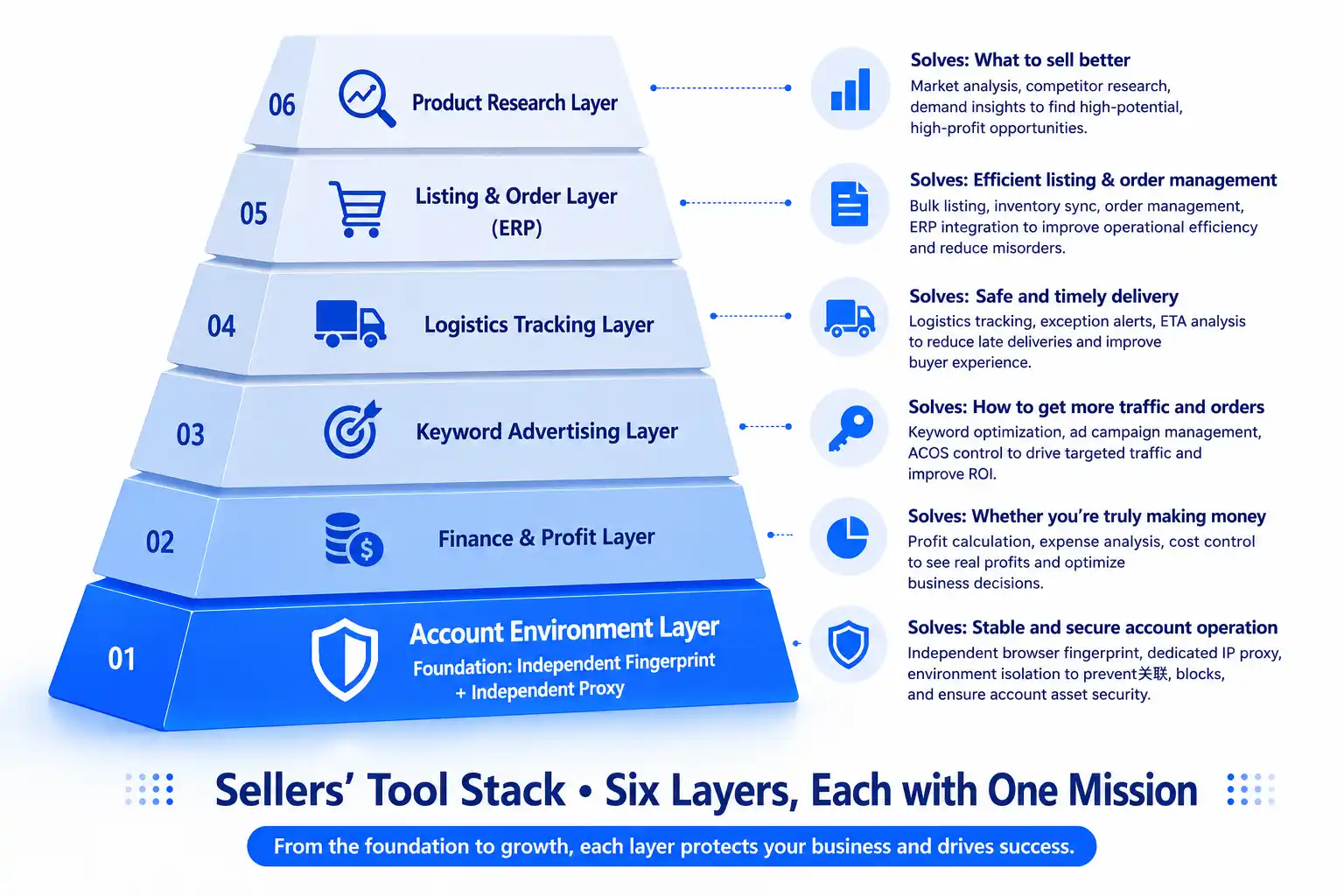
After surveying all six layers, a counterintuitive fact: most sellers willingly pay for the first five layers, yet the sixth — the account layer — is the one most often left exposed, even though it is the foundation of the other five.
Match Tools to Business Stage: Three at Start, Five at Growth, Full Stack at Matrix
Tools aren't bought all at once. Scale by stage and only fix the most painful layer at each stage:
- Start-up stage (1-2 stores, validation): three things are enough — one research tool + the platform's ads backend + one account environment. You can skip the ERP for now: with low single-store order volume, manual handling in the platform backend is actually faster; what deserves investment at this stage is getting the account environment right, because swapping tools is easy — swapping a banned account is not.
- Growth stage (3-10 stores, scaling): add an ERP and logistics tracking — once order volume rises, the time cost of manual labels and one-by-one tracking exceeds the tool fee; bring in profit accounting at the same time, since this is when you most often "make revenue but not profit." Ad automation depends on platform complexity.
- Matrix stage (10+ stores, multi-platform): full stack in place, but the focus shifts from "adding tools" to "managing tools" — subscription audits, account ledgers, and team permissions (the matrix management of multiple accounts is fully covered in Amazon multi-account anti-association).
One hard rule for whether to buy a new tool: hours the task consumes per week × labor cost vs. the tool's annual fee — if greater, buy it; if smaller, make do with what you have.
Three Gaps: Why the Stack Is Still Chaotic After Buying Everything
Most sellers' tool stack problems aren't "missing tools" but three gaps between layers:
- Gap one: data silos. Keywords from research tools, orders in the ERP, ad spend in the ads backend — scattered across five interfaces, switched between daily, with data moved by hand. The fix: prefer tool combinations with native integrations (e.g., ERP pulling platform orders directly, tracking platforms connected to stores); where integration isn't possible, export reports on a fixed schedule and consolidate — don't expect humans to sync in real time.
- Gap two: exposed accounts. This is the costliest one — every tool needs a login: platform backend, ERP, ad accounts, email... If all these accounts sit on the same computer and the same IP, when one account goes down, the platform can trace the rest through the environment. The richer the tool stack, the larger the exposure — account-layer isolation is not optional (the full protection plan for multiple accounts is systematically covered in cross-border multi-account anti-association).
- Gap three: permission chaos. Once the team grows, tool credentials start being shared: an operator runs ads on the boss's account, a departed employee still holds the ERP password — a double loss of efficiency and security. The fix mirrors platform accounts: accounts are managed by the system; people sign in with their own identity (team collaboration practices are covered in a dedicated site article).
The common thread: none of the three gaps is solved by "buying another tool" — the first two need integrations and an environment foundation; the third needs management discipline.
Building the Account Layer Right: Put Tool Logins into Independent Environments Too
What does "built right" mean for the account layer? One standard: one independent environment per business identity — store backend, the matching ERP account, ad accounts, and payout email all logged in inside the same environment. Using MasBrowser as an example:
One store, one environment: after the environment is configured with an independent fingerprint and clean proxy, every tool account for that store logs in inside it — to the platform, this is one "normal computer stably using various tools," not a suspicious shared exit for multiple accounts.

Tool accounts follow the environment: once bound, store authorizations in the ERP and login states of ad accounts stay inside the environment; when team members change, the environment is handed over as a whole — no re-login, no reconfiguration.
Don't let penny-pinching sink the whole stack: when assigning proxies to tool accounts, stay away from public free IPs — they carry the violation records of previous users, and using them to log into your ERP or platform backend plants a landmine under the entire stack (the reasons are fully covered in are free proxy IPs safe).
In one sentence: the first five layers raise your "money-making efficiency"; the sixth — the account layer — ensures "you can keep earning" — they multiply, not compete: either one at zero and the result is zero.
Too Many Tools to Manage? Three Operating Disciplines
Once the stack takes shape, three disciplines are enough for daily management:
- Quarterly subscription audit: review subscribed tools each quarter for usage and renewal tier — stacks breed "zombie subscriptions" that bill for half a year of non-use.
- Account ledger: register every tool account as "which account, bound to which environment, owned by whom" — it powers both offboarding and incident response, and the ledger itself is the foundation of team collaboration.
- New tools enter a test environment first: run any new tool in a test environment before full rollout — especially tools requesting store data authorization; verify permission scope and data flow on a small scale first.
With these three, the tool stack becomes an "asset" instead of a "burden."
FAQ
What is the minimum tool set for a cross-border seller?
Three at the start: one research tool + the platform backend + account environment management. Add ERP and logistics tracking as order volume grows — validate the workflow with free tiers and trials first, then pay for layers proven useful; don't copy someone else's "full bundle."
Should I buy an all-in-one suite or best-of-breed per layer?
Trade-offs either way: suites integrate easily but are shallow per function; best-of-breed performs better but you maintain the data plumbing yourself. Use an all-in-one to get moving at the start, then swap in deeper tools per layer at the matrix stage — the reverse order (piling up professional tools from day one) is the most common beginner waste.
Why do accounts still get banned when I've bought all the tools?
Because ban determination happens at the account environment layer, not the tool layer — no matter how good the tools, if multiple accounts share one computer, one IP, and one browser fingerprint, the platform still flags the association. Account isolation requires independent environments + independent proxies — exactly the job of the stack's sixth layer.
When should I adopt an ERP?
Watch order-handling time: if you spend more than an hour a day printing labels, uploading tracking numbers, and checking stock, it's time. At low volume, manual handling is perfectly fine and saves the ERP learning curve and monthly fee.
How do I keep accounts across multiple tools from becoming chaos?
Ledger + environment: one ledger records the "account - environment - owner" mapping; the account set of each business identity logs in inside the same independent environment — authorizations, login states, and handovers all follow the environment, decoupling people from accounts.
Conclusion
A cross-border seller's tool stack is essentially a six-layer systems project: research, listing/orders, logistics, keywords/ads, and finance each take a layer, with the account environment layer underneath — check the layers before buying, scale tools by stage, and watch the three gaps when managing.
If this article leaves you with one thing, it's this: the account environment layer is the foundation of every tool — however efficient the first five layers, losing the account resets everything to zero. Set up an independent environment for your first store with the free tier, and let the whole stack stand on a clean foundation — download MasBrowser and start building your tool stack from the ground up.