Can Platforms Detect a Fingerprint Browser? How It Works and 6 Myths
"I use a fingerprint browser — can the platform detect it?" — this is the most asked question in the multi-account operations circle, and also the most polarized: one side says "fingerprint browsers are made to avoid detection, use it with confidence", the other says "platforms already recognize fingerprint browsers long ago, you'll be banned either way".
Neither claim is accurate. The truth is: platforms never detect "the fingerprint browser tool" — they detect "anomalies in environment and behavior" — the tool itself has no "fingerprint" that can be identified; what gets identified is the flaws left by improper configuration and abnormal behavior.
This article explains the principles thoroughly: what methods platforms use, which myths expose you most easily, which signals mean you should self-check, and how to judge whether your environment is clean.
Can a Fingerprint Browser Be Detected? The Answer First
To be precise: platforms don't detect the "fingerprint browser" — they detect "anomalies in environment and behavior". A well-configured fingerprint browser leaves no anomaly signals in the environment; improper configuration or abnormal behavior is what gets you caught.
Let's break it down:
- The tool itself: a fingerprint browser's design goal is to make every environment "look like a real device" — it never "declares" to the platform that it's a special browser, and the platform can't read information like "what software this is".
- Anomaly signals: what the platform can read is a pile of parameters (fingerprint, IP, timezone, behavior); it judges "does this pile look like a normal user". A fingerprint browser helps you make the parameters look right — but if the changes are incomplete, contradictory, or the behavior doesn't look human, you still get caught.
So the right way to ask "will it be detected" is "does my environment have anomaly signals". Environment clean, the platform will most likely treat you as an ordinary user; environment contradictory, you'll be watched whether or not you use a fingerprint browser.
How Do Platforms Detect Abnormal Environments? Four Types of Risk-Control Signals
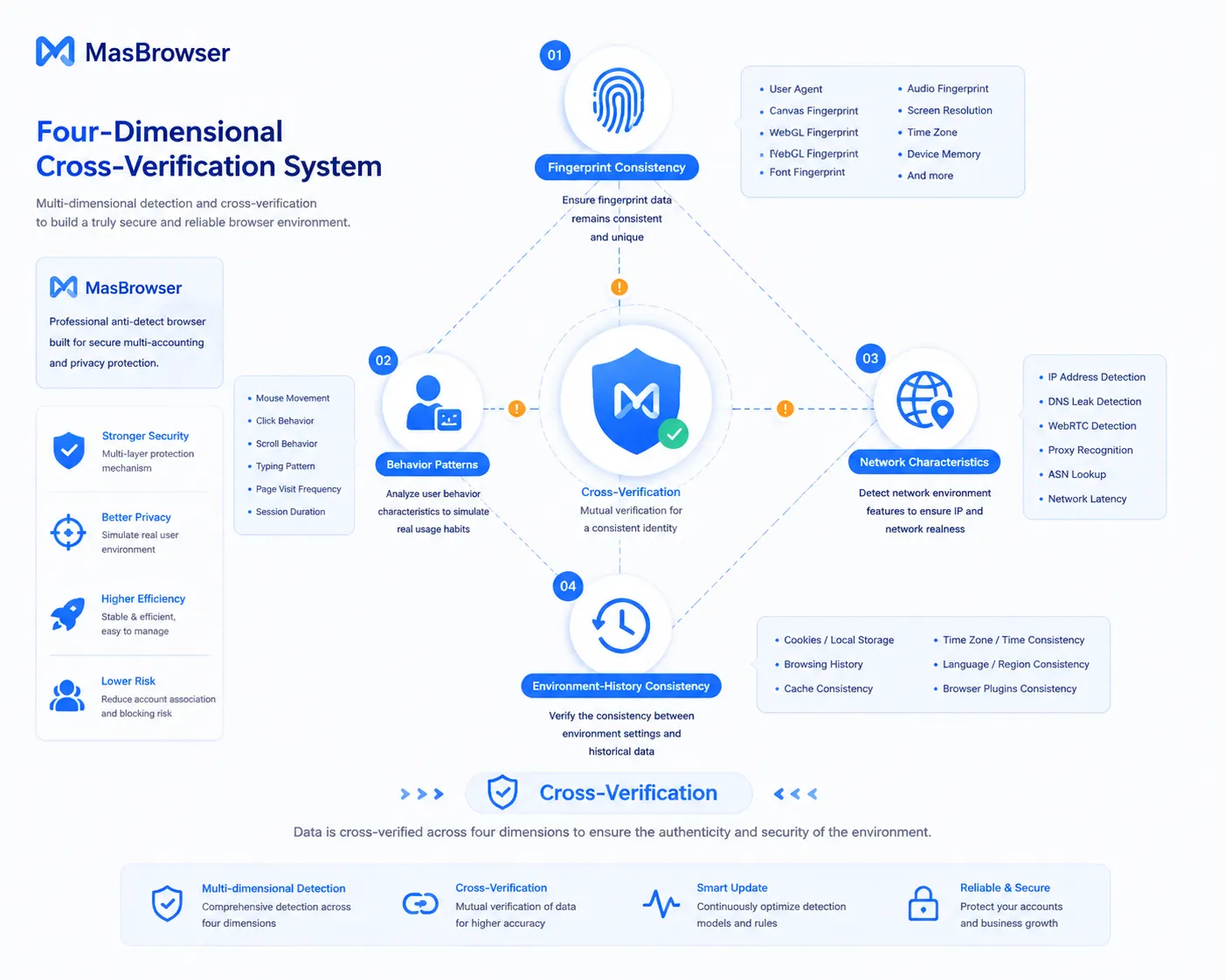
Platforms don't catch you by "recognizing a fingerprint browser" — they use four types of signals together to judge "whether this environment/account is abnormal".
- Fingerprint consistency analysis: check whether your UA, Canvas, WebGL, fonts, timezone, language and other parameters are "self-consistent" — a US IP with a Chinese system, UA says Windows but the fingerprint looks like Mac, these contradictions are the #1 anomaly signal (the full breakdown of fingerprint parameters is in What Is Browser Fingerprinting).
- Behavior pattern analysis: check whether the operation rhythm looks human — are login times regular, is operation frequency abnormal, is a new account suddenly doing a lot. Mass adding friends at 3 a.m. triggers risk control more easily than fingerprint contradictions.
- Network characteristics analysis: check IP quality, whether WebRTC/DNS leaks, whether multiple accounts share the same network exit (the full logic of IP/timezone/language consistency is covered in Whoer anonymity score).
- Environment-history consistency: check whether an account's login environment matches its historical record — the same account suddenly logging in from a completely different device/region is judged as "account anomaly".
Only when the four types of signals cross-confirm does the platform dare to act. One type alone may "make sense", but contradictions piling up across types trigger verification or restrictions. This also explains why the crude trick of "changing just one parameter" doesn't work — the platform looks at the whole picture, not single items. This framework isn't guesswork: based on a review of the public risk-control policies of Amazon, Facebook and TikTok, the three major platforms generally list "device parameter consistency" and "operation behavior reasonableness" as the two pillars of risk control, and fingerprint detection is only part of the former.
The 6 Most Common Myths About Fingerprint Browser Detection
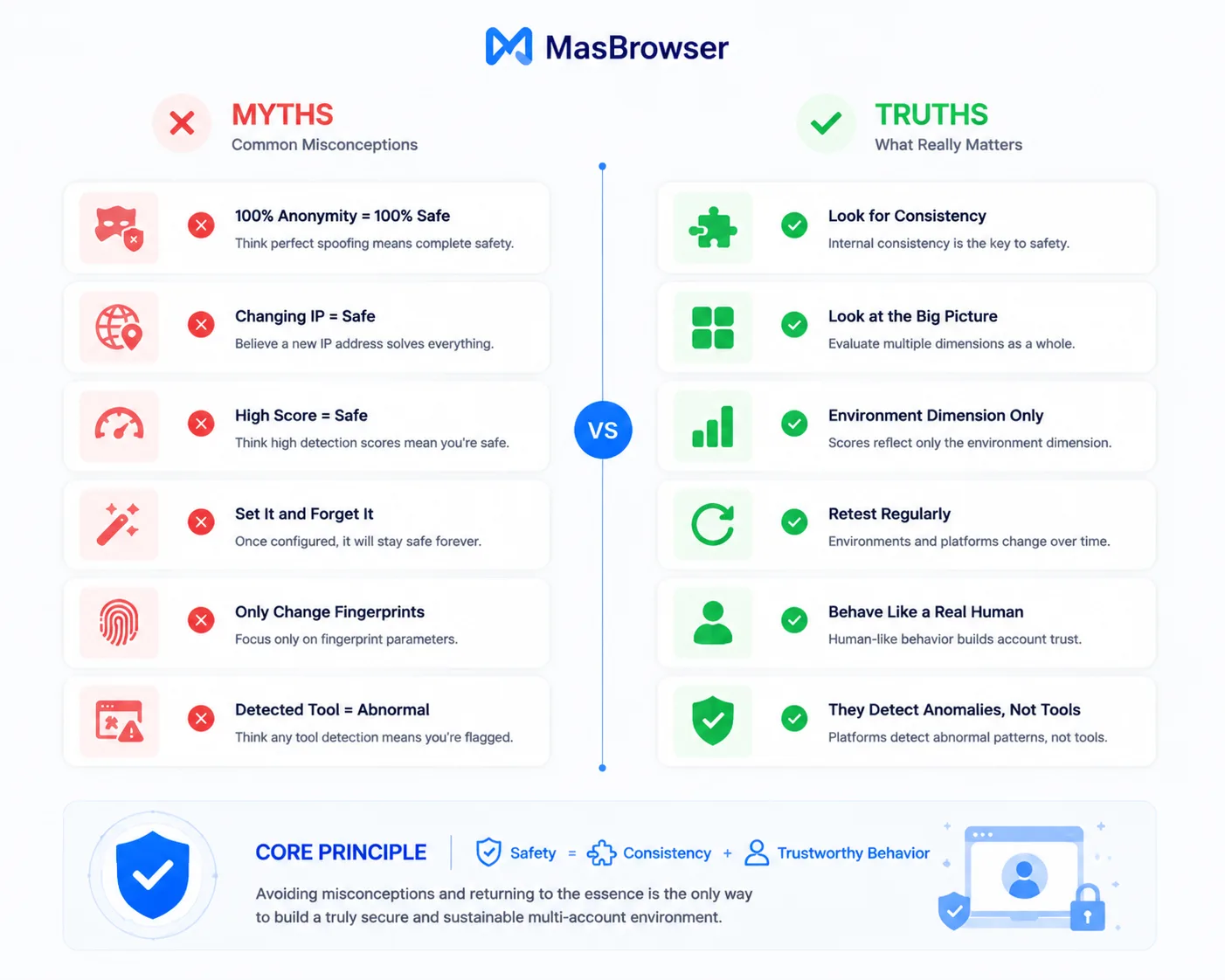
These 6 myths account for most reasons multi-account operations get "watched" — the tool isn't the problem, the usage is.
- Myth 1: "100% anonymity score means safe": detection scores are a reference, not a verdict. Being at 100% long-term is actually rare — real users' environments always have noise. The key is "self-consistency", not "high score".
- Myth 2: "Changed IP = safe": IP is just one part of the network layer; a contradiction in fingerprint, timezone or behavior exposes you anyway (the full logic of why changing IP alone isn't enough is in Fingerprint Browser vs VPN).
- Myth 3: "High detection tool score = platform won't watch me": detection tools simulate the "website's perspective" and can see most parameters, but can't measure behavior patterns. A high score only means the "environment dimension" is clean.
- Myth 4: "Configure the environment once and done": dynamic proxies change IPs, system updates change fingerprints — environments change; clean today doesn't mean clean next month. Regular re-testing is a basic practice.
- Myth 5: "Only change the fingerprint, skip behavior": no matter how clean the environment, robot-like behavior still exposes you. Fingerprint answers "who you are", behavior answers "what you're doing" — both need to look human.
- Myth 6: "Detecting a fingerprint browser = detecting an anomaly": these two concepts get conflated. The platform may know "your environment is somewhat special", but "special" isn't "violating" — what actually triggers risk control is "anomaly" (contradictions, leaks, risky behavior), not "using a tool".
The myths converge on one point: treating the "tool" as a "get-out-of-jail-free card". The tool just helps you get the environment right; the behavior rhythm after that still depends on you.
Warning Signals Before Risk Control Targets You
Platforms won't directly tell you "I detected your fingerprint browser", but they hint through some signals that "your environment or behavior has been noticed".
- Frequent verification requests: CAPTCHAs and two-step verification popping up often at login — possibly lower IP reputation or suspicious environment parameters.
- Login environment reminders: the platform prompts "new device login detected" — it thinks your login environment doesn't match history; this is an environment-history consistency signal.
- Operation throttling: features work but you're downweighted, throttled or rate-limited — an "early warning" earlier than a ban, often triggered by behavior patterns.
- Linked accounts affected: when one account has a problem, other accounts on the same network/environment get watched too — the association dimension has been flagged.
When any signal appears, first self-check the environment (is the IP flagged, is the fingerprint self-consistent, is the network shared), then self-check the behavior rhythm — use detection tools to rule out environment problems (how to use the tools in fingerprint detection tools roundup); what remains is a behavior problem. Suggested handling order: pause high-frequency operations in that environment first → re-test the environment to find contradictions → if the environment has problems, fix them (change IP / adjust fingerprint); if not, lower operation frequency and nurture for a few days → if the account is already restricted, go through the platform appeal process and explain that the device environment is normal.
How to Self-Check Whether Your Environment Will Be Detected? Three Steps
Don't wait for signals — after configuring the environment, proactively self-test once and turn "will I be watched" into "I know the score". Three steps:
- Environment self-test: use detection tools to check fingerprint self-consistency, IP quality, timezone/language matching, WebRTC/DNS leaks — if these four are clean, the environment dimension passes (judgment criteria in the ip-api + BrowserScan two-tool test).
- Behavior self-check: are login times regular, does the operation rhythm look human, any "new account operating aggressively" — the behavior dimension relies on self-discipline; tools can't manage it.
- Regular re-testing: re-test the environment after changing proxies, fingerprints, or system updates — treat "environment getting dirty" as a routine concern.
A clean environment = self-consistent fingerprint + clean IP + human-like behavior; when all three are in place, the platform has no reason to watch you. Take MasBrowser as an example: its "configure once, isolated" approach (configure by IP, environment virtualization) helps you get the "environment dimension" right in one pass, and the behavior dimension depends on operational habits. For complete independent environments and fingerprint isolation configuration, see the MasBrowser multi-account security management page.
FAQ
Can a platform "recognize" a fingerprint browser?
Platforms can't read information like "what software this is" — they read a collection of parameters and behavior. A fingerprint browser itself isn't "recognized"; what gets recognized is environment and behavior anomalies. With a well-configured environment, it's just an "ordinary browser".
Why can platforms judge "this environment is suspicious"?
Through cross-verification of four types of signals: fingerprint consistency, behavior patterns, network characteristics, environment-history consistency. If any type or combination shows contradictions (e.g. IP doesn't match fingerprint region, new account acting too aggressively), risk control flags it.
Can I still get banned with a fingerprint browser?
Yes, but the reason is usually not the tool but configuration and behavior: fingerprint and IP region contradictions, WebRTC leaks, robot-like behavior, shared network exits — all of these cancel out the tool's effect. The tool solves the environment dimension; the behavior dimension depends on operational habits.
Is a high detection tool score absolutely safe?
No. Detection tools can see the "environment dimension" parameters but can't measure the "behavior dimension". A high score means the environment is clean, but abnormal behavior can still trigger risk control. Get the environment right and make behavior look human — only when both pass are you stable.
Conclusion
The answer to "can a fingerprint browser be detected" hides in three words: it depends on configuration. Platforms don't detect the tool — they detect environment and behavior anomalies — fingerprint self-consistent, IP clean, behavior human, and there's no reason to watch you; parameter contradictions, leaks, abnormal behavior, and even the best tool can't save you.
Don't treat the tool as a get-out-of-jail-free card — treat it as "environment infrastructure" — get the infrastructure right, and the remaining behavior is on you. The free plan includes 2 environment slots: download MasBrowser, configure your first environment and run a detection tool self-test — you'll have a definitive answer about whether your environment is "clean".