How to Use BrowserLeaks? Read Every Test Result and Fix Issues
If you check scores with Whoer, this may sound familiar: 90+ points, feels reassuring — and the account still runs into trouble. The reason is simple: score-based tools only check "surface values", while platform risk control looks far deeper than a single score. To truly understand your environment, you need a per-item deep-check tool — and BrowserLeaks is the poster child of that category.
Set the positioning straight first: BrowserLeaks doesn't "score" your browser; it's a specialist clinic split by test item — IP leaks, Canvas, WebGL, fonts, TLS fingerprint... one dedicated page per item, one dimension examined per page. This article walks you through the pages: what to look at, what counts as clean, how to fix what you find, and where it fits in your environment verification workflow.
What Is BrowserLeaks? How It Differs from Score-Based Tools
Browser testing tools come in three styles (a full cross-comparison is in fingerprint detection tools roundup): scorers (Whoer gives one overall disguise score), verifiers (CreepJS checks whether parameters lie), and item-by-item deep-checkers — BrowserLeaks belongs to the third. The official homepage splits testing into a dozen standalone pages, each probing one dimension — no signup, fully free.
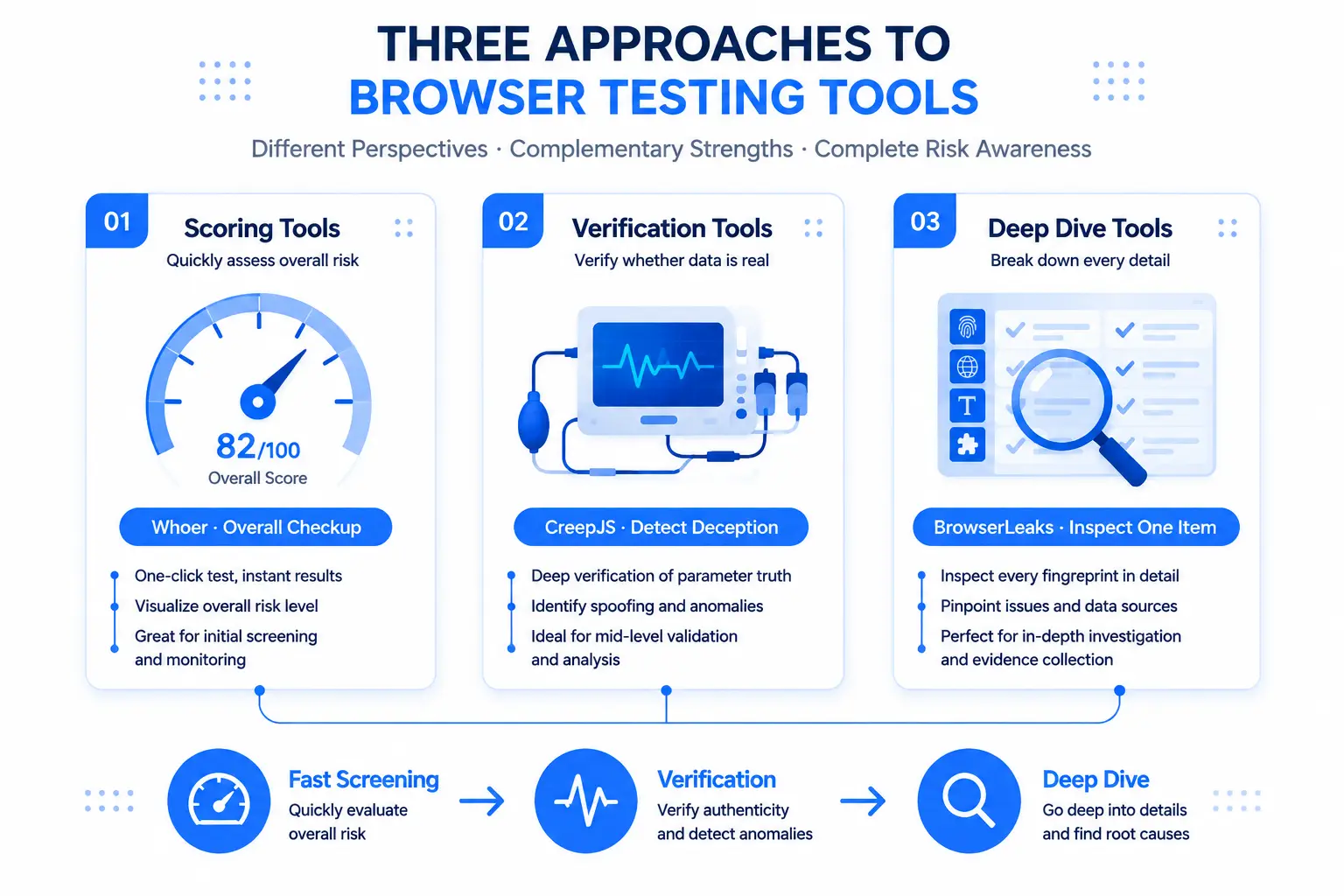
The three styles complement rather than replace each other: scorers are fast (good for daily checks), verifiers are ruthless (good before a key environment goes live), and deep-checkers are thorough (good when "the score looks off but you can't tell why") — BrowserLeaks' value is precisely that "taking it apart": it can drill a suspicious environment down to the exact parameter that leaked.
Three Must-Check Pages: Most Leaks Show Up Here
You don't need to run all ten pages every time — three of them cover most of the risk for daily verification:
- IP page (/ip) — more than just an IP check. This page carries the most information: beyond the IP address and location, it includes WebRTC leak test, DNS leak test, and IPv6 leak test as sub-tests, and even shows the TCP/IP stack fingerprint. Clean state: the displayed IP matches your proxy and none of the three leak tests expose a real address. This page is the litmus test of proxy quality — a proxy that connects but leaks DNS locally, or a WebRTC that reveals the real IP, both surface here (the mechanics are fully explained in WebRTC IP leaks).
- Canvas page (/canvas) — the page generates a Canvas image and displays its hash. Check two things: whether the image content looks normal (excessive noise or a blank frame both signal misconfiguration) and whether the hash is stable (refreshing the same environment should yield the same hash — time-varying hashes are exactly what CreepJS hunts for; here, stability comes first).
- WebGL page (/webgl) — shows the GPU vendor, renderer model, and the full WebGL report. Clean state: vendor and model match the profile configured in your environment, and don't contradict devices common in the IP's region — a "US residential IP + Chinese-market discrete GPU model" combo is parameters fighting each other, a contradiction risk control loves to catch.
The shared logic across these pages: not just "is there a value" but "do the values cohere with each other" — that's where item-by-item checks beat looking at a total score.
Three Advanced Pages: Check What Others Don't
When the basics are clean but the account still misbehaves, the advanced pages often hold the answer:
- TLS page (/tls) — the most overlooked leak source. This page generates a JA3/JA4 TLS fingerprint — the protocol versions and cipher suites your browser reports during the handshake. The key point: proxies and fingerprint parameters can be faked, but TLS handshake traits are hard to change — if you pair a niche browser or special client with a proxy, the TLS fingerprint directly exposes "this is not a regular Chrome". Clean state: the TLS fingerprint matches the claimed browser kernel (environments on mainstream kernels are basically safe; this page mainly screens for "non-mainstream clients").
- Fonts page (/fonts) — enumerates system fonts and fingerprints via text rendering sizes. Check two things: whether the font count is in a sane range (a clean Windows environment with one to two hundred fonts is normal; several thousand installed means exploding uniqueness) and whether fonts contradict the profile's language.
- Features page (/features) — lists the full set of supported HTML5 features. The more mainstream the feature set, the safer: an environment supporting a pile of obscure APIs actually stands out more. This page is mostly for "comparing two environments" — inconsistent feature sets mean the two environments differ in kernel version or configuration.
The advanced-page logic in one sentence: the more unique, the more dangerous — the essence of fingerprint safety is not pretty parameters but "looking identical to a million normal users".
Found a Problem? Fix It by Layer
BrowserLeaks results must end in fixes — match the problem type to its layer:
- Network-layer problems (DNS/WebRTC/IPv6 leaks on the IP page) → fix proxy and environment settings: confirm the proxy type is configured correctly, WebRTC is disabled as needed in the environment, and an IP test confirms region consistency — step-by-step configuration is in the fingerprint browser proxy setup guide; after changes, re-test on the /ip page.
- Parameter-layer problems (Canvas/WebGL/Fonts contradicting the profile) → fix the environment's fingerprint configuration: let fingerprint parameters auto-generate from the proxy IP, or manually align the "region-device" profile; after changes, re-test hash stability and parameter consistency first.
- Client-layer problems (TLS fingerprint not matching the claimed kernel) → switch to a mainstream-kernel environment: this layer is nearly impossible to patch manually; the practical fix is moving to a fingerprint browser environment built on a mainstream kernel — matching the TLS fingerprint of a "real Chrome" is far easier than making a niche client pass as one.
A suggested fix-and-verify rhythm: change one thing, test one page — change five settings at once and when something breaks you won't know which change did it.
Fitting It into the Workflow: the Last Ring of a Four-Layer Funnel
Slot BrowserLeaks into a complete verification system (the first three layers are detailed in dual-tool isolation testing and the CreepJS deep dive):
- ip-api checks the network — is the IP region and timezone right;
- BrowserScan checks parameters — are UA, Canvas and other parameters complete, any warnings;
- CreepJS verifies truthfulness — do parameters lie, how many Lies;
- BrowserLeaks breaks down the details — are DNS/IPv6/TLS/fonts, the places others don't check, leaking.
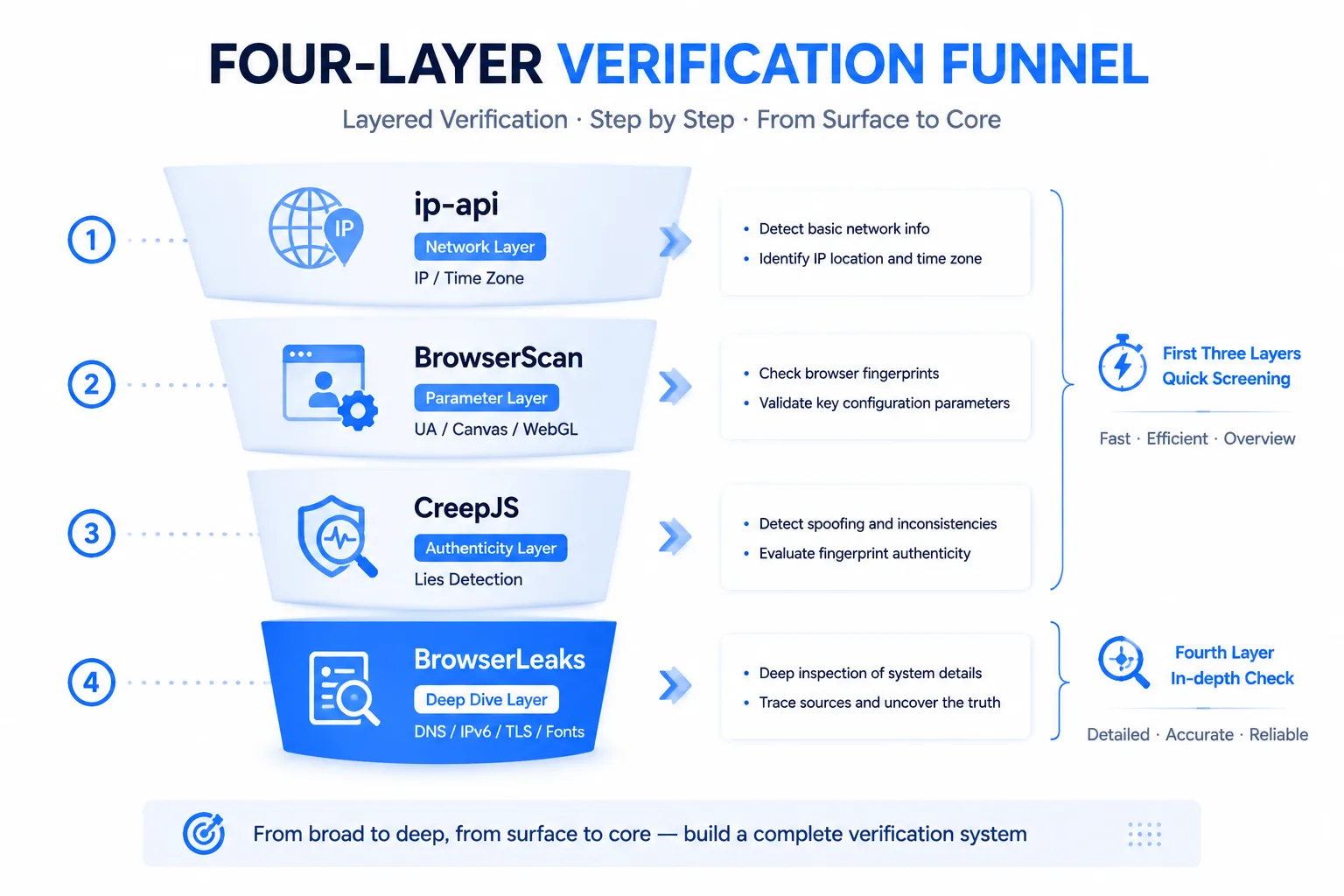
The order matters: the first three layers triage fast, the fourth digs deep — routine new environments run the first three (minutes); before a high-value account goes live, or for an environment where "all metrics pass but it still feels off", add BrowserLeaks' IP, TLS, and Fonts pages — a dozen minutes for a thoroughly verified bottom. The division of labor with Whoer follows naturally: Whoer handles daily quick checks, BrowserLeaks handles deep breakdowns (Whoer's usage is covered in the Whoer anonymity score guide).
FAQ
Is BrowserLeaks free? Does it require signup?
Free with no signup — open a test page and it runs automatically, results shown right on the page. It monetizes through API services; the regular testing features are fully open to users, which is part of why it works so well as a routine verification tool.
Which is more accurate, BrowserLeaks or Whoer?
They don't conflict — the granularity differs. Whoer gives a total score, fast, for daily patrols; BrowserLeaks dissects item by item, deep, for chasing specific problems. "Which is more accurate" is a false question — when a score looks off, use BrowserLeaks to take it apart; using both together is the complete solution.
What is a TLS fingerprint (JA3/JA4)? Should multi-account operators care?
A TLS fingerprint is the set of technical traits a browser reports when establishing an encrypted connection — sites can use it to judge "what client you're actually running". For multi-account operators: mainstream-kernel fingerprint browser environments have little to worry about; but pair a niche browser, special client, or script-based solution with a proxy, and the TLS fingerprint becomes a visible flaw — plain to see on the /tls page.
Results change on every refresh — is that normal?
Go page by page: the Canvas hash, font list, and IP info should be stable (inconsistency across repeated tests of the same environment signals misconfiguration); slight fluctuation in some dynamic display items (like ad-identifier info) is normal. "Items that should be stable but aren't" is more alarming than "warnings" — it means randomization in the environment is out of control.
Found a leak but don't know how to fix it — what's step one?
In order: ① identify which layer the leak is on (network-layer issues go back to the IP page for the specific sub-test); ② nine out of ten network-layer leaks come from proxy configuration or the environment's WebRTC settings — recheck those two first; ③ parameter-layer leaks: adjust the matching config page in your fingerprint browser and re-test — change one thing, test once; don't batch changes.
Conclusion
BrowserLeaks' value is turning the vague idea of "browser safety" into concrete, locatable, fixable pages — the IP page catches proxy leaks, Canvas/WebGL pages check parameter coherence, the TLS page exposes the client's true identity, the Fonts page watches uniqueness. It doesn't score you, but when a score looks wrong, it tells you exactly which layer the problem lives on.
Weave it into your verification workflow: the first three layers triage (ip-api → BrowserScan → CreepJS), the fourth digs deep (BrowserLeaks' IP, TLS, and Fonts pages) — minutes for routine environments, a dozen for critical ones, in exchange for the certainty that "every parameter was verified with my own eyes".
The free tier's 2 environment quota is perfect for practicing this workflow: build two environments and run both through the four-layer funnel to see which layer the differences come from — download MasBrowser and upgrade your environment verification from "reading scores" to "breaking down details".